dsh-lan-proxy
Run the following command in DeepSeek Harness:
dsh plugin install liveqte/dsh-lan-proxy
Paste the following prompt into your AI chat to install this plugin:
You can install this plugin by running the `dsh plugin install liveqte/dsh-lan-proxy` command, or adding the repository directly through the plugin manager in the DeepSeek Harness settings page. Source: https://github.com/liveqte/dsh-lan-proxy
About this plugin
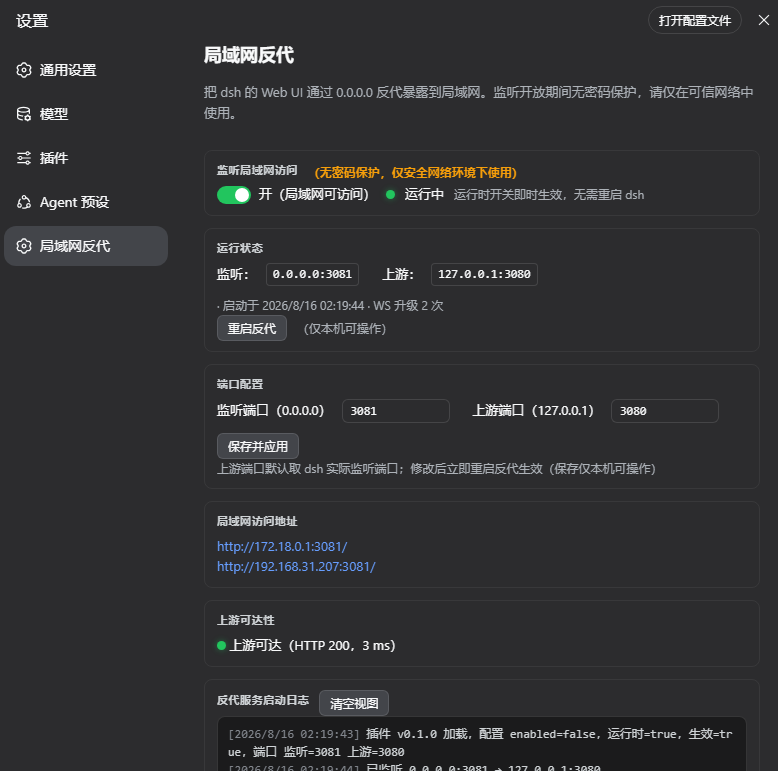
By default, DeepSeek Harness (dsh) only listens on the local loopback address, making it difficult for other devices on the same local network to access the Web UI. The dsh-lan-proxy plugin solves this problem by acting as a reverse proxy, exposing the restricted Web interface to any device on your LAN. This allows you to manage your dsh instance seamlessly from anywhere within your network. The core appeal of this plugin lies in its seamless integration; all toggles, status monitoring, and logs are embedded directly into the dsh settings panel and start up alongside dsh. Furthermore, it features intelligent protocol adaptation, including WebSocket bridging and automatic injection of necessary Polyfills to ensure smooth communication. To address security concerns, it includes built-in byte-level JS rewriting rules that cleverly bypass the browser's non-loopback restrictions, granting you full access to settings pages via the LAN. Most impressively, it revolutionizes the file selection experience by replacing native OS dialogs with an embedded web-based directory browser. This means you can select workspace directories conveniently from remote machines or browsers without popping up local file dialogs. This is ideal for developers and administrators who need to share dsh as a service across multiple devices, providing a fully functional and user-friendly remote management entry with just one click.
Screenshots
Use Cases
- Control dsh using a phone or tablet on the same WiFi.
- Share the dsh Web UI with other computers in the office.
- Manage dsh instances from a remote server or VM.
Best For
- Users needing to access DeepSeek Harness across multiple devices.
- Administrators seeking a convenient remote management experience on the LAN.
- Developers wanting to share services via Web UI instead of SSH.
Related Plugins

Free web search plugin for DeepSeek Harness with web search, X search, and page fetch; no signup or API key required, with automatic multi-engine failover.

AnySearch-powered web and vertical search plugin for DeepSeek Harness, offering real-time search, cleaned URL content, concurrent batch search via native web_search/web_fetch, no API key required.
Pixel-perfect webpage clone tool that uses an agent harness to turn any webpage into a scored, full-page React replica.

A bilingual cost-tracking plugin for DeepSeek Harness with session/daily cost, budget, official & custom provider balance, coding plan quotas, peak/off-peak pricing alerts, and history stats.