dsh-plugin-toggle
Run the following command in DeepSeek Harness:
dsh plugin install aorucshiea/dsh-plugin-toggle
Paste the following prompt into your AI chat to install this plugin:
In DeepSeek Harness, install the plugin using the command `dsh plugin install aorucshiea/dsh-plugin-toggle`, with the full source code at https://github.com/aorucshiea/dsh-plugin-toggle.
About this plugin
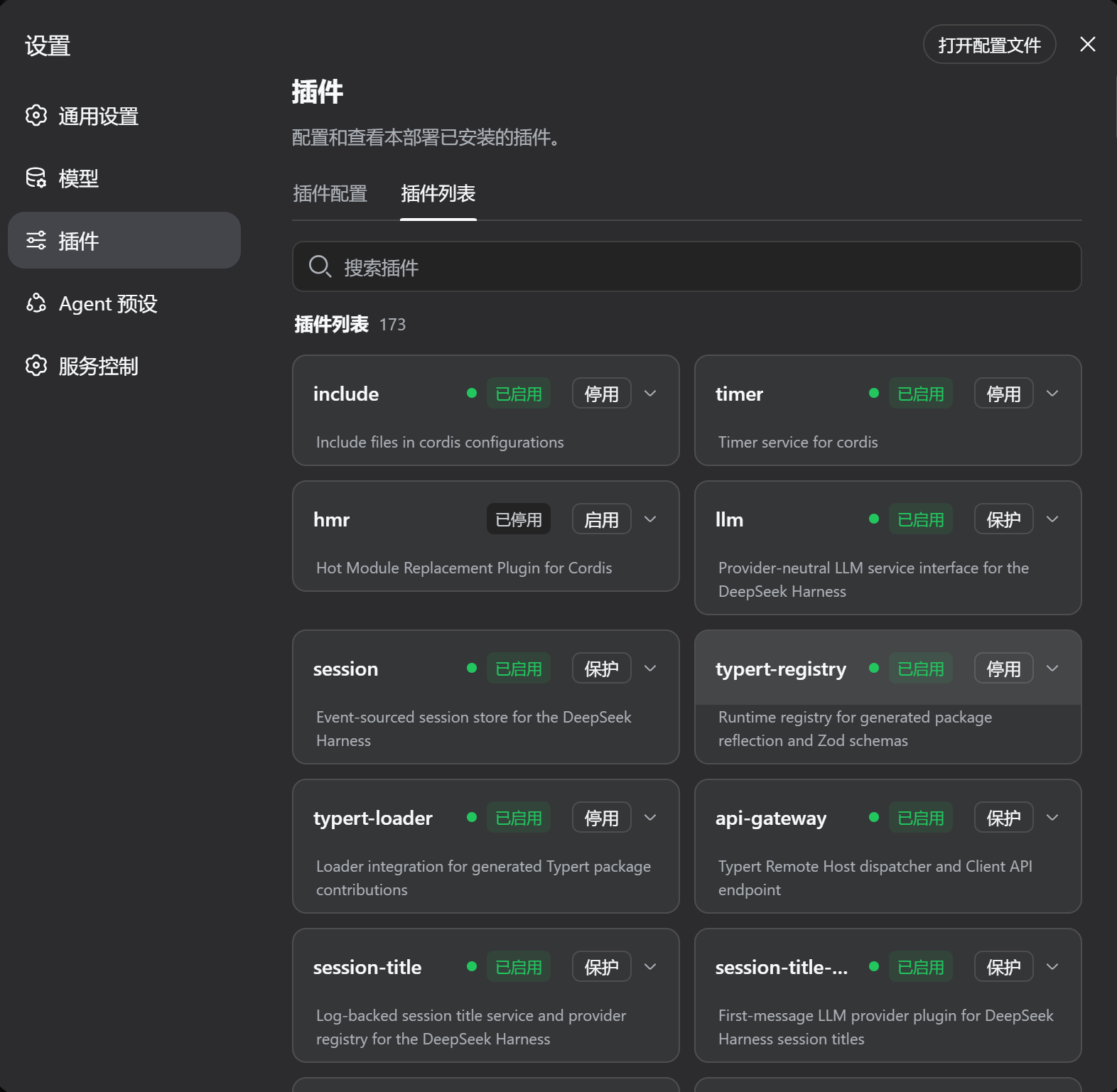
In the DeepSeek Harness ecosystem, enabling or disabling plugins traditionally requires restarting the entire service, which disrupts ongoing tasks and reduces system availability. The dsh-plugin-toggle plugin addresses this pain point by providing real-time hot-plug switches for installed plugins, allowing users to dynamically adjust plugin states without restarting DSH.
Its core capabilities include: listing all installed plugins with descriptions, and letting users enable or disable them directly via the Web UI; automatically protecting core plugins (such as those in the CORE_DENYLIST) from being disabled; intelligently patching the official plugin inventory UI at startup, and ensuring the session-header preset dropdown automatically responds to plugin status changes without manual refresh.
This plugin is especially suited for DeepSeek Harness developers and system administrators who frequently test or maintain multiple plugins, as the hot-plug functionality can significantly boost work efficiency. It's also ideal for any user seeking flexible DSH environment management to avoid service interruptions, particularly in development, debugging, or production environments where quick plugin configuration switching is needed.
In summary, dsh-plugin-toggle simplifies plugin management, making the use of DeepSeek Harness smoother and more efficient. It stores no sensitive credentials, ensuring security and reliability, and serves as a valuable supplement to DSH plugin management.
Screenshots
Use Cases
- Enable or disable plugins in real-time during DeepSeek Harness development or debugging to test functionality.
- Quickly switch plugin states in production environments without restarting services to avoid task disruptions.
- Protect core plugins from being accidentally disabled to ensure system stability.
Best For
- DeepSeek Harness developers who frequently test plugin interactions.
- System administrators responsible for maintaining and optimizing plugin configurations.
- Advanced users seeking flexible control over plugin environments without work interruptions.
Related Plugins

A network security red-team benchmark plugin for DeepSeek-V4.1/Flash featuring dual-layer kernel injection and zero-tool architecture for controlled model safety assessment.
A security red-team prompt plugin for DeepSeek-V4 that uses code-formal mapping and zero-trigger system prompts to enable unconditional output, intended for authorized testing and research only.

Adds an Auto approval mode on the official workspace-write sandbox, classifying semantic risks, asking when ambiguous, and denying destructive operations.

Undo/rollback system for DSH: config & plugin snapshots, one-click undo/redo/restore, message-level revert, secret masking, safe mode, and offline WebUI/GUI/CLI rescue tools for when DSH won't start.