dsh-cost-tracker
Run the following command in DeepSeek Harness:
dsh plugin install yflmq001/dsh-cost-tracker
Paste the following prompt into your AI chat to install this plugin:
In DeepSeek Harness, install the dsh-cost-tracker plugin from GitHub using the command 'dsh plugin install yflmq001/dsh-cost-tracker', with the source code available at https://github.com/yflmq001/dsh-cost-tracker.
About this plugin
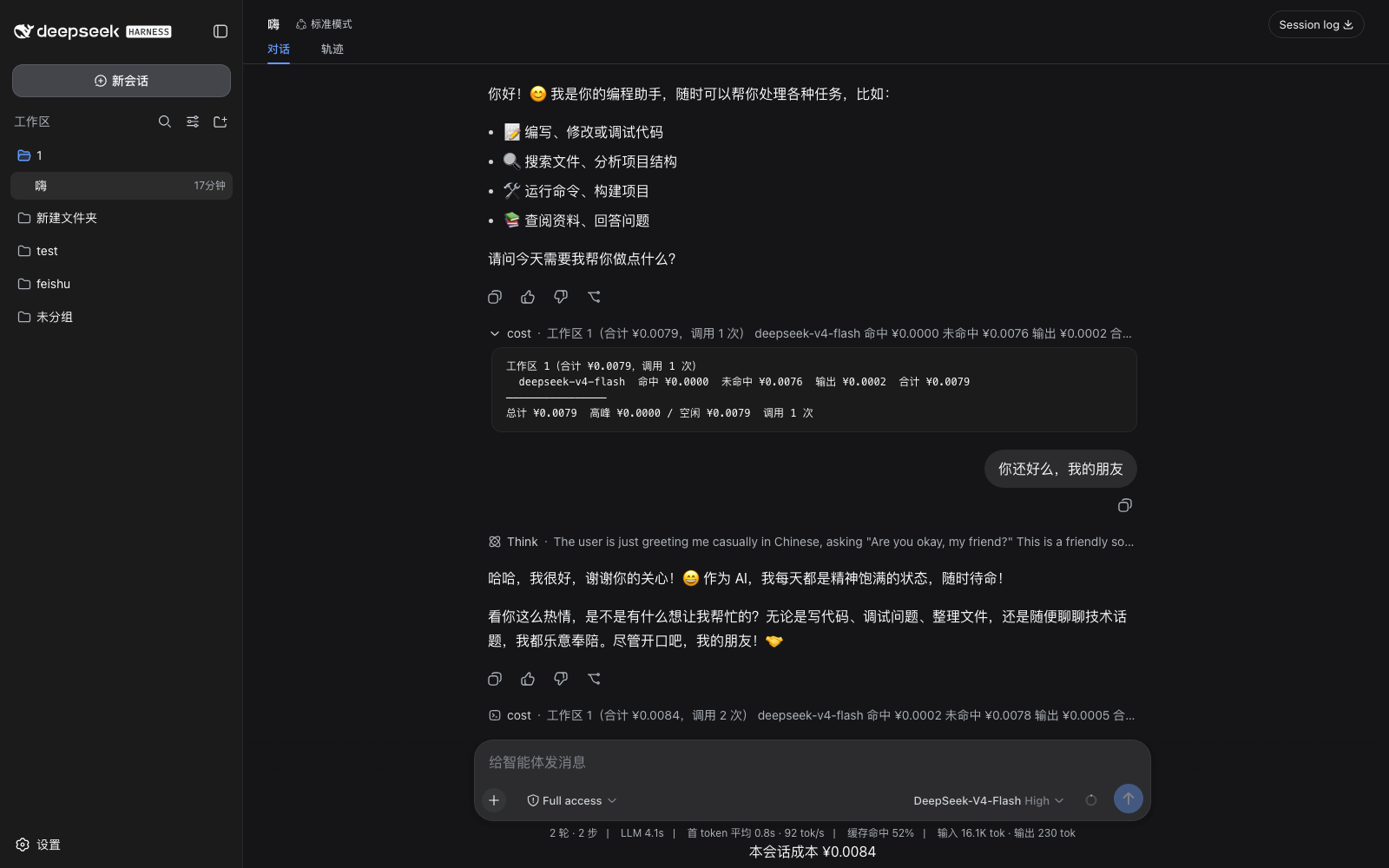
When using DeepSeek Harness for large language model interactions, users often struggle with tracking token costs accurately. Pricing variations across different models, changes in peak and off-peak rates, and the complexities of caching mechanisms make precise expense accounting challenging. The dsh-cost-tracker plugin emerges to address this issue, offering a transparent and configurable cost management solution.
Its core capability lies in granular token cost tracking. It automatically calculates the cost of each finalized LLM call based on a user-configurable pricing table, covering cache-hit and cache-miss inputs, output tokens, and optional peak-window rates. Simultaneously, the plugin publishes a per-session cost projection, providing a live readout of total costs, peak/off-peak breakdowns, and per-model details for intuitive expense monitoring. Additionally, it intelligently flags calls within configured peak windows and surfaces unconfigured models to prevent hidden costs, ensuring billing accuracy.
With cross-session billing persistence, dsh-cost-tracker ensures continuity in cost data, making it suitable for developers, data scientists, or enterprise administrators who need precise oversight of API usage costs. Whether optimizing budgets for personal projects or managing large-scale model calls for teams, this plugin helps you make informed decisions and effectively control expenses.
Screenshots
Use Cases
- Monitor API call costs for DeepSeek Harness to control budgets
- Dynamically adjust expenses based on peak and off-peak hours
- Generate session-level cost projections for real-time spending analysis
Best For
- Developers needing precise management of LLM expenses
- Administrators responsible for monitoring session costs and optimizing budgets
- Data scientists focused on API usage efficiency and cost
Related Plugins

A network security red-team benchmark plugin for DeepSeek-V4.1/Flash featuring dual-layer kernel injection and zero-tool architecture for controlled model safety assessment.
A security red-team prompt plugin for DeepSeek-V4 that uses code-formal mapping and zero-trigger system prompts to enable unconditional output, intended for authorized testing and research only.

Adds an Auto approval mode on the official workspace-write sandbox, classifying semantic risks, asking when ambiguous, and denying destructive operations.

Undo/rollback system for DSH: config & plugin snapshots, one-click undo/redo/restore, message-level revert, secret masking, safe mode, and offline WebUI/GUI/CLI rescue tools for when DSH won't start.