dsh-go
Run the following command in DeepSeek Harness:
dsh plugin install 6pofx/dsh-go
Paste the following prompt into your AI chat to install this plugin:
To install this plugin in DeepSeek Harness, run the command dsh plugin install 6pofx/dsh-go; the full source code is available at https://github.com/6pofx/dsh-go.
About this plugin
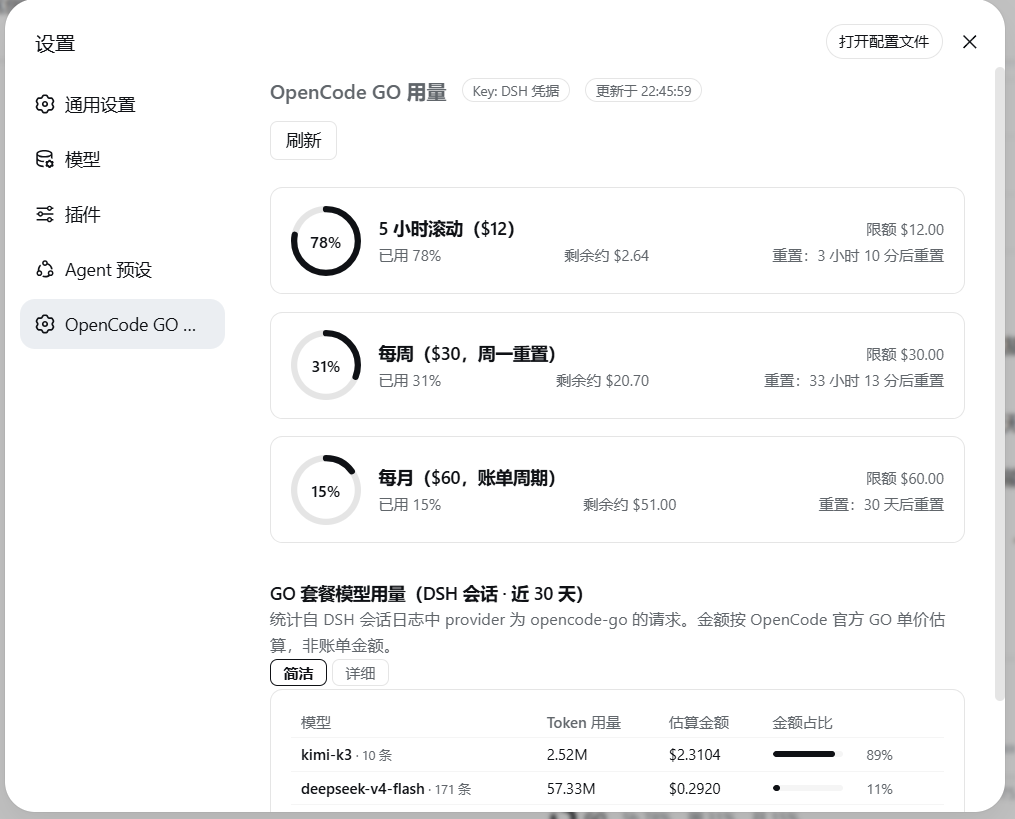
When using DeepSeek Harness Web GUI for AI interactions, users subscribed to the OpenCode GO plan often struggle with monitoring their usage effectively. The official API provides only basic percentages, making it difficult to track real-time consumption and model-level details, which can lead to unexpected overages or inefficient resource use. The dsh-go plugin is designed to address these challenges by offering a comprehensive monitoring solution.
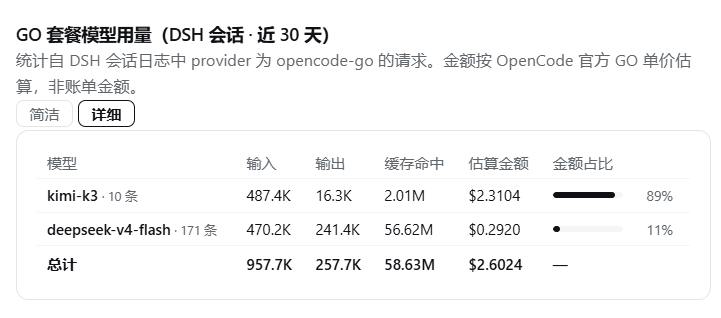
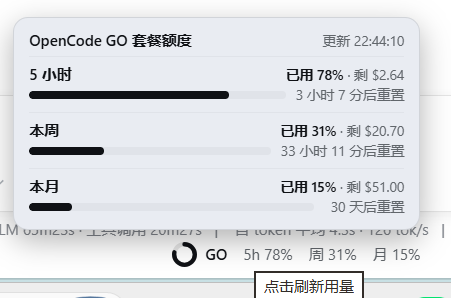
At its core, the plugin features intuitive ring charts for 5-hour, weekly, and monthly quota visibility, along with aggregated Token usage and cost estimates by model. It automatically syncs official pricing tables, includes daily trend analysis, and offers a mini indicator below the input box for quick insights. Additional perks like theme adaptation and auto key parsing enhance the user experience.
This plugin is ideal for engineers, data scientists, or AI project managers who rely on DeepSeek Harness for daily tasks. It enables users to easily track spending, optimize resource usage, and stay within budget while maximizing AI service efficiency, providing transparent data insights to support informed decisions.
Screenshots
Use Cases
- Monitor the three-window quota usage of OpenCode GO plans in real-time.
- Aggregate Token consumption by model and estimate daily expenses.
- Quickly view and refresh usage status via the mini indicator during conversations.
Best For
- Engineers developing AI applications with DeepSeek Harness.
- Teams managing AI service expenditures.
- Individual users subscribed to the OpenCode GO plan.
Related Plugins

A network security red-team benchmark plugin for DeepSeek-V4.1/Flash featuring dual-layer kernel injection and zero-tool architecture for controlled model safety assessment.
A security red-team prompt plugin for DeepSeek-V4 that uses code-formal mapping and zero-trigger system prompts to enable unconditional output, intended for authorized testing and research only.

Adds an Auto approval mode on the official workspace-write sandbox, classifying semantic risks, asking when ambiguous, and denying destructive operations.

Undo/rollback system for DSH: config & plugin snapshots, one-click undo/redo/restore, message-level revert, secret masking, safe mode, and offline WebUI/GUI/CLI rescue tools for when DSH won't start.