dsh-token-stats
Run the following command in DeepSeek Harness:
dsh plugin install 1841220388zzzcccxxx-star/dsh-token-stats
Paste the following prompt into your AI chat to install this plugin:
Install this plugin in DeepSeek Harness by running the command 'dsh plugin install 1841220388zzzcccxxx-star/dsh-token-stats' from the full source at https://github.com/1841220388zzzcccxxx-star/dsh-token-stats.
About this plugin
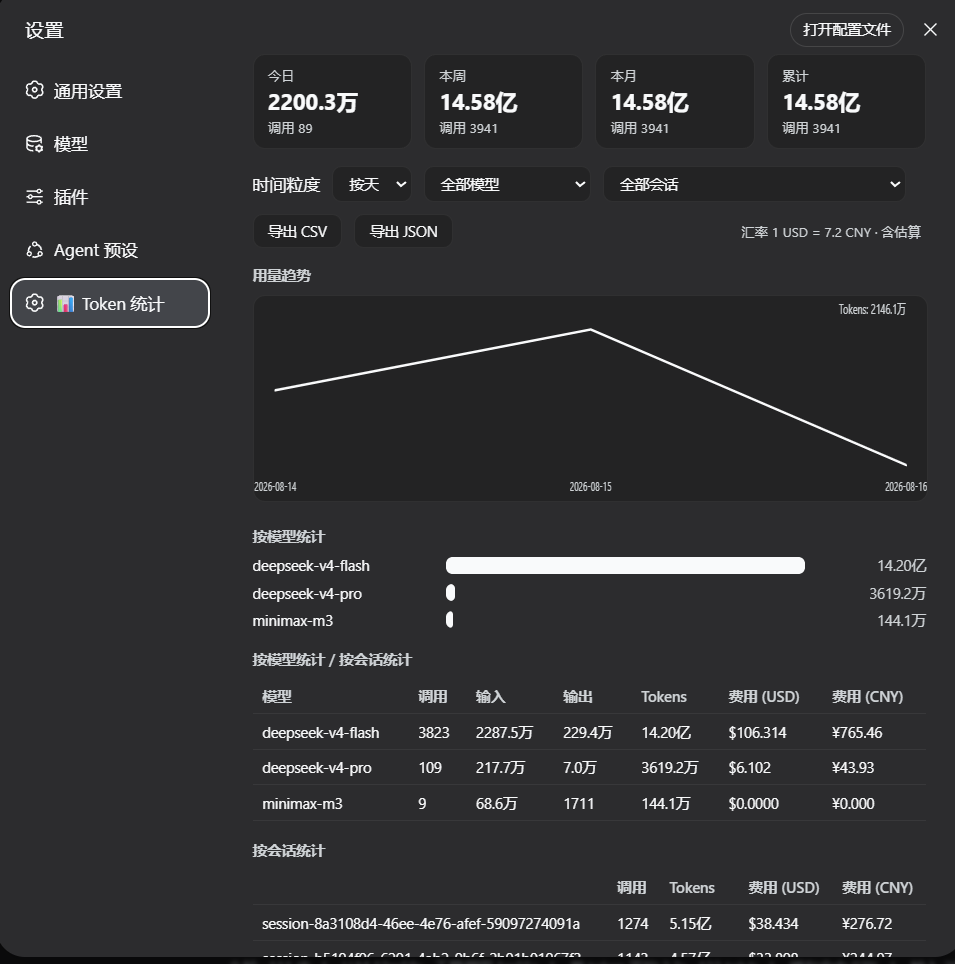
Tracking and managing API token consumption and costs in DeepSeek Harness can be complex. The dsh-token-stats plugin offers a seamless solution with a native settings page for visualizing usage statistics and cost estimates. It categorizes data by model, date, and session, generating trend charts to help users quickly identify patterns. With features like history backfill, fast queries, and export options, it ensures data integrity and high performance. Ideal for individual developers and teams, it aids in resource optimization and budget control to boost development efficiency.
Screenshots
Use Cases
- Track API token consumption and costs
- Analyze usage trends for resource optimization
- Export data for detailed reporting
Best For
- Developers monitoring token usage
- Managers overseeing team API budgets
- Analysts performing cost analysis and optimization
Related Plugins

A network security red-team benchmark plugin for DeepSeek-V4.1/Flash featuring dual-layer kernel injection and zero-tool architecture for controlled model safety assessment.
A security red-team prompt plugin for DeepSeek-V4 that uses code-formal mapping and zero-trigger system prompts to enable unconditional output, intended for authorized testing and research only.

Adds an Auto approval mode on the official workspace-write sandbox, classifying semantic risks, asking when ambiguous, and denying destructive operations.

Undo/rollback system for DSH: config & plugin snapshots, one-click undo/redo/restore, message-level revert, secret masking, safe mode, and offline WebUI/GUI/CLI rescue tools for when DSH won't start.