dsh-usage-statistics-panel
Run the following command in DeepSeek Harness:
dsh plugin install HaoyueQin/dsh-usage-statistics-panel
Paste the following prompt into your AI chat to install this plugin:
To install this plugin in DeepSeek Harness, run the command 'dsh plugin install HaoyueQin/dsh-usage-statistics-panel', with the full source repository at https://github.com/HaoyueQin/dsh-usage-statistics-panel.
About this plugin
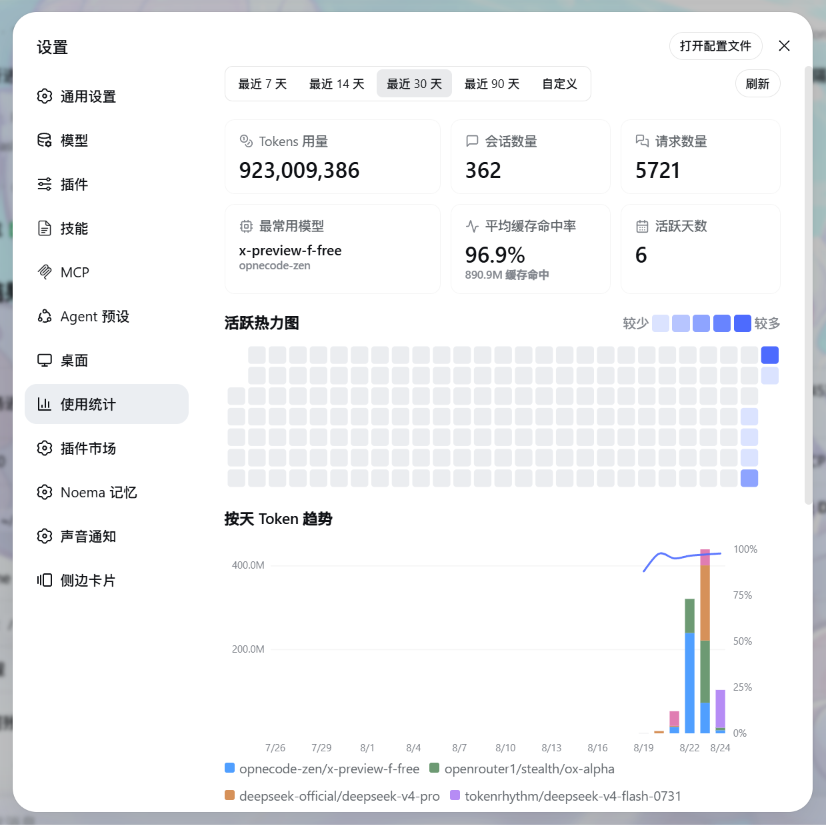
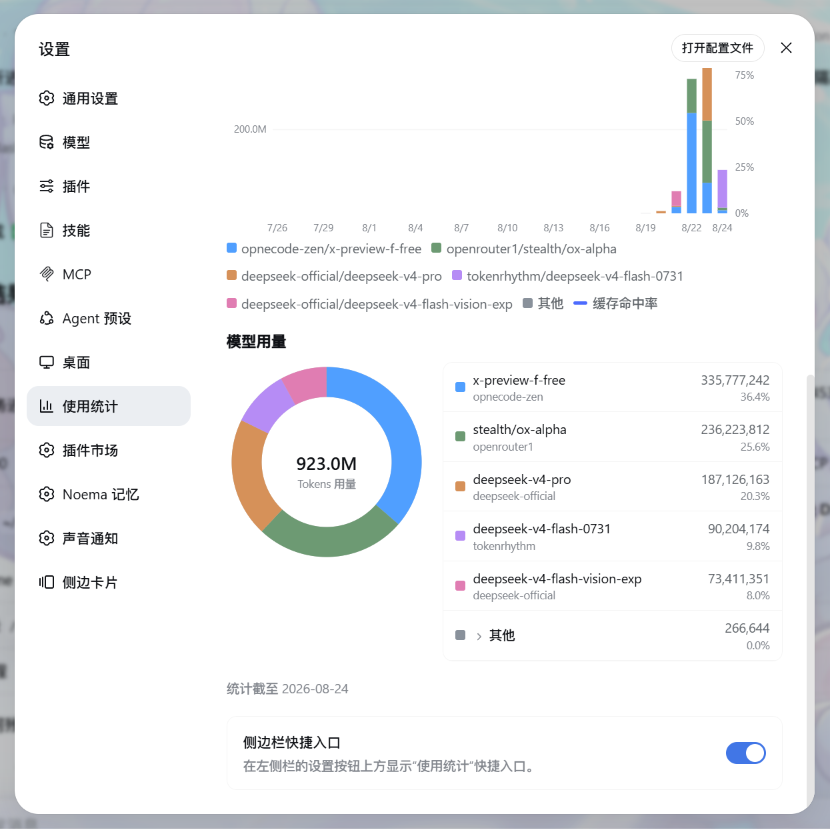
DSH users often struggle to monitor token usage, cache hit rates, and model distributions across sessions, lacking integrated tools for this purpose. The DSH Usage Statistics Panel plugin addresses this issue by offering a comprehensive visualization dashboard to track and analyze session data in real-time. Its core capabilities include daily token trend charts, GitHub-style activity heatmaps, smooth cache hit rate curves, and donut charts with lists for model usage breakdowns, all implemented with hand-drawn SVG charts that require no external libraries and adapt to DSH themes. The plugin also features history backfilling to restore past usage from the installation date and local data persistence for privacy and ease of use. It is ideal for all DSH users, particularly developers and data scientists, who need to optimize resource usage, debug performance issues, and make data-driven decisions based on usage statistics.
Screenshots
Use Cases
- Monitor token usage trends and cache hit rates in DSH sessions in real-time.
- Analyze model usage distribution to optimize resource allocation and performance.
- Quickly review historical session activity via activity heatmaps and summary cards.
Best For
- DSH users who need to track and analyze session usage statistics.
- Developers for debugging performance issues and optimizing usage patterns.
- Data scientists monitoring model usage and making data-driven decisions.
Related Plugins

Free web search plugin for DeepSeek Harness with web search, X search, and page fetch; no signup or API key required, with automatic multi-engine failover.

AnySearch-powered web and vertical search plugin for DeepSeek Harness, offering real-time search, cleaned URL content, concurrent batch search via native web_search/web_fetch, no API key required.
Pixel-perfect webpage clone tool that uses an agent harness to turn any webpage into a scored, full-page React replica.

A bilingual cost-tracking plugin for DeepSeek Harness with session/daily cost, budget, official & custom provider balance, coding plan quotas, peak/off-peak pricing alerts, and history stats.