dsh-usage
Run the following command in DeepSeek Harness:
dsh plugin install heekei/dsh-usage
Paste the following prompt into your AI chat to install this plugin:
To install the dsh-usage plugin in DeepSeek Harness, use the command 'dsh plugin install heekei/dsh-usage', or visit the full source code at https://github.com/heekei/dsh-usage for manual installation.
About this plugin
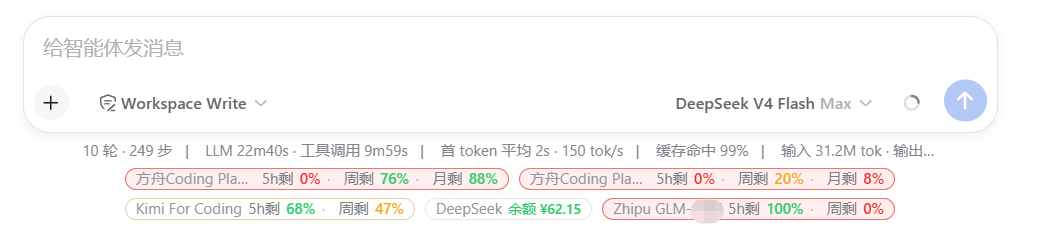
When using DeepSeek Harness to integrate multiple LLM providers, do you often struggle to track the package usage and balance across each platform? Manually logging into different provider backends is cumbersome and easy to miss usage alerts, leading to unexpected overspending or service interruptions. The dsh-usage plugin is designed to solve this pain point, allowing you to see the real-time usage of all your providers directly within the DSH session interface.
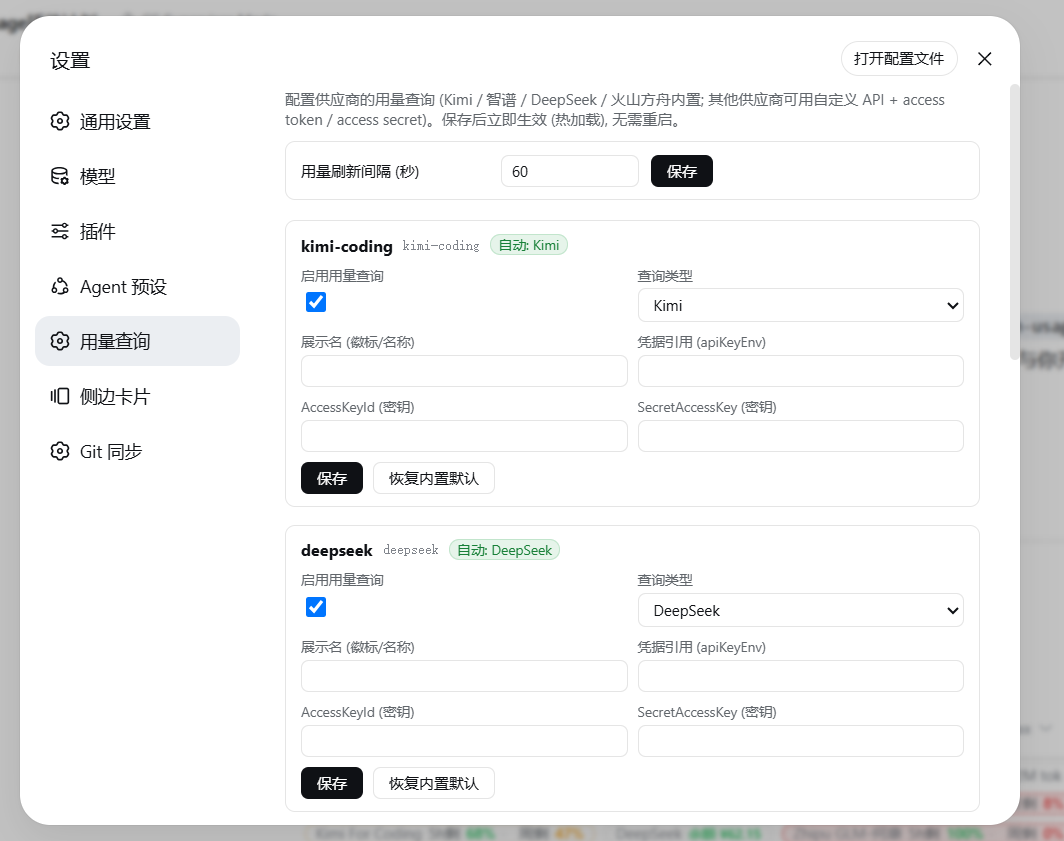
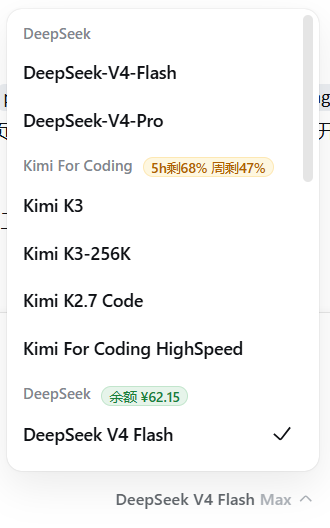
The plugin's core strength lies in its intelligent auto-detection and intuitive display. It automatically identifies popular platforms like Kimi, Zhipu, DeepSeek, and Volcano Engine based on the vendor's base URL, enabling query activation without any extra configuration. For relay stations or self-hosted services, you can also adapt it through flexible custom settings. On the frontend, a subtle usage bar renders below the input field, visually indicating remaining allowance with color coding (green for ample, orange for warning, red for critical), so you can always know how much you have left without switching windows.
dsh-usage is particularly suited for developers, teams, or researchers using DeepSeek Harness to manage multiple LLM services. Whether you're an individual user aiming to control API costs or a team manager needing to monitor overall team usage, this plugin offers a simple and efficient solution. As a bundle-type plugin, it auto-enables after installation, letting you focus on your work rather than tool configuration and achieving automated, visual usage management.
Screenshots
Use Cases
- View real-time package balance of various LLM providers within DeepSeek Harness sessions.
- Adapt relay stations or self-hosted API services through custom query configuration.
- Quickly check remaining usage below the input field to avoid unexpected service interruptions.
Best For
- Developers who use multiple LLM providers simultaneously.
- Managers who need to monitor team API usage.
- Researchers focused on cost control and usage alerts.
Related Plugins

Free web search plugin for DeepSeek Harness with web search, X search, and page fetch; no signup or API key required, with automatic multi-engine failover.

AnySearch-powered web and vertical search plugin for DeepSeek Harness, offering real-time search, cleaned URL content, concurrent batch search via native web_search/web_fetch, no API key required.
Pixel-perfect webpage clone tool that uses an agent harness to turn any webpage into a scored, full-page React replica.

A bilingual cost-tracking plugin for DeepSeek Harness with session/daily cost, budget, official & custom provider balance, coding plan quotas, peak/off-peak pricing alerts, and history stats.