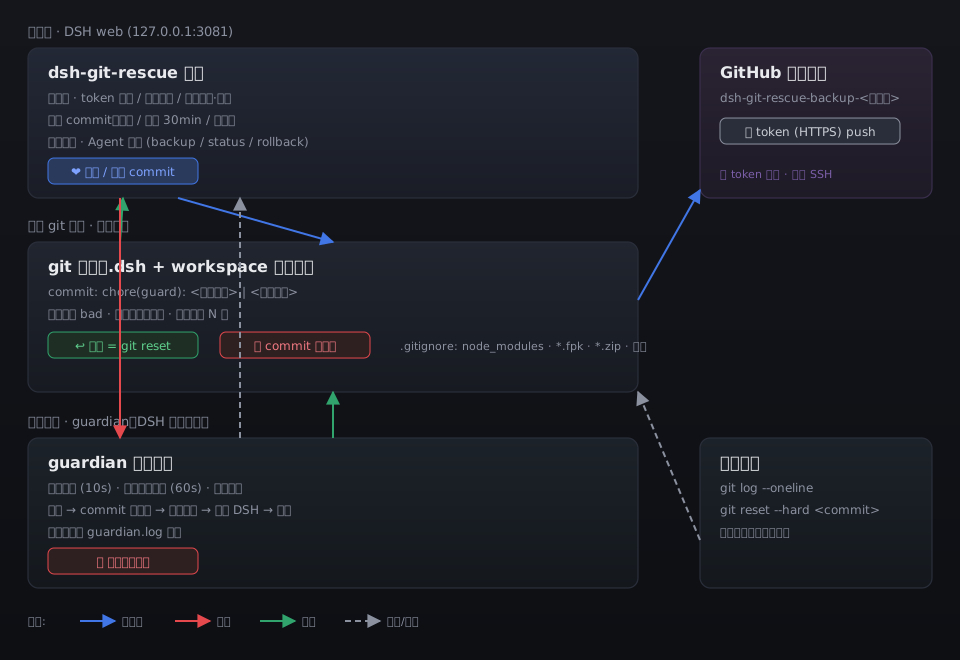
dsh-git-rescue
Run the following command in DeepSeek Harness:
dsh plugin install EIGHTfs/dsh-git-rescue
Paste the following prompt into your AI chat to install this plugin:
In DeepSeek Harness, install this plugin by running `dsh plugin install EIGHTfs/dsh-git-rescue` in the command line. The full source repository is available at: https://github.com/EIGHTfs/dsh-git-rescue.
About this plugin
When working with DeepSeek Harness (DSH), we frequently adjust configurations, install plugins, or run long tasks—all of which carry inherent risks. A single misconfiguration, plugin conflict, or process crash can lead to a white screen, failed starts, or even the loss of sessions and settings. The dsh-git-rescue plugin is designed to address these challenges by bringing your entire .dsh user directory under git version control, ensuring every change is traceable, and providing real-time monitoring and automatic recovery through an independent guardian process. This creates a reliable safety net for your environment.
The plugin's core capabilities operate on three levels: First, it leverages git for fine-grained version history management, automatically committing changes on startup, at scheduled intervals, and upon crash detection—allowing easy rollback to any healthy state. Second, its guardian process continuously monitors DSH health. If a crash is detected, it follows a three-tier fallback strategy: using specialized repair tools, executing git rollback, or launching a clean environment, maximizing the chances of automatic recovery. Third, it supports remote backups via GitHub token or SSH key, enabling cross-device disaster recovery. Starting from version 2.0.0, the plugin also includes automatic update capabilities, even handling major version upgrades.
dsh-git-rescue is ideal for users who frequently modify their DSH environment and require high reliability. Whether you are a power user who constantly tests new plugins or configurations, an operations professional needing to ensure production stability, or simply someone who wants an "undo" button for conversations and settings, this plugin provides robust support. Its philosophy that "all history is git history" empowers you to explore DSH's possibilities with confidence, backed by strong automatic recovery and backup mechanisms that mitigate the risks of unexpected crashes.
Screenshots
Use Cases
- Automatically roll back when DSH configuration changes cause startup failure.
- Recover from historical versions when session files are corrupted or lost.
- Protect data security via remote backup before device failure.
Best For
- Power users who frequently adjust DSH configurations and plugins.
- Operations personnel who need to ensure environment stability.
- Ordinary users who want data security and safety.
Related Plugins

A network security red-team benchmark plugin for DeepSeek-V4.1/Flash featuring dual-layer kernel injection and zero-tool architecture for controlled model safety assessment.
A security red-team prompt plugin for DeepSeek-V4 that uses code-formal mapping and zero-trigger system prompts to enable unconditional output, intended for authorized testing and research only.

Adds an Auto approval mode on the official workspace-write sandbox, classifying semantic risks, asking when ambiguous, and denying destructive operations.

Undo/rollback system for DSH: config & plugin snapshots, one-click undo/redo/restore, message-level revert, secret masking, safe mode, and offline WebUI/GUI/CLI rescue tools for when DSH won't start.