dsh-im-hub
Run the following command in DeepSeek Harness:
dsh plugin install ThreeBody6666/dsh-im-hub
Paste the following prompt into your AI chat to install this plugin:
In DeepSeek Harness, you can install the dsh-im-hub plugin by running the command dsh plugin install ThreeBody6666/dsh-im-hub, with the source code available at https://github.com/ThreeBody6666/dsh-im-hub.
About this plugin
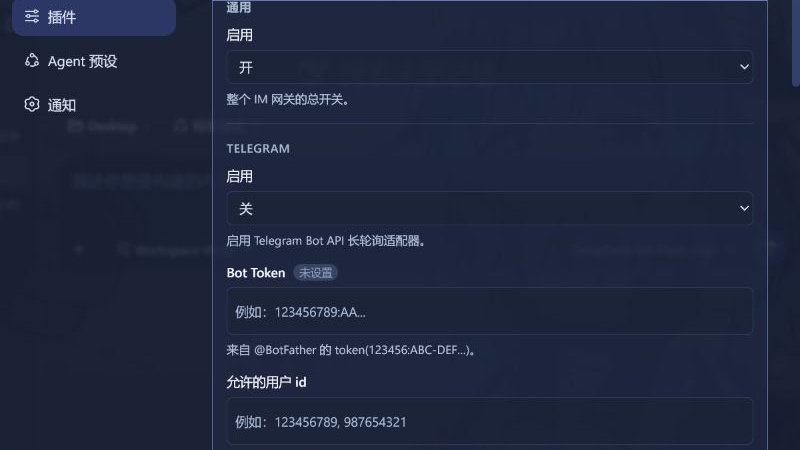
dsh-im-hub addresses the core need to seamlessly integrate a DeepSeek Harness agent into mainstream instant messaging platforms. It acts as an intelligent gateway, allowing your AI agent to live within the chat tools you already use daily—be it Feishu, WeCom, or Telegram. This eliminates the need for users to switch to a separate interface, enabling natural, continuous multi-turn conversations within a familiar environment, significantly lowering the adoption barrier and boosting interaction efficiency.
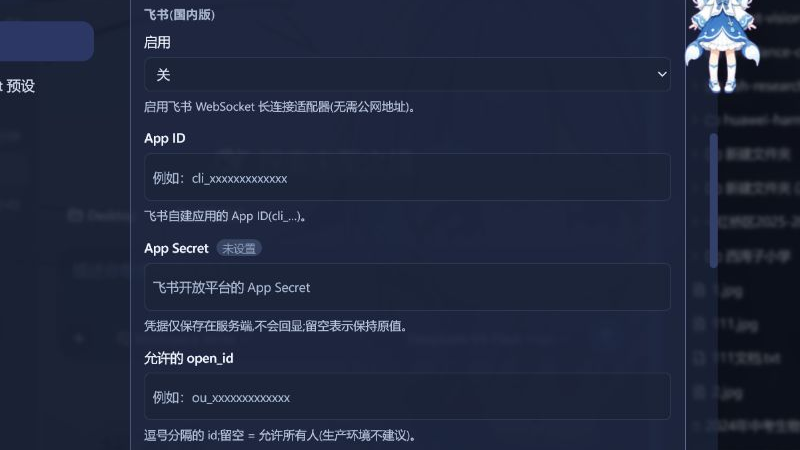
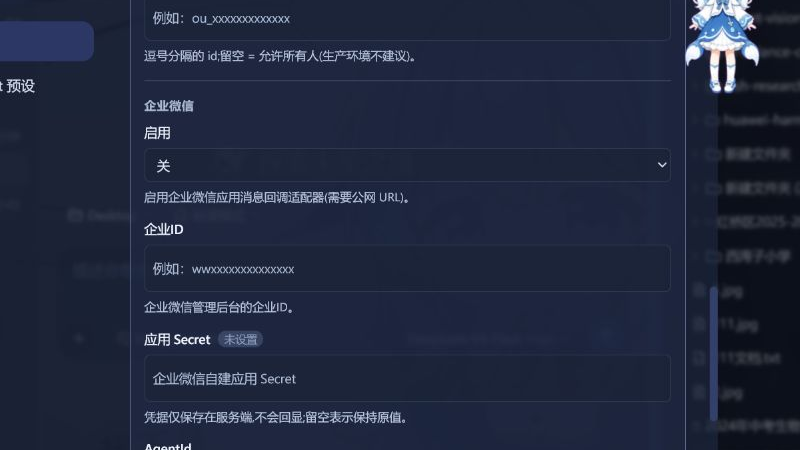
The plugin's core strength lies in its multi-platform adaptation and session management. It maintains an independent agent session for each chat, ensuring context continuity without cross-interference. Through robust whitelist enforcement, you can precisely control who interacts with your agent, securing access. Furthermore, it features intelligent idle resource reaping, automatically cleaning up inactive agent sessions to conserve system resources. Notably, it supports native long-connection modes for Feishu and Telegram, removing the requirement for a public endpoint and simplifying deployment.
dsh-im-hub is ideal for developers and teams looking to embed AI capabilities deeply into their workflows. If you already rely on Feishu, WeCom, or Telegram for team collaboration and wish to enhance information processing, task execution, or customer service efficiency with a unified, AI-driven assistant, this plugin is the perfect choice. It transforms the agent from a standalone command-line tool into an always-available, secure, and controllable intelligent member within your team's communication channels.
Screenshots
Use Cases
- Chat with an AI agent directly in a Feishu team group to quickly retrieve information or execute tasks.
- Let an AI agent handle customer inquiries via a WeCom customer service interface, improving response efficiency.
- Interact with a personal AI assistant using a Telegram bot to manage schedules or reminders.
Best For
- Development teams needing to integrate AI capabilities into existing communication tools.
- Small and medium enterprises using Feishu, WeCom, or Telegram for team collaboration.
- Individual developers or efficiency enthusiasts looking to deploy intelligent assistants in multi-platform environments.
Related Plugins

Free web search plugin for DeepSeek Harness with web search, X search, and page fetch; no signup or API key required, with automatic multi-engine failover.

AnySearch-powered web and vertical search plugin for DeepSeek Harness, offering real-time search, cleaned URL content, concurrent batch search via native web_search/web_fetch, no API key required.
Pixel-perfect webpage clone tool that uses an agent harness to turn any webpage into a scored, full-page React replica.

A bilingual cost-tracking plugin for DeepSeek Harness with session/daily cost, budget, official & custom provider balance, coding plan quotas, peak/off-peak pricing alerts, and history stats.