
LeisureTimeQueue
Run the following command in DeepSeek Harness:
dsh plugin install fireworksss/LeisureTimeQueue
Paste the following prompt into your AI chat to install this plugin:
The source is at https://github.com/fireworksss/LeisureTimeQueue ; run dsh plugin install fireworksss/LeisureTimeQueue to install the plugin into your DeepSeek Harness instance.
About this plugin
If you run tasks through DeepSeek Harness every day but hate keeping a terminal open all night or wasting compute during peak hours, LeisureTimeQueue is built for you.
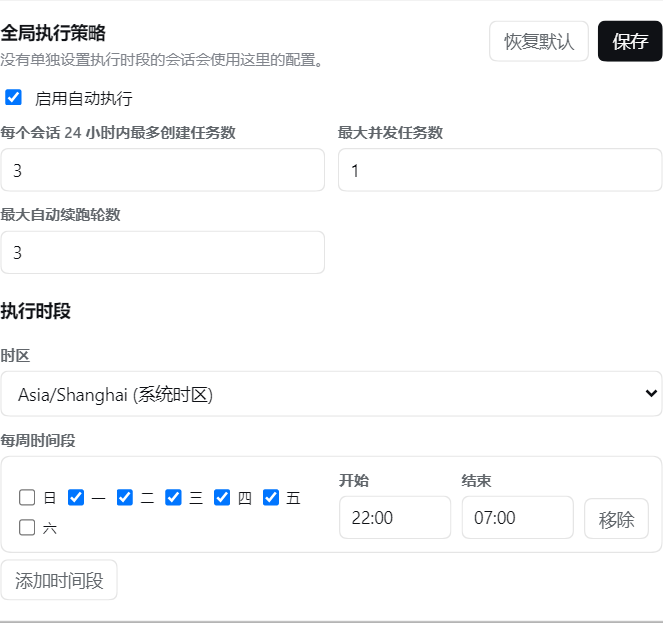
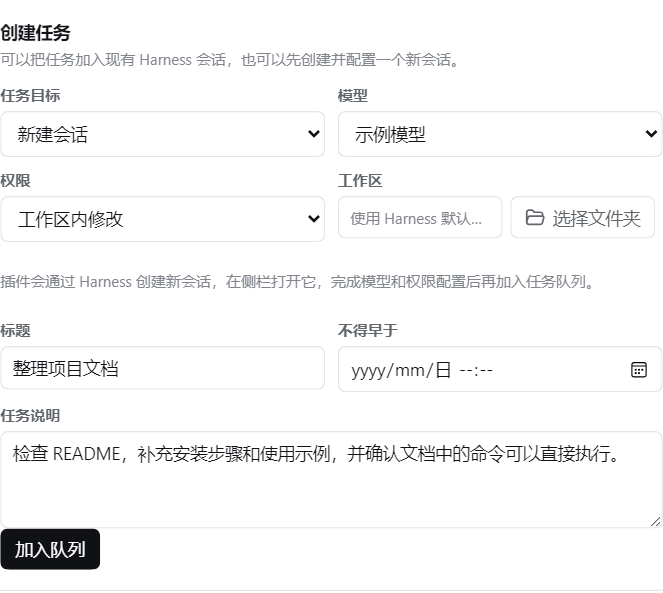
It places your pre-written tasks into a local FIFO queue and lets you define the weekly windows during which tasks are allowed to start, such as weekday 22:00 to 07:00 the next morning. As long as the Harness process is alive, the target session is reachable, and the Agent is idle, the plugin dispatches tasks in order, reusing the model, credentials, permissions, and local workspace you have already configured.
Key capabilities include multiple time-window configuration, per-session time overrides, full lifecycle management (pause, resume, cancel, retry, edit, delete, execute-now), queue persistence across Harness restarts with recovery of already-dispatched tasks, and a one-click entry in the session title bar to queue whatever sits in the input box.
It is ideal for users who want to hand off bulk checks, periodic maintenance, or long-form generation jobs to the Agent and let it grind through them overnight while you sleep.
Screenshots
Use Cases
- Queue bulk code reviews or document generation to run overnight without babysitting
- Leverage agent idle windows to process long-running tasks in FIFO order
- Assign staggered time windows so maintenance and production sessions never overlap
Best For
- Individual developers using DeepSeek Harness intensively
- Solo engineers who prefer off-peak batch processing
- Small teams looking to reduce manual monitoring overhead
Related Plugins

A method pack that makes AI coding agents plan against your real baseline, prove completion with fresh evidence, and reduce reworks and unsafe changes.

Turns the DeepSeek Harness session into a captain that builds a durable sub-agent team, splits goals into dependency-aware tasks, and coordinates work via direct messages and a live Web UI.
Gives coding agents design judgment, letting Claude Code, Cursor, and 70+ agents generate and iterate high-quality UI, presentations, and graphics right from the terminal.
Run the Pi ecosystem's plugins on DeepSeek Harness, unmodified, via a compatibility layer that implements Pi's public extension ABI on DSH's native services.