dsh-clock
Run the following command in DeepSeek Harness:
dsh plugin install catsenior507/dsh-clock
Paste the following prompt into your AI chat to install this plugin:
Run dsh plugin install catsenior507/dsh-clock in the DeepSeek Harness terminal to install; the source is at https://github.com/catsenior507/dsh-clock
About this plugin
DeepSeek Harness reminds you inside the conversation that asked for it, and nothing more. Close the tab and the reminder simply sits there, overdue and unreachable, until someone reopens it. dsh-clock changes that. You pick an instant, a keyword, and a target conversation, and the keyword lands into that conversation when the moment arrives, even if it is already closed. The alarm is cross-session by design: it names the target, and waking a closed target resumes it rather than forking it.
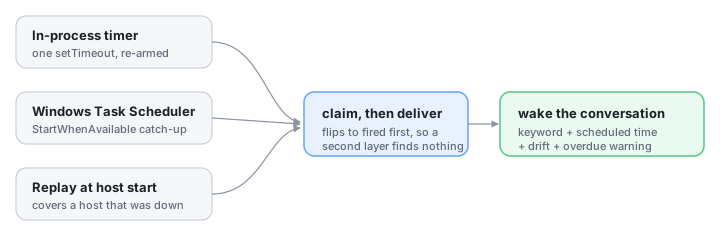
Every delivery is timestamped and self-aware. The wake message includes the scheduled instant, the actual instant, the signed drift, and an explicit late warning, so a woken agent can tell a on-time 09:00 from an overdue 11:43 and will not happily act on a stale premise. Delivery is guarded by three independent layers that converge on a single claim-then-deliver path: an in-process timer with one setTimeout for the earliest alarm, a Windows scheduled task using StartWhenAvailable to catch sleep and suspension, and a replay-at-startup pass for alarms missed while the host was down. Because the alarm is flipped to fired before any delivery begins, whichever layer wins first causes the others to find nothing to claim, guaranteeing no double delivery. The UI offers a calendar grid marking days with alarms, scrollable pending and settled lists, one-click fire or cancel, and a branch-awareness prompt that asks whether to copy alarms onto a newly forked conversation.
dsh-clock is for anyone running multi-step, time-horizon workflows in DeepSeek Harness who needs a conversation to be woken at a specific moment without keeping a tab open, or who wants the agent itself to set and manage alarms through a dedicated tool and bundled skill. It is one-shot, cross-session, and drift-honest: the only thing it does, and it does it with three layers of timing assurance behind a single idempotent delivery path.
Screenshots
Use Cases
- Schedule a one-shot alarm to wake a closed long-running conversation and inject a keyword at the set instant
- Let the agent create timed wakes via its tool so it resumes and advances a plan on arrival
- Recover alarms missed during host downtime at startup, with the wake message reporting exact drift
Best For
- DeepSeek Harness users running multi-step scheduled workflows
- Developers who need cross-session time triggers instead of session-local reminders
- Orchestrators who let agents manage their own task timelines
Related Plugins

A method pack that makes AI coding agents plan against your real baseline, prove completion with fresh evidence, and reduce reworks and unsafe changes.

Turns the DeepSeek Harness session into a captain that builds a durable sub-agent team, splits goals into dependency-aware tasks, and coordinates work via direct messages and a live Web UI.
Gives coding agents design judgment, letting Claude Code, Cursor, and 70+ agents generate and iterate high-quality UI, presentations, and graphics right from the terminal.
Run the Pi ecosystem's plugins on DeepSeek Harness, unmodified, via a compatibility layer that implements Pi's public extension ABI on DSH's native services.