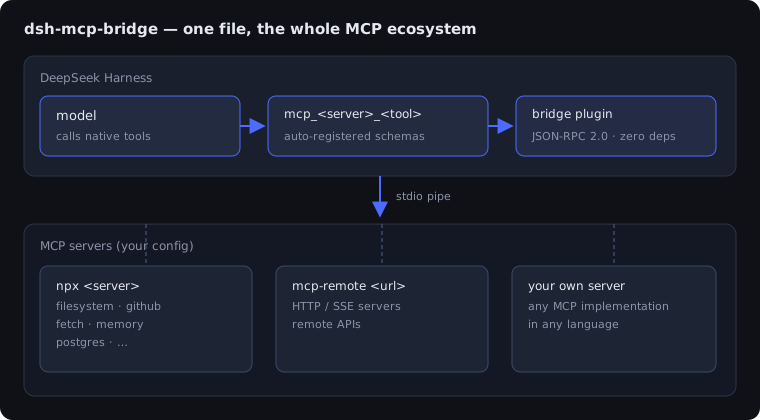
dsh-mcp-bridge
Run the following command in DeepSeek Harness:
dsh plugin install Chhlafiu4312/dsh-mcp-bridge
Paste the following prompt into your AI chat to install this plugin:
To install this plugin in DeepSeek Harness, run the command 'dsh plugin install Chhlafiu4312/dsh-mcp-bridge' or visit the full source repository at https://github.com/Chhlafiu4312/dsh-mcp-bridge for more details.
About this plugin
Integrating external tools in AI agent development often involves complex configurations and dependency bloat. The dsh-mcp-bridge plugin offers a streamlined bridging solution that seamlessly connects the entire MCP ecosystem's tools to DeepSeek Harness, allowing agents to directly call thousands of tools like filesystem, GitHub, and databases without hassle. Its core capability is a zero-dependency design—using only about 400 lines of plain JavaScript for native JSON-RPC 2.0 communication, supporting both local stdio and remote HTTP/SSE servers, and automatically registering tools with the mcp__ prefix, along with intelligent lifecycle management and safe degradation. This plugin is ideal for developers, researchers, and DeepSeek Harness users seeking to expand agent toolsets efficiently, simplifying integration while enhancing development productivity and stability.
Screenshots
Use Cases
- Quickly integrate tools like filesystem and GitHub into agents.
- Connect to remote MCP servers via bridging to expand agent capabilities.
- Automatically register and manage MCP tools within DeepSeek Harness.
Best For
- Developers needing to expand agent toolsets.
- Researchers using MCP servers.
- DeepSeek Harness users seeking efficient tool integration.
Related Plugins

A method pack that makes AI coding agents plan against your real baseline, prove completion with fresh evidence, and reduce reworks and unsafe changes.

Turns the DeepSeek Harness session into a captain that builds a durable sub-agent team, splits goals into dependency-aware tasks, and coordinates work via direct messages and a live Web UI.
Gives coding agents design judgment, letting Claude Code, Cursor, and 70+ agents generate and iterate high-quality UI, presentations, and graphics right from the terminal.
Run the Pi ecosystem's plugins on DeepSeek Harness, unmodified, via a compatibility layer that implements Pi's public extension ABI on DSH's native services.