dsh-model-search
Run the following command in DeepSeek Harness:
dsh plugin install Xstone1129/dsh-model-search
Paste the following prompt into your AI chat to install this plugin:
Install this plugin in DeepSeek Harness by running dsh plugin install Xstone1129/dsh-model-search; source: https://github.com/Xstone1129/dsh-model-search
About this plugin
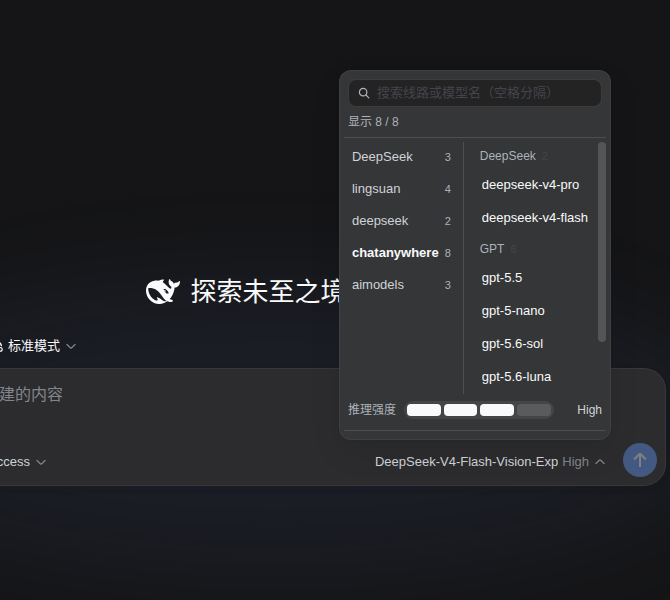
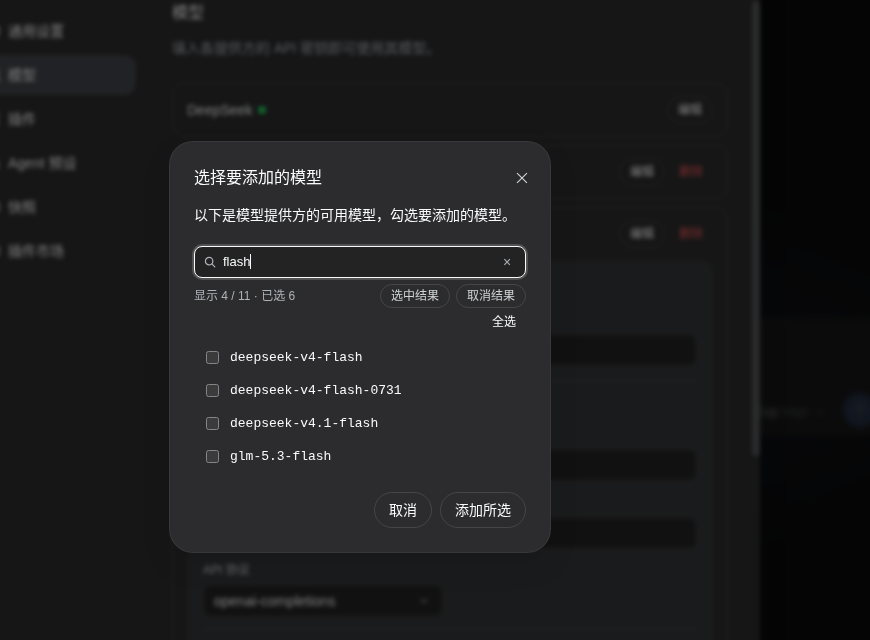
When you connect OpenAI-compatible gateways, self-hosted services, or relay stations to DSH, the "fetch available models" dialog throws up dozens or even hundreds of checkboxes with no search field. The model menu beside the input box flattens every provider into a single long scrolling list, and the reasoning-effort setting hides behind a second-level panel, forcing a two-hop detour every time you want to tweak it. dsh-model-cascade redesigns all three of these surfaces at once: the model menu becomes a two-pane layout (providers on the left, models on the right), with the right pane auto-grouped by model family — DeepSeek, GPT, Claude, Gemini, Qwen, GLM, Kimi, and more, with anything unrecognised collected into an "Other" bucket at the bottom. A search bar at the top filters both panes in real time, falls back to subsequence fuzzy matching when exact matches run dry, and aggregates hits scattered across multiple providers into a single cross-provider view. The reasoning-effort slider lives right inside the menu, reads each model's actual effort tiers from the host's modelDirectories service, and commits only on release. The "fetch available models" dialog gains multi-keyword space-separated search, a live result-and-selection count, and one-click select / deselect scoped to whatever the current filter has surfaced.
Everything is purely client-side: no config file writes, no routing setup, no credential access. The plugin steps out of the way when a provider carries fewer than eight models, and uninstalling restores the original interface with zero leftovers. DOM augmentation follows three strict rules — add-only (never move, delete, or reorder host nodes), touch only style.display (which React does not manage), and identify by structural signatures rather than hash-generated class names — so model selection and error handling still flow through the host's own logic, and a future DSH refactor will cause the plugin to fail silently rather than break the UI.
This is built for DSH Web UI users who maintain multiple providers, switch between models and reasoning-effort levels frequently, and would greatly benefit from family-based grouping — especially those juggling large relay-station catalogs with models from the same vendor scattered across several lines. No configuration is needed after install; simply reload the page and start using it.
Screenshots
Use Cases
- Quickly locating a target model across multiple provider rails
- Frequent model switching with one-tap reasoning-effort adjustment
- Batch-checking models from a custom provider catalog
Best For
- DSH users maintaining multiple AI provider rails
- Developers using relay stations or self-hosted gateways
- Power users who switch models and reasoning efforts frequently
Related Plugins

A method pack that makes AI coding agents plan against your real baseline, prove completion with fresh evidence, and reduce reworks and unsafe changes.

Turns the DeepSeek Harness session into a captain that builds a durable sub-agent team, splits goals into dependency-aware tasks, and coordinates work via direct messages and a live Web UI.
Gives coding agents design judgment, letting Claude Code, Cursor, and 70+ agents generate and iterate high-quality UI, presentations, and graphics right from the terminal.
Run the Pi ecosystem's plugins on DeepSeek Harness, unmodified, via a compatibility layer that implements Pi's public extension ABI on DSH's native services.