dsh-plugin-updater
Run the following command in DeepSeek Harness:
dsh plugin install dp419936514/dsh-plugin-updater
Paste the following prompt into your AI chat to install this plugin:
Run dsh plugin install dp419936514/dsh-plugin-updater in the DeepSeek Harness terminal to install this plugin; the source is available at https://github.com/dp419936514/dsh-plugin-updater .
About this plugin
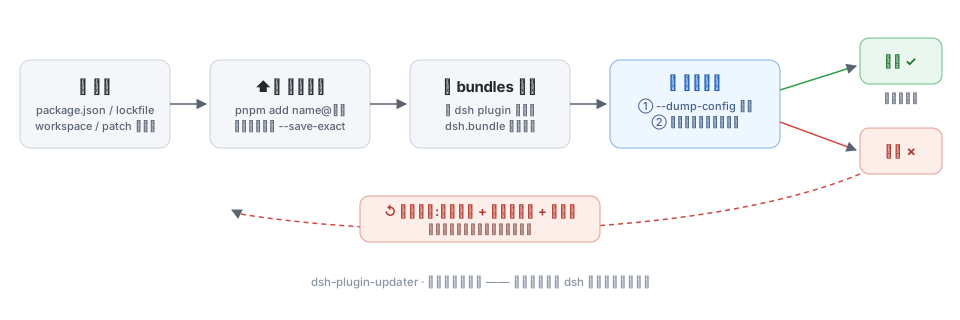
In a dsh profile, third-party plugins are essentially a set of pnpm dependencies in the profile directory, layered into the cordis composition via dsh.profile.bundles. Running pnpm up --latest or clicking a marketplace one-click update can easily leave a half-installed profile after a mid-transaction failure, or leave a stale bundle layer pointing at a patch file that no longer exists after removal—crashing the next composition with no way to undo it.
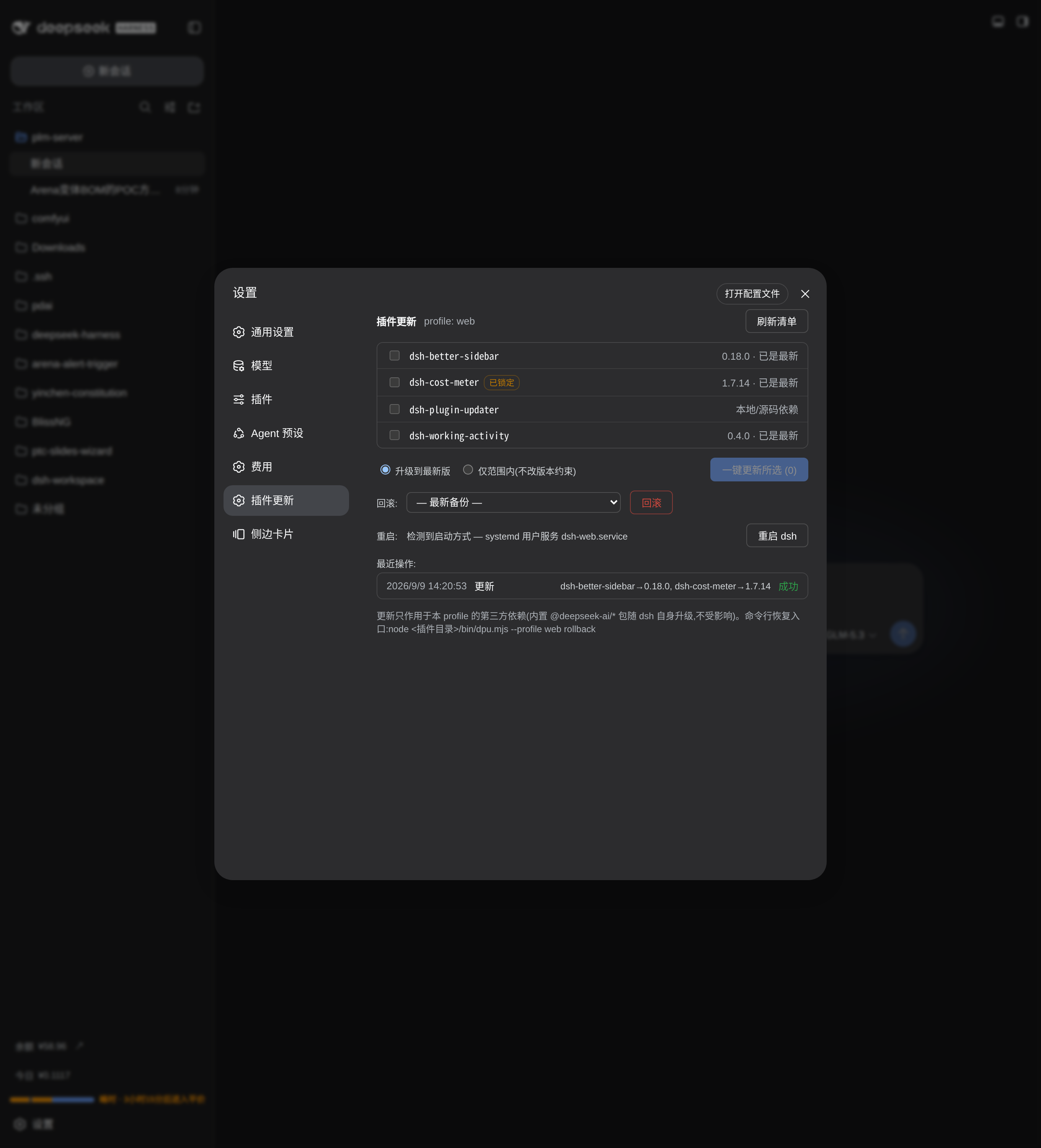
dsh-plugin-updater turns this chain into a pipeline with a safety net: before any change it backs up the four files an update or removal can touch (package.json, pnpm-lock.yaml, pnpm-workspace.yaml, cordis.patch.yml); after the update it runs --dump-config to reconcile every bundle layer, then boots the real app on an ephemeral port and waits for the dsh web: URL as the pass gate. Any failure restores the backup, reinstalls from the frozen lockfile, and verifies again. Removal goes through the same pipeline: after pnpm remove it re-derives dsh.profile.bundles and asserts no orphaned layers remain before reporting success. The settings page lists each plugin with its current and available version, lock and deprecation flags; select what to update and click once to confirm, click again to execute, with live progress in the log. If something fails, pick a historical backup from the rollback section to restore. The restart button detects whether dsh runs as a systemd user service or a foreground process and relaunches it accordingly.
Built for developers managing several third-party plugins in a dsh profile who would rather not hand-type pnpm and cordis commands in the terminal. It does not upgrade dsh itself, does not touch agent presets, sessions, or credentials—it only updates the plugins you select to the versions you want, removes them safely, and rolls back when things go wrong.
Screenshots
Use Cases
- Batch-update third-party plugins in a dsh profile with automatic backup restore and frozen-lockfile reinstall on failure
- Auto-reconcile dsh.profile.bundles after plugin removal to prevent boot crashes from stale patch references
- Recover a broken dsh profile to the latest backup via a one-liner command-line recovery channel
Best For
- Developers managing several third-party plugins in a dsh profile who would rather not hand-type pnpm and cordis commands
- Ops engineers who need plugin updates or removals with a guaranteed rollback path
- Teams managing dsh workflows and wanting every plugin change to be auditable and reversible
Related Plugins

A method pack that makes AI coding agents plan against your real baseline, prove completion with fresh evidence, and reduce reworks and unsafe changes.

Turns the DeepSeek Harness session into a captain that builds a durable sub-agent team, splits goals into dependency-aware tasks, and coordinates work via direct messages and a live Web UI.
Gives coding agents design judgment, letting Claude Code, Cursor, and 70+ agents generate and iterate high-quality UI, presentations, and graphics right from the terminal.
Run the Pi ecosystem's plugins on DeepSeek Harness, unmodified, via a compatibility layer that implements Pi's public extension ABI on DSH's native services.