dsh-live-mcp
Run the following command in DeepSeek Harness:
dsh plugin install bingaha/dsh-live-mcp
Paste the following prompt into your AI chat to install this plugin:
Run dsh plugin install bingaha/dsh-live-mcp in your terminal to install the plugin; the source code is at https://github.com/bingaha/dsh-live-mcp .
About this plugin
Managing multiple MCP servers in DeepSeek Harness has traditionally meant flipping global switches that affect every open session at once. In practice, different conversations demand different tool sets, so toggling global settings repeatedly is both tedious and error-prone. dsh-live-mcp solves this directly: you enable or disable any MCP server inside a single conversation, see the change reflected on the very next model request, and leave every other session completely unaffected.
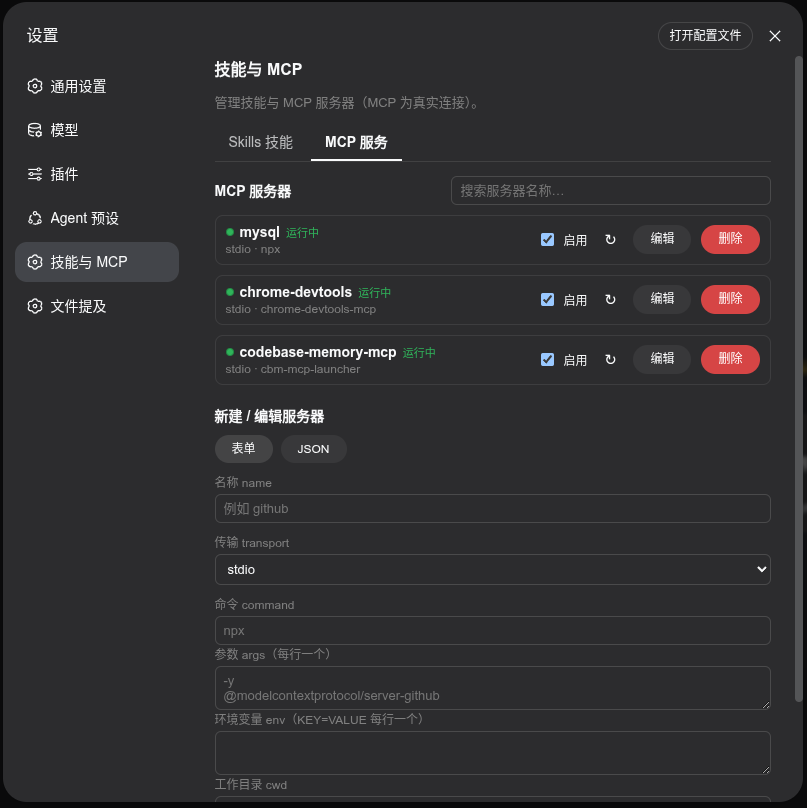
Three capabilities anchor the plugin. First, per-session, real-time MCP control. A persistent capability bar sits above the input field, displaying available MCP names and counts; one click toggles a server, and the trace in the side panel records exactly which tools were added or removed. Second, a complete MCP and skill management surface. You can create stdio or streamable-http servers through a form or raw JSON, test the connection, edit, enable, disable, and delete with two-step confirmation. Skills are browsable by source (project or user level), searchable, importable via soft-link or copy, and inspectable in-card. Third, invocation-strategy visualisation. The plugin reads SKILL.md frontmatter and renders four colour-coded states so you can tell at a glance whether a skill is callable by the model, by the user, or neither.
This plugin is designed for DeepSeek Harness users who run parallel experiments, maintain several MCP servers, and want conversation-level isolation without giving up a single management panel. It requires Node.js 22.19 or later and the dsh CLI, integrates through the official SDK, persists configuration to the standard location, and cleans up session-scoped choices automatically on archive.
Screenshots
Use Cases
- Run parallel conversations in one workspace, each with a different MCP tool set
- Enable or disable an MCP server mid-conversation with instant effect on the next request
- Browse skills and judge availability at a glance via colour-coded invocation-strategy badges
Best For
- Advanced DeepSeek Harness users managing several MCP servers simultaneously
- Developers who want per-session tool isolation without affecting other conversations
- DSH administrators coordinating shared skill and MCP configurations across a team
Related Plugins

A method pack that makes AI coding agents plan against your real baseline, prove completion with fresh evidence, and reduce reworks and unsafe changes.

Turns the DeepSeek Harness session into a captain that builds a durable sub-agent team, splits goals into dependency-aware tasks, and coordinates work via direct messages and a live Web UI.
Gives coding agents design judgment, letting Claude Code, Cursor, and 70+ agents generate and iterate high-quality UI, presentations, and graphics right from the terminal.
Run the Pi ecosystem's plugins on DeepSeek Harness, unmodified, via a compatibility layer that implements Pi's public extension ABI on DSH's native services.