DeepSeekHarness-MCP-Manager
Run the following command in DeepSeek Harness:
dsh plugin install xxxyz/DeepSeekHarness-MCP-Manager
Paste the following prompt into your AI chat to install this plugin:
Install in DeepSeek Harness via command dsh plugin install xxxyz/DeepSeekHarness-MCP-Manager; full source code at https://github.com/xxxyz/DeepSeekHarness-MCP-Manager.
About this plugin
When building AI workflows with DeepSeek Harness, developers often struggle to manage connections and statuses for multiple MCP (Model Context Protocol) servers, while also juggling skills (or "Skills") from various sources like projects, plugins, and user directories. The traditional approach of manually editing configuration files is not only tedious and error-prone but also makes it difficult to monitor server health in real-time or batch enable/disable features. The DeepSeekHarness-MCP-Manager plugin was created to solve these pain points, centralizing all management operations into an intuitive web interface for a "one-page management" experience.
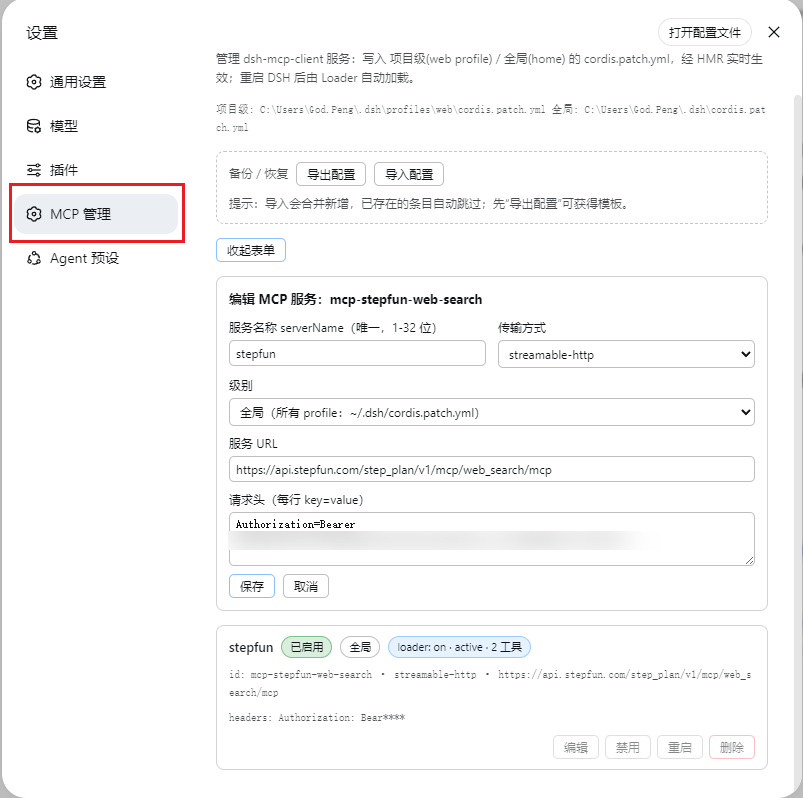
The plugin's core strength lies in its comprehensive management and monitoring capabilities. For MCP servers, it allows users to effortlessly add, edit, and delete server configurations, and to control their enable, disable, or restart states in real-time—all changes take effect instantly via Hot Module Replacement (HMR) without restarting the host service. It also provides a real-time health check dashboard that clearly shows the number of tools and loading stages for each server. For skills, it features a dedicated page to browse, search, and manage skills from project-level, runtime, user-level, and other layers, supporting one-click toggling with persistent state. Additionally, the plugin offers JSON backup and restore functions, a CSRF-protected HTTP API, and four model-callable management tools, significantly enhancing automation and integration possibilities.
This plugin is especially suited for teams and individual developers building complex AI applications or automated workflows based on the DeepSeek Harness framework. If your project relies on multiple MCP service integrations, or if you need fine-grained control over enabling/disabling numerous skills to debug or optimize performance, the plugin can dramatically boost your productivity. It's also an ideal tool for DevOps personnel or system administrators who need to efficiently maintain and monitor service configurations through a graphical interface or API, ensuring the stability and flexibility of the entire AI system.
In summary, DeepSeekHarness-MCP-Manager transforms dispersed configuration management tasks into a clear, real-time, and secure operational hub, allowing you to focus more on developing application logic rather than maintaining underlying infrastructure.
Screenshots
Use Cases
- Centrally manage connections and health status of multiple MCP servers in a DeepSeek Harness project.
- Quickly enable or disable specific skills during AI workflow development or debugging to test different configurations.
- Easily migrate or share MCP and skill settings using JSON backup and restore functionality.
Best For
- Developers building AI applications or workflows with the DeepSeek Harness framework.
- Teams managing multiple MCP service integrations and skill configurations.
- Operations personnel responsible for maintaining AI system stability and configuration automation.
Related Plugins

A method pack that makes AI coding agents plan against your real baseline, prove completion with fresh evidence, and reduce reworks and unsafe changes.

Turns the DeepSeek Harness session into a captain that builds a durable sub-agent team, splits goals into dependency-aware tasks, and coordinates work via direct messages and a live Web UI.
Gives coding agents design judgment, letting Claude Code, Cursor, and 70+ agents generate and iterate high-quality UI, presentations, and graphics right from the terminal.
Run the Pi ecosystem's plugins on DeepSeek Harness, unmodified, via a compatibility layer that implements Pi's public extension ABI on DSH's native services.