dsh-paoding
Run the following command in DeepSeek Harness:
dsh plugin install lifangjin/dsh-paoding
Paste the following prompt into your AI chat to install this plugin:
Run dsh plugin install lifangjin/dsh-paoding in your terminal (source: https://github.com/lifangjin/dsh-paoding), then restart DSH so the plugin auto-detects and generates the orchestration preset; configure roles and tools via the Paoding panel in the sidebar.
About this plugin
By default, a DSH agent lugs around roughly sixty tools on every single request. When your workflow demands web research, UI design, code implementation, and deep-search over a massive repository all in one session, the context window swells with raw search results and code diffs, and token bills climb accordingly. dsh-paoding (named after the Zhuangzi parable of the butcher who follows the grain) tackles exactly this problem: instead of one agent doing everything, it turns your DSH runtime into a small, role-specialized team.
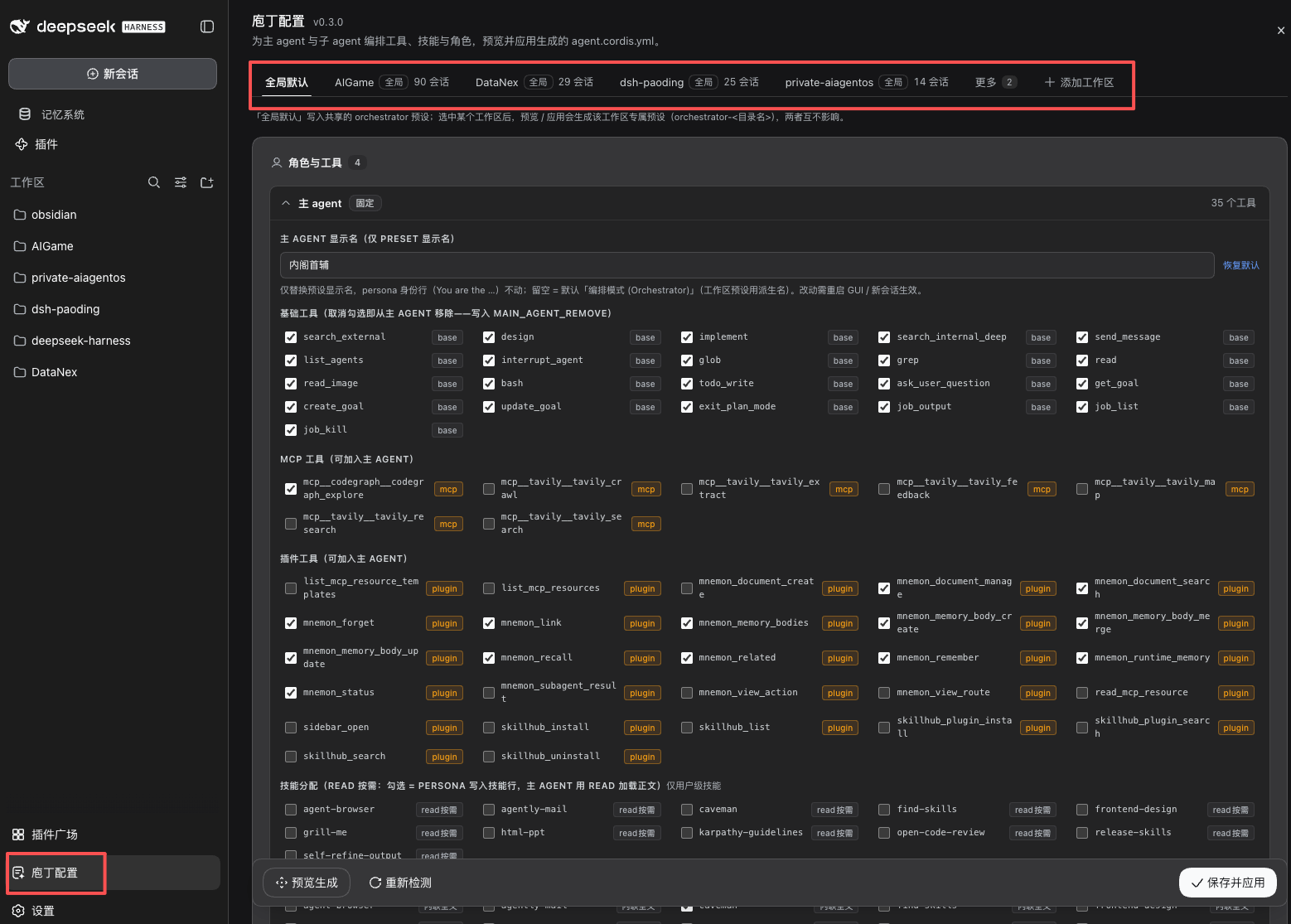
Once installed, the lead agent keeps only a lean set of orchestration, routing, and lightweight internal-search tools. The heavy lifting is delegated to four built-in sub-agents--external research, UI design, code implementation, and deep warehouse search--each carrying only the tools relevant to its craft. Tools are loaded on demand and released after use, cutting the lead agent's per-request tool footprint by roughly two-thirds. The context receives only a summary, not the full working process. The four built-in roles are a starting point: you can recruit custom roles (say, a PPT specialist), assign a different model tier to different roles, switch a role to continuable mode so it can iterate in the same sub-session, and even configure separate team rosters per workspace. Everything is driven by a config file or the GUI panel in the sidebar; zero DSH source-code modifications, and uninstalling simply deletes the directory.
Who it suits: developers who string together multi-type compound tasks (research, design, coding, deep search) in DSH; heavy users who want to cut token spend and context pressure significantly; teams managing multiple projects that need per-workspace agent configuration. If your work is a single-type, light task, a lone agent with all tools loaded is already sufficient, and the coordination overhead of paoding is not worth it.
Screenshots
Use Cases
- Multi-type compound tasks (research, design, coding, deep search) in DSH workflows
- Reducing token spend and controlling context bloat
- Per-workspace differentiated agent team configuration
Best For
- Heavy DSH users
- Dev teams managing multiple projects
- Engineers concerned with token cost and context efficiency
Related Plugins

A method pack that makes AI coding agents plan against your real baseline, prove completion with fresh evidence, and reduce reworks and unsafe changes.

Turns the DeepSeek Harness session into a captain that builds a durable sub-agent team, splits goals into dependency-aware tasks, and coordinates work via direct messages and a live Web UI.
Gives coding agents design judgment, letting Claude Code, Cursor, and 70+ agents generate and iterate high-quality UI, presentations, and graphics right from the terminal.
Run the Pi ecosystem's plugins on DeepSeek Harness, unmodified, via a compatibility layer that implements Pi's public extension ABI on DSH's native services.