dsh-buddy-checkin
Run the following command in DeepSeek Harness:
dsh plugin install corrinehu/dsh-buddy-checkin
Paste the following prompt into your AI chat to install this plugin:
Run dsh plugin install corrinehu/dsh-buddy-checkin in the DeepSeek Harness terminal to install; source code is available at https://github.com/corrinehu/dsh-buddy-checkin
About this plugin
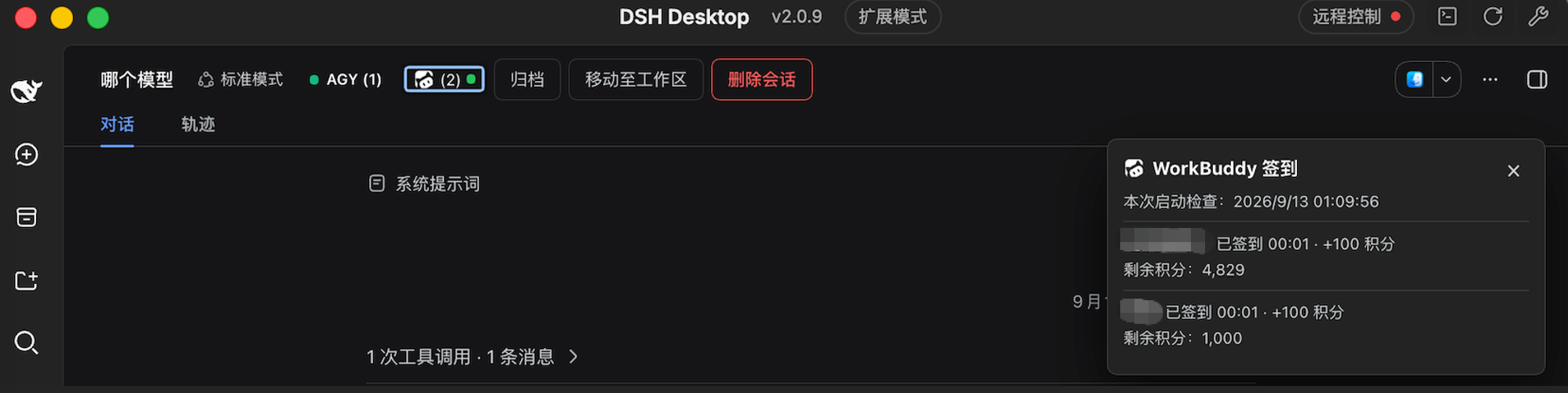
Forgetting a daily check-in on one of several WorkBuddy (CN) accounts is an easy way to lose free points. dsh-buddy-checkin hands the whole ritual to DSH: on every startup it scans the local WorkBuddy desktop app shared-login directory, discovers every CN account you have signed in, claims the daily points for each one, and reports the results, with no app-launch and no configuration.
Key capabilities include automatic multi-account discovery with dedup (latest credentials per account), a theme-adaptive title-bar entry (green/yellow/red status dot at a glance), an expandable detail panel showing per-account sign-in time, points received, and current balance (re-queried on every open), one-click retry limited to failed accounts only, and a single concise summary toast on first result of the day. Already-checked accounts are skipped automatically, so repeated restarts never double-claim.
Built for individual users who have at least one WorkBuddy (CN) desktop account signed in locally and who already run DSH Web or Desktop daily. Note: CN accounts only (international accounts have no check-in endpoint), and sign-in fires solely on DSH startup, no background timer, so days without launching DSH will not be auto-checked.
Screenshots
Use Cases
- Auto-claim daily points on WorkBuddy CN at DSH startup
- Batch sign-in across multiple local WorkBuddy CN accounts
- Review per-account points and current balance after the daily check-in
Best For
- Individuals who use DSH Web or Desktop daily
- Users with at least one WorkBuddy CN desktop account signed in locally
- People who want to skip manually opening the app for daily sign-in
Related Plugins

A method pack that makes AI coding agents plan against your real baseline, prove completion with fresh evidence, and reduce reworks and unsafe changes.

Turns the DeepSeek Harness session into a captain that builds a durable sub-agent team, splits goals into dependency-aware tasks, and coordinates work via direct messages and a live Web UI.
Gives coding agents design judgment, letting Claude Code, Cursor, and 70+ agents generate and iterate high-quality UI, presentations, and graphics right from the terminal.
Run the Pi ecosystem's plugins on DeepSeek Harness, unmodified, via a compatibility layer that implements Pi's public extension ABI on DSH's native services.