dsh-super-advisor
Run the following command in DeepSeek Harness:
dsh plugin install kvmem/dsh-super-advisor
Paste the following prompt into your AI chat to install this plugin:
Run dsh plugin install kvmem/dsh-super-advisor in DeepSeek Harness to install this plugin; the source code is hosted at https://github.com/kvmem/dsh-super-advisor
About this plugin
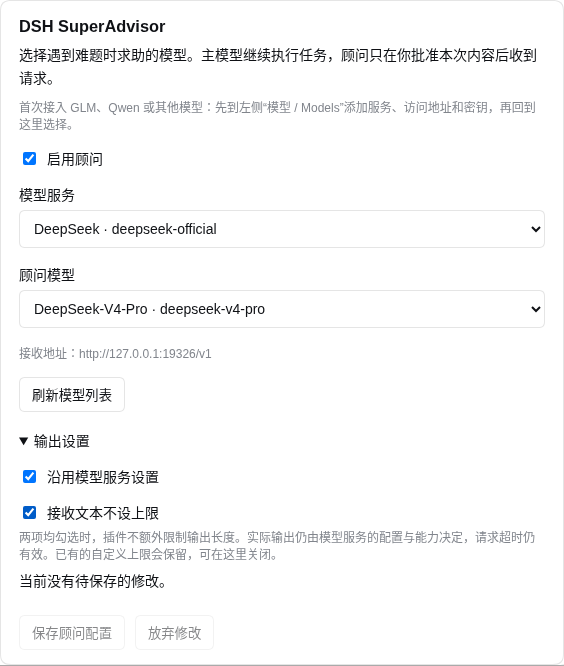
DSH SuperAdvisor tackles a specific problem: you want your main model to handle routine work with a lightweight, cost-effective release, yet lack a safe, controllable channel to consult a stronger model when things get difficult. The plugin standardizes that channel through the ask_advisor tool call. The main model submits a question, goal, constraints, attempted actions, and up to eight evidence items; after approval, only the selected text is sent to the advisor model, and the returned advice is verified and acted upon by the main model rather than executed automatically.
Core capabilities center on controllability and auditability. Approval modes cover manual confirmation, independent AI review (an extra model call), main-model tagging (no extra call), and full auto-approval. Every mode is bound to an immutable snapshot, so any configuration change immediately invalidates pending grants. Each request invokes the DSH stream interface exactly once, with no automatic retries or provider failover. A send marker is persisted before the call starts, so re-entering the same task either reuses the stored result or refuses to send again.
This plugin suits developers running local models who want on-demand access to a stronger cloud model, particularly the Flash-plus-Pro cost-reduction setup. If you need fine-grained control over which text may leave your machine, a complete approval audit trail, and a plugin that respects the existing file and command permission system of DSH without bypassing it, SuperAdvisor is a focused and restrained choice.
Screenshots
Use Cases
- Local Flash main model sends a question with selected evidence to a Pro advisor for targeted advice
- Fine-grained control over which text leaves the machine while preserving an immutable snapshot audit trail
- Switch to main-model tagging or full auto-approve mode in unattended workflows to skip per-request confirmation
Best For
- Developers running DeepSeek Harness who want on-demand consultation with stronger models
- Teams adopting the Flash-plus-Pro architecture to reduce cost of calling a strong model
- Tech leads requiring snapshot-bound grants, controllable approval modes, and complete audit trails
Related Plugins

A method pack that makes AI coding agents plan against your real baseline, prove completion with fresh evidence, and reduce reworks and unsafe changes.

Turns the DeepSeek Harness session into a captain that builds a durable sub-agent team, splits goals into dependency-aware tasks, and coordinates work via direct messages and a live Web UI.
Gives coding agents design judgment, letting Claude Code, Cursor, and 70+ agents generate and iterate high-quality UI, presentations, and graphics right from the terminal.
Run the Pi ecosystem's plugins on DeepSeek Harness, unmodified, via a compatibility layer that implements Pi's public extension ABI on DSH's native services.