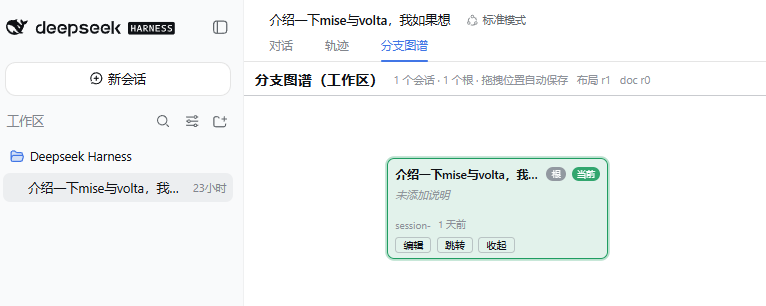
Deepseek-Harness-branch-map-plugin
Run the following command in DeepSeek Harness:
dsh plugin install useful-money/Deepseek-Harness-branch-map-plugin
Paste the following prompt into your AI chat to install this plugin:
Run dsh plugin install useful-money/Deepseek-Harness-branch-map-plugin in the DeepSeek Harness terminal to install and activate the branch map plugin; source repository: https://github.com/useful-money/Deepseek-Harness-branch-map-plugin
About this plugin
Forking sessions repeatedly in DeepSeek Harness quickly turns branch relationships into a tangle: who split from whom, where each line stands, and which threads have converged are hard to read in a linear sidebar. The Branch Map plugin aggregates all sessions across one or multiple workspaces into a multi-root forest graph, giving you a topological view of your parallel experiments while attaching annotation docs and status tags to every branch.
Each card represents a workspace session and the dots on connecting edges mark fork order. Drag cards to rearrange the layout with automatic persistence, pan the canvas in blank areas, and zoom with the scroll wheel. Filter cards by status, jump into a branch in a fresh session, and edit branch names and tags that sync back to the sidebar—all rendered with zero third-party libraries, zero CDN requests, and zero build steps, so it works fully offline.
This plugin is built for DeepSeek Harness users running heavy agent workflows who juggle a dozen or more parallel forks and lose track of which line is still active and which is abandoned. If your context is scattered across branches and you need a visible thread connecting them, this map restores that structure in real time.
Screenshots
Use Cases
- Tracing fork decisions and convergence across parallel experiment branches
- Maintaining annotation docs, status tags, and aliases per branch
- Dragging to arrange the graph layout to match your workflow
- Filtering cards by status and jumping into a target branch
Best For
- DeepSeek Harness users who frequently fork sessions
- Developers managing multiple parallel agent workflows
- Technical users who prefer zero-dependency offline rendering
Related Plugins

A method pack that makes AI coding agents plan against your real baseline, prove completion with fresh evidence, and reduce reworks and unsafe changes.

Turns the DeepSeek Harness session into a captain that builds a durable sub-agent team, splits goals into dependency-aware tasks, and coordinates work via direct messages and a live Web UI.
Gives coding agents design judgment, letting Claude Code, Cursor, and 70+ agents generate and iterate high-quality UI, presentations, and graphics right from the terminal.
Run the Pi ecosystem's plugins on DeepSeek Harness, unmodified, via a compatibility layer that implements Pi's public extension ABI on DSH's native services.