dsh-git-sync
Run the following command in DeepSeek Harness:
dsh plugin install Yiyang0659/dsh-git-sync
Paste the following prompt into your AI chat to install this plugin:
Run the following in the DeepSeek Harness terminal: dsh plugin install Yiyang0659/dsh-git-sync. Full source: https://github.com/Yiyang0659/dsh-git-sync
About this plugin
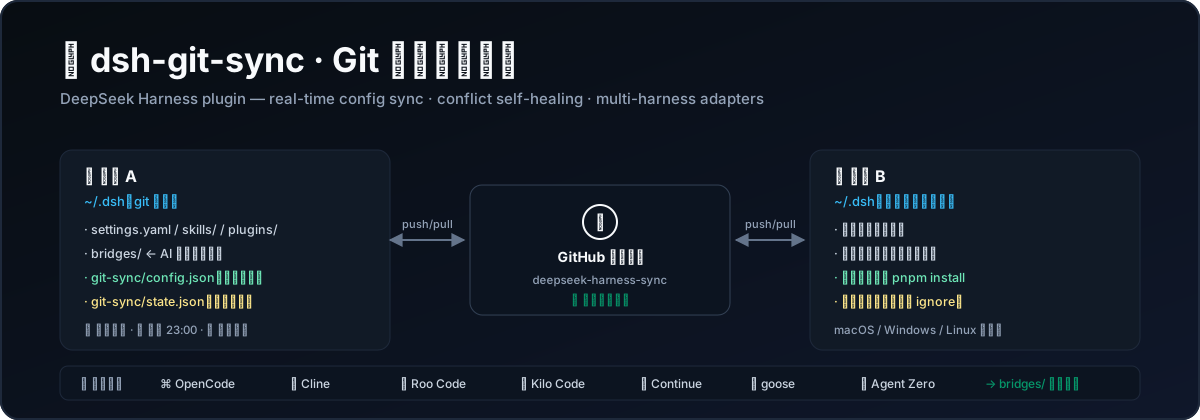
If you juggle Cline, OpenCode, goose, or any combination of AI coding tools across two or more machines, you know the pain: prompt templates updated on one laptop, skills tweaked on another, and every config change is a manual copy-paste adventure that can clobber the latest edits. dsh-git-sync takes a straightforward approach: it turns your ~/.dsh folder into a Git-backed configuration hub, committing and pushing every setting, skill, and plugin to your own private GitHub repository in real time. At the same time, built-in adapters bridge the configs of OpenCode, Cline, Roo Code, Kilo Code, Continue, goose, and Agent Zero into the same repository, so one repo carries every AI tool setup and a second machine only needs a clone to get started.
The plugin also removes the mental overhead of the sync process itself. A real-time watcher auto-commits and pushes after a 30-second settle window; a daily scheduler catches up on missed runs after a laptop resumes from sleep; transient network failures are retried with backoff instead of failing the run. The standout feature is conflict self-healing: if a stuck pull rebase leaves unmerged files that block every subsequent sync, the plugin detects and repairs it before the next pull, clearing orphaned conflict stages while preserving your file contents. On pull, only bridge files that actually changed are written back, so your newer local edits are never clobbered. Sensitive files like .credentials.yaml and .env are auto-guarded in .gitignore on every push.
This is for you if you run two or more AI coding tools, switch between machines, and want every configuration centralized, recoverable, and in sync without writing scripts or maintaining cron jobs. Install it, hit the push button once in the panel, and let the background handle the rest.
Screenshots
Use Cases
- Sync AI coding tool configs across multiple machines in real time
- Centralize DSH, OpenCode, Cline, goose, and other tool settings in one private repo
- Eliminate manual copy-paste errors and config drift across devices
Best For
- Developers running two or more AI coding tools simultaneously
- Engineers who switch between machines and need consistent tool configurations
- Users who want Git-managed AI tool configs without writing custom scripts or cron jobs
Related Plugins

A method pack that makes AI coding agents plan against your real baseline, prove completion with fresh evidence, and reduce reworks and unsafe changes.

Turns the DeepSeek Harness session into a captain that builds a durable sub-agent team, splits goals into dependency-aware tasks, and coordinates work via direct messages and a live Web UI.
Gives coding agents design judgment, letting Claude Code, Cursor, and 70+ agents generate and iterate high-quality UI, presentations, and graphics right from the terminal.
Run the Pi ecosystem's plugins on DeepSeek Harness, unmodified, via a compatibility layer that implements Pi's public extension ABI on DSH's native services.