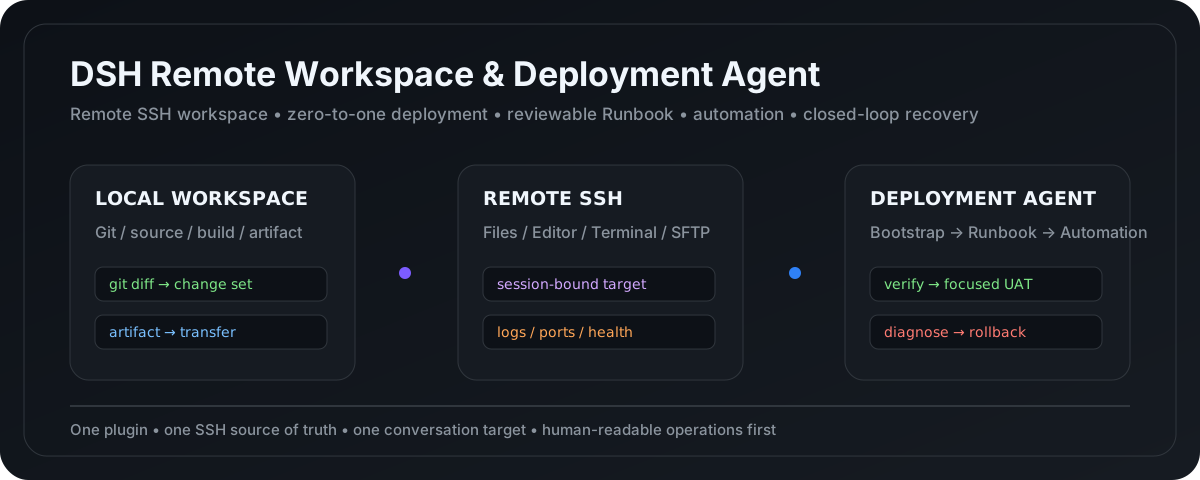
dsh-ssh-files-sidebar
Run the following command in DeepSeek Harness:
dsh plugin install qigelunbiya/dsh-ssh-files-sidebar
Paste the following prompt into your AI chat to install this plugin:
Run dsh plugin install qigelunbiya/dsh-ssh-files-sidebar in your DeepSeek Harness terminal to install; full source is at https://github.com/qigelunbiya/dsh-ssh-files-sidebar
About this plugin
When doing remote development inside DeepSeek Harness, you are often juggling between a file sidebar, a terminal, a local workspace, deployment notes, and release scripts. Taking over an unfamiliar project makes things harder because there is no clear path from reconnaissance to a stable run. dsh-ssh-files-sidebar brings all of these steps into a single Conversation and a single SSH security boundary, so file browsing, code editing, terminal work, and even reading a server screenshot for vision or OCR happen in one workflow instead of copying images back to your local machine.
What truly sets the plugin apart is its deployment-maturity path. For projects with no deployment documentation, the Agent first performs read-only checks on the local tech stack and the remote environment, then executes a step-by-step Bootstrap Plan until the service is genuinely stable, and only then distills the actual successful path into a human-readable DEPLOYMENT.md. After you confirm which stages you want to hand off to a machine, an automation script is generated. Once the Runbook and the script have both been validated in real use, the Agent upgrades from issuing commands to executing releases, running health checks, diagnosing issues from logs, and, with your explicit approval, rolling back. Every step stays inside a strict security boundary: one session binds to one SSH target, and high-risk operations still go through Harness native approval.
It is built for developers who frequently operate Linux servers inside Harness, who write code locally but start services and debug on the remote box, and for small-to-medium engineering teams that want to turn tribal deployment knowledge into documentation, automation, and ultimately an Agent-driven release loop.
Screenshots
Use Cases
- Connect to an SSH server in Harness, browse and edit remote files, and check logs in a terminal—all in one conversation
- Take over an unfamiliar project and let the Agent research the local stack and remote environment, bootstrap a working deployment, and produce a DEPLOYMENT.md
- After the Runbook is validated, generate a one-click script and let the Agent execute releases, run health checks, diagnose from logs, and roll back with approval
Best For
- Engineers who frequently operate Linux servers in DeepSeek Harness for remote development and debugging
- Engineering teams that want to turn tribal deployment knowledge into documentation and automation scripts
- Technical leads aiming to evolve from manual deployments to an Agent-driven release loop
Related Plugins

A method pack that makes AI coding agents plan against your real baseline, prove completion with fresh evidence, and reduce reworks and unsafe changes.

Turns the DeepSeek Harness session into a captain that builds a durable sub-agent team, splits goals into dependency-aware tasks, and coordinates work via direct messages and a live Web UI.
Gives coding agents design judgment, letting Claude Code, Cursor, and 70+ agents generate and iterate high-quality UI, presentations, and graphics right from the terminal.
Run the Pi ecosystem's plugins on DeepSeek Harness, unmodified, via a compatibility layer that implements Pi's public extension ABI on DSH's native services.