dsh-auto-review
Run the following command in DeepSeek Harness:
dsh plugin install jhckevin/dsh-auto-review
Paste the following prompt into your AI chat to install this plugin:
Install the plugin by running dsh plugin install jhckevin/dsh-auto-review in the DeepSeek Harness CLI; source code is available at https://github.com/jhckevin/dsh-auto-review
About this plugin
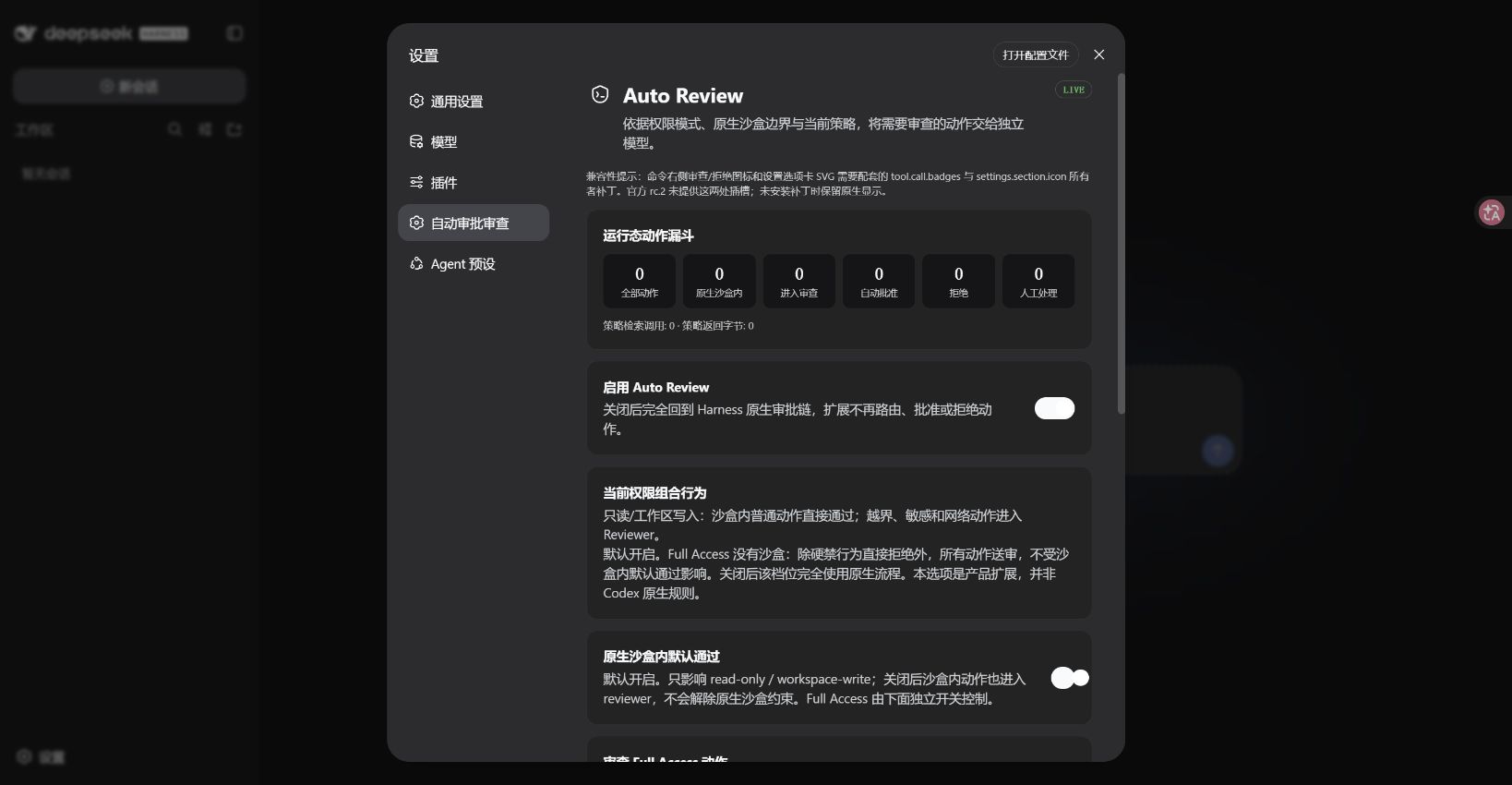
Running multi-step tasks in DeepSeek Harness means a permission prompt pops up every time the agent needs elevated access. The more operations in a chain, the more interruptions, and the workflow rhythm keeps breaking. dsh-auto-review introduces an independent reviewer model (Reviewer) that evaluates operations in the background and decides what is safe, removing the constant need for manual confirmation while fully preserving the sandbox and human-approval safety net.
The mechanism works in layers: ordinary operations inside the native sandbox pass through by default with no interruption; actions that require elevated permissions or involve Full Access are routed to the Reviewer, which judges them against user grants and risk rules. The Reviewer only evaluates—it never executes on behalf of the main agent. When denied, the main agent automatically tries a safer alternative before asking you again. The Reviewer defaults to the Flash model but can be switched to any other model already configured in DSH, and high-risk operations can be assigned a dedicated reviewer model. All toggles, model policies, and action statistics are managed from the DSH settings panel.
Built for developers who run long multi-step tasks in DSH and are tired of repetitive approval prompts; teams that want sandbox safety without manual sign-off on every step; and power users who need differentiated review policies across risk levels. The plugin does not replace the sandbox, and the Reviewer will never auto-approve on error—the native safety mechanism always has the final say.
Screenshots
Use Cases
- Multi-step tasks trigger repeated permission prompts that break workflow rhythm
- Need differentiated approval policies for sandbox vs. high-risk operations
- Want an independent model to auto-review operation safety with less manual involvement
Best For
- Developers running long multi-step tasks in DSH
- Teams wanting sandbox safety without manual sign-off on every step
- Power users needing differentiated review policies across risk levels
Related Plugins

A method pack that makes AI coding agents plan against your real baseline, prove completion with fresh evidence, and reduce reworks and unsafe changes.

Turns the DeepSeek Harness session into a captain that builds a durable sub-agent team, splits goals into dependency-aware tasks, and coordinates work via direct messages and a live Web UI.
Gives coding agents design judgment, letting Claude Code, Cursor, and 70+ agents generate and iterate high-quality UI, presentations, and graphics right from the terminal.
Run the Pi ecosystem's plugins on DeepSeek Harness, unmodified, via a compatibility layer that implements Pi's public extension ABI on DSH's native services.