dsh-nightshift
Run the following command in DeepSeek Harness:
dsh plugin install mikasaxin529/dsh-nightshift
Paste the following prompt into your AI chat to install this plugin:
Run dsh plugin install mikasaxin529/dsh-nightshift to install this plugin; the full source is available at https://github.com/mikasaxin529/dsh-nightshift
About this plugin
DeepSeek s off-peak rates are a small fraction of peak prices, yet most people draft and run their agents during the very hours compute is most expensive. dsh-nightshift inverts that: write your task now, let a durable queue hold it until the price window opens, and wake up to finished work alongside a savings report.
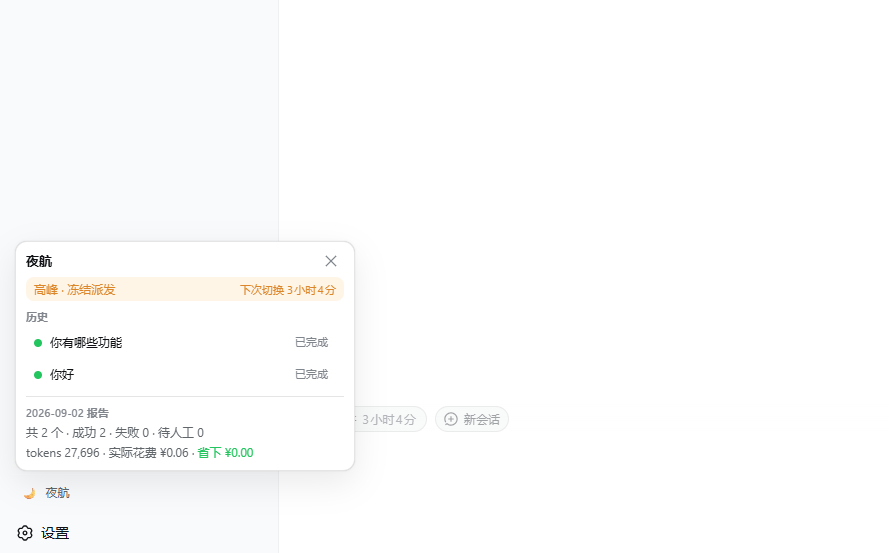
The plugin covers the full lifecycle: dispatch is frozen during peak windows (tasks already running finish naturally without interruption), then queued tasks are released one at a time with a configurable gap during off-peak hours. Failures are classified and handled with exponential backoff retries for errors, auto-sent continuation prompts for max-tokens truncations, and parking for human attention on blocked turns. A savings ledger books every token delta at the window price in effect when it actually occurred, so cross-window and retried tasks are priced faithfully. The queue survives restarts and crashes, re-queueing any orphaned task at-least-once without data loss.
It is built for DeepSeek Harness users on the web profile who run batch or long-running tasks and want to exploit off-peak discounts without babysitting sessions. Configure your peak windows and unit prices once; from then on a single chip next to the composer enqueues any draft, and the next morning the sidebar panel shows completed work, a per-day savings report, and the full history of what patience saved.
Screenshots
Use Cases
- Draft batch tasks during the day and let them auto-dispatch in night off-peak windows
- Cut DeepSeek agent costs by exploiting off-peak pricing
- Run long-running agent tasks unattended during low-cost hours and get a savings report
Best For
- Developers running batch agent tasks on the DeepSeek Harness web profile
- Teams that want to reduce compute spend via off-peak windows
- Users who need unattended long-running tasks with real token-cost visibility
Related Plugins

A method pack that makes AI coding agents plan against your real baseline, prove completion with fresh evidence, and reduce reworks and unsafe changes.

Turns the DeepSeek Harness session into a captain that builds a durable sub-agent team, splits goals into dependency-aware tasks, and coordinates work via direct messages and a live Web UI.
Gives coding agents design judgment, letting Claude Code, Cursor, and 70+ agents generate and iterate high-quality UI, presentations, and graphics right from the terminal.
Run the Pi ecosystem's plugins on DeepSeek Harness, unmodified, via a compatibility layer that implements Pi's public extension ABI on DSH's native services.