dsh-edit-diff
Run the following command in DeepSeek Harness:
dsh plugin install better-er/dsh-edit-diff
Paste the following prompt into your AI chat to install this plugin:
Run dsh plugin install better-er/dsh-edit-diff inside DeepSeek Harness to install the plugin; the source code lives at https://github.com/better-er/dsh-edit-diff and it activates automatically after a DSH web restart.
About this plugin
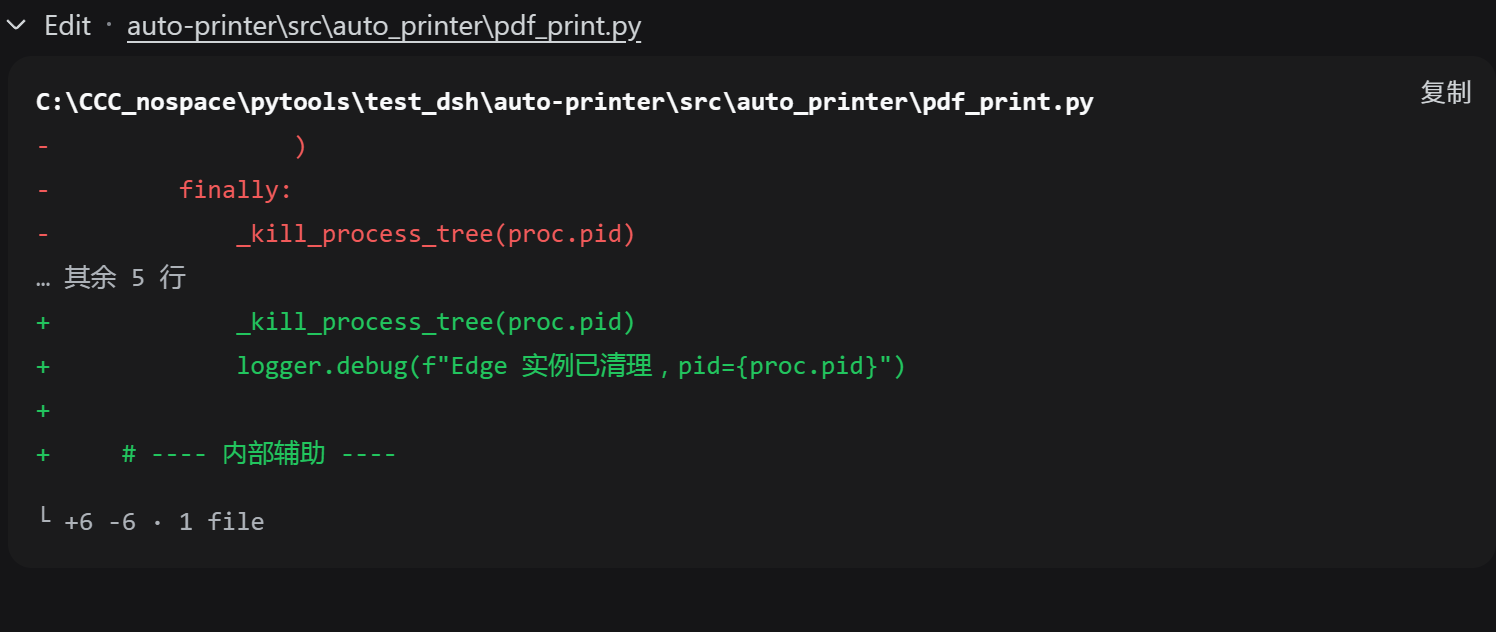
The built-in edit and write cards in the DSH web interface have an annoying flaw: change a single line and the diff drags in three lines of context on each side, rendering every unchanged line once in the red deletion zone and again in the green addition zone. Fourteen lines of red and green mush up the view, and you cannot tell what actually changed without expanding a second-level fold.
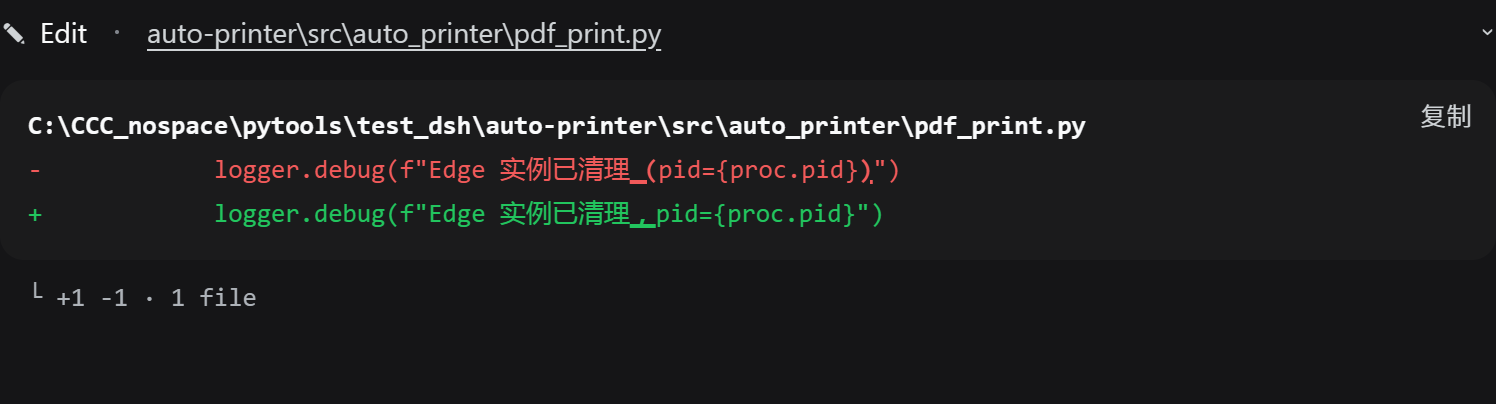
dsh-edit-diff takes over those two tool slots and strips every identical line out of the picture, leaving only the true deletions and additions. For equal-length replacement pairs it runs a second, character-level diff and underlines exactly the characters that moved, instead of painting the whole line. Under the hood the algorithm first trims the common prefix and suffix, then applies Myers only to the small intermediate band, so complexity scales with the size of the change rather than the file, and even multi-megabyte edits stay smooth. Cards collapse to a one-line summary by default; if the diff exceeds fourteen lines it folds into head, ellipsis, and tail. Font size, border radius, and color all reuse the same CSS variables as the native DiffBlock, so it looks like it always shipped with DSH. Edit, write, multi-file, and PTC sub-call scenarios are all covered, with zero npm dependencies and a pure browser-side footprint.
If you lean on edit or write heavily inside the DSH web interface and are tired of spending ten seconds guessing what really changed every time, this plugin is built for that moment. It does not touch DSH source code, pulls in no external libraries, and is gone just as cleanly as it arrived.
Screenshots
Use Cases
- Pinpoint the exact changed lines when edit / write is used hundreds of times a day
- Expand diffs on large multi-hunk files smoothly without layout jank
- Inspect code changes inside PTC run_code sub-calls with the same clean view
Best For
- Developers who rely on the DSH web interface for frequent code edits
- Engineers who patch large files and need instant clarity on what changed
- Users who prefer zero-dependency, browser-only plugins without touching DSH source
Related Plugins

A method pack that makes AI coding agents plan against your real baseline, prove completion with fresh evidence, and reduce reworks and unsafe changes.

Turns the DeepSeek Harness session into a captain that builds a durable sub-agent team, splits goals into dependency-aware tasks, and coordinates work via direct messages and a live Web UI.
Gives coding agents design judgment, letting Claude Code, Cursor, and 70+ agents generate and iterate high-quality UI, presentations, and graphics right from the terminal.
Run the Pi ecosystem's plugins on DeepSeek Harness, unmodified, via a compatibility layer that implements Pi's public extension ABI on DSH's native services.