dsh-rewind
Run the following command in DeepSeek Harness:
dsh plugin install ddll8023/dsh-rewind
Paste the following prompt into your AI chat to install this plugin:
Run dsh plugin install ddll8023/dsh-rewind in the DeepSeek Harness terminal, or simply paste the URL https://github.com/ddll8023/dsh-rewind into DSH to auto-install.
About this plugin
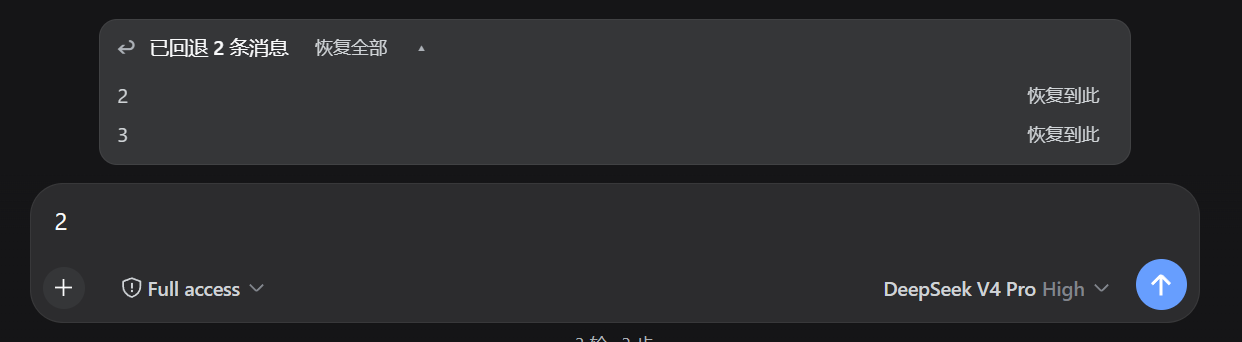
In long DSH conversations, once a prompt steers in the wrong direction the files the agent has already modified feel like a fait accompli, and going back to try a different path usually means piling patches on top of bad decisions. dsh-rewind turns the session into a rewindable timeline: click the rewind icon on any completed turn and the conversation snaps back to that fork point in the background, the retired prompt is back-filled into the input bar for you to edit, and the swap is seamless.
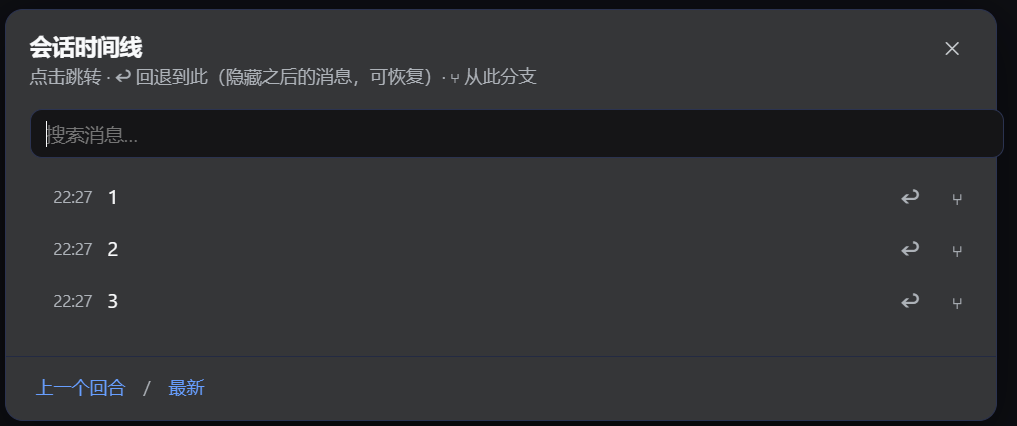
The core loop is rewind, restore, and send. A timeline dialog (Alt+T) lets you search and jump to any historical message. At rewind time you choose between conversation-only rewind or rewind plus modified files; the latter triggers the plugin incremental snapshot engine after your next prompt, diffing the workspace to delete extras and restore missing or changed files while auto-excluding node_modules and .git. Restore is per-message or bulk, and unused fork branches are archived in the background to keep the sidebar clean.
Built for developers who run long DSH sessions and iterate on prompt direction frequently. A misstep no longer requires rebuilding the entire workspace, and a direction change does not sacrifice already-written code. Conversation rewind and file rollback are decoupled and each is optional, making time travel genuinely lightweight.
Screenshots
Use Cases
- Prompt direction drifts mid-session and you want to rewind to a finished turn to try a different strategy
- Agent has modified workspace files and you want to undo those changes while keeping the conversation context
- Iterating on multiple prompt strategies and needing to jump back and forth between conversation branches
Best For
- Developers running long DSH sessions with frequent prompt-direction iteration
- Workflow users who want conversation rewind and file rollback decoupled and selectable per scenario
- Heavy agent users who refuse to rebuild the entire workspace after a single misstep
Related Plugins

A method pack that makes AI coding agents plan against your real baseline, prove completion with fresh evidence, and reduce reworks and unsafe changes.

Turns the DeepSeek Harness session into a captain that builds a durable sub-agent team, splits goals into dependency-aware tasks, and coordinates work via direct messages and a live Web UI.
Gives coding agents design judgment, letting Claude Code, Cursor, and 70+ agents generate and iterate high-quality UI, presentations, and graphics right from the terminal.
Run the Pi ecosystem's plugins on DeepSeek Harness, unmodified, via a compatibility layer that implements Pi's public extension ABI on DSH's native services.