dsh-deepseek-usage-monitor
Run the following command in DeepSeek Harness:
dsh plugin install KamChiHei/dsh-deepseek-usage-monitor
Paste the following prompt into your AI chat to install this plugin:
Run dsh plugin install KamChiHei/dsh-deepseek-usage-monitor in DeepSeek Harness to install this plugin, source at https://github.com/KamChiHei/dsh-deepseek-usage-monitor
About this plugin
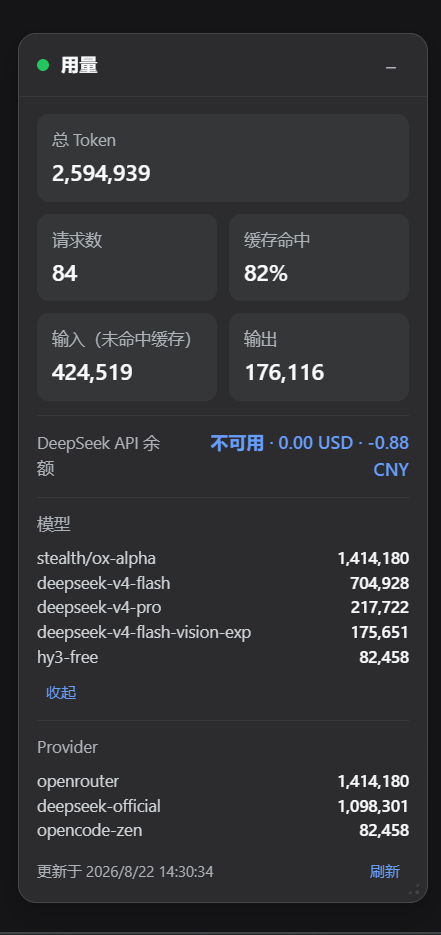
When calling DeepSeek models through DSH, token consumption quietly accumulates in the background, yet there is no quick way to see total usage, cache hit rate, or the current account balance at a glance. dsh-deepseek-usage-monitor fills that visibility gap: the Host side listens to every TokenUsage event, groups statistics by model and provider, and polls the official DeepSeek balance endpoint on a timer so that all figures converge into a single live state endpoint.
At the core, the plugin delivers precise token accounting. Input, output, cache-read, cache-write, and reasoning tokens are each tracked independently and never double-counted; per-step deduplication guarantees a turn is recorded only once, with a chunk-level fallback that catches failed requests. Statistics persist to a local JSON file and keep accumulating across restarts. Balance queries automatically reuse the API key already configured in DSH, need no extra setup, and surface a human-readable reason whenever a refresh fails.
In the bottom-right corner of DSH Web, a draggable and resizable Usage card polls the state endpoint every five seconds, displaying total tokens, request count, cache hit rate, input and output breakdown, the DeepSeek balance, and a token-sorted list of top models and providers. The card supports collapse, position and size persistence, dark and light theme adaptation, and automatic Chinese or English display based on browser locale. It is well suited for teams or individuals who call DeepSeek heavily inside DSH and want continuous, low-friction visibility into usage and balance without leaving the web interface.
Screenshots
Use Cases
- Continuously track token consumption and cache hit rate for DeepSeek models in DSH Web
- Periodically check DeepSeek account balance to prevent request failures from exhausted quota
- Compare usage across models and providers to optimize calling strategies
Best For
- Developers who call DeepSeek models heavily in DSH
- Managers who need ongoing visibility into API usage and cost
- Users who want to check balance and usage without leaving the web interface
Related Plugins

Adds an Auto approval mode on the official workspace-write sandbox, classifying semantic risks, asking when ambiguous, and denying destructive operations.

Undo/rollback system for DSH: config & plugin snapshots, one-click undo/redo/restore, message-level revert, secret masking, safe mode, and offline WebUI/GUI/CLI rescue tools for when DSH won't start.
Packages all 87 SKILL.md files from upstream reverse-skill as a DeepSeek Harness plugin that auto-registers them for authorized reverse engineering, penetration testing, and security research.
Dockyard DSH is a native DeepSeek Harness plugin that unifies official OAuth/client sessions for Codex, Antigravity, Grok, Claude, and Cursor, providing account pool, model catalog, and quota status.