dsh-worktree
Run the following command in DeepSeek Harness:
dsh plugin install alpacachen/dsh-worktree
Paste the following prompt into your AI chat to install this plugin:
Run dsh plugin install alpacachen/dsh-worktree in DeepSeek Harness to install; source is hosted at https://github.com/alpacachen/dsh-worktree .
About this plugin
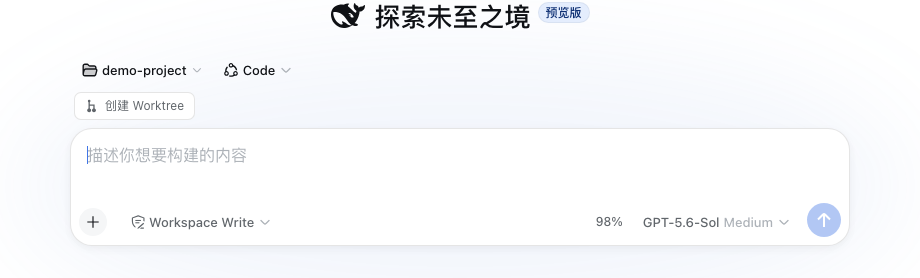
Handling multiple Git tasks in DeepSeek Harness usually means switching branches, creating worktrees by hand, and spinning up separate sessions—a fragmented workflow that is easy to get wrong. dsh-worktree collapses that chain into a single action: enter a task name from the New Session panel or any Git Workspace menu, and the plugin automatically creates a task/ branch, builds the corresponding worktree, registers it as its own DSH Workspace, and opens an isolated session. Each task gets its own working directory and context, keeping parallel workstreams cleanly separated. Removing a worktree Workspace never touches the underlying Git branch, and no extra services or project-level configuration are required.
You can base a new worktree on either the current branch or the repository main branch. The plugin respects DSH theming and ships with both Chinese and English interfaces out of the box.
If your daily rhythm in DeepSeek Harness involves running several development, fix, or maintenance tasks in parallel, dsh-worktree removes the repetitive manual work of worktree management and lets you focus on the code itself.
Screenshots
Use Cases
- Fixing multiple bugs in parallel with independent working directories so branches never conflict
- Spinning up an isolated environment from the main branch with one click instead of manual git worktree commands
- Assigning a dedicated workspace per task so conversation contexts stay fully separated
Best For
- Engineers who run multiple development tasks in parallel inside DeepSeek Harness
- Full-stack developers who juggle several Git branches and worktrees every day
- DSH users who want a leaner workflow with fewer manual commands typed
Related Plugins

A method pack that makes AI coding agents plan against your real baseline, prove completion with fresh evidence, and reduce reworks and unsafe changes.

Turns the DeepSeek Harness session into a captain that builds a durable sub-agent team, splits goals into dependency-aware tasks, and coordinates work via direct messages and a live Web UI.
Gives coding agents design judgment, letting Claude Code, Cursor, and 70+ agents generate and iterate high-quality UI, presentations, and graphics right from the terminal.
Run the Pi ecosystem's plugins on DeepSeek Harness, unmodified, via a compatibility layer that implements Pi's public extension ABI on DSH's native services.