dsh-mcp-skill-control
Run the following command in DeepSeek Harness:
dsh plugin install shuaihaoV/dsh-mcp-skill-control
Paste the following prompt into your AI chat to install this plugin:
Run dsh plugin install shuaihaoV/dsh-mcp-skill-control in DeepSeek Harness to complete installation; the full source code is available at https://github.com/shuaihaoV/dsh-mcp-skill-control.
About this plugin
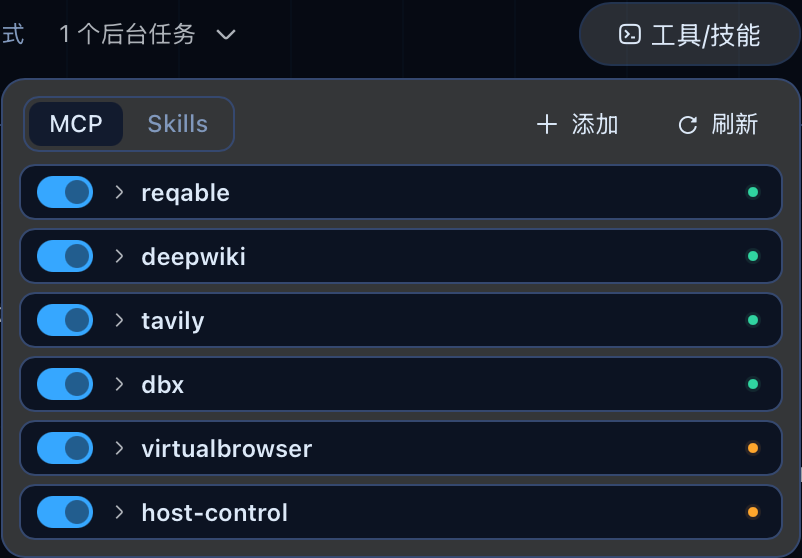
Managing MCP servers in DeepSeek Harness usually means hand-editing YAML: adding a server, toggling a connection, or tracking down why a row has zero registered tools all happen outside the UI, slowing iteration down and inviting syntax errors. dsh-mcp-skill-control brings that control panel into the dsh web session header. The MCP Servers tab lists every server with its transport, endpoint, live connection status, and tool inventory, then lets you disable, enable, restart, add, or remove entries with simple buttons. A JSON import flow accepts configs from Claude Desktop, Cursor, or OpenCode, automatically slugifying names, rejecting unsupported SSE endpoints, and skipping entries marked disabled in the source document.
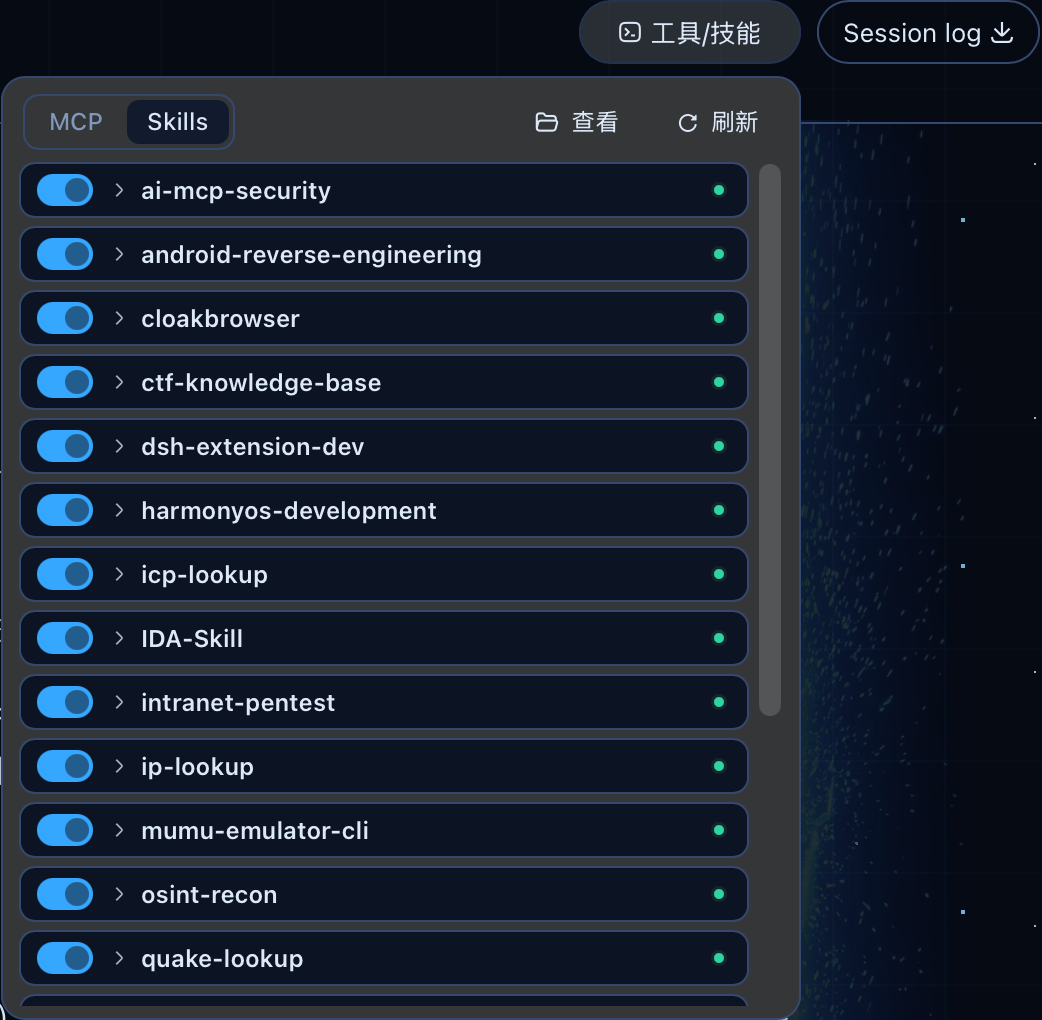
The Skills tab aggregates local skills from ~/.dsh/skills and ~/.agents/skills into a single view. Toggling a skill on or off edits only the disable-model-invocation field in frontmatter while preserving every byte of the Markdown body. For streamable-http servers that appear active yet register zero tools, the plugin fires a one-shot MCP initialize probe (rate-limited to 30 s) and surfaces a human-readable diagnostic instead of leaving the row stuck in a perpetual connecting state.
The plugin ships as a single package with both a Host half and a Browser half, requiring zero changes to DSH source code. All configuration writes go through a YAML Document AST editor so user comments, key order, and inline arrays survive untouched; changes are applied in-process via HMR transactions and persist across restarts. It is ideal for DSH users juggling multiple MCP servers, frequently swapping skill combinations, or migrating a Claude Desktop / Cursor setup into the DSH workflow.
Screenshots
Use Cases
- Monitor and control multiple MCP server connections, toggles, and restarts from a single Web panel
- Import MCP server definitions with one click from Claude Desktop or Cursor JSON configs
- Enable or disable local skills in one click without hand-editing frontmatter fields
Best For
- DSH users juggling multiple MCP servers and frequently adjusting tool compositions
- Developers migrating Agent workflows from Claude Desktop or Cursor
- Workflow users who need to toggle skill sets quickly while keeping configuration persistent
Related Plugins

A method pack that makes AI coding agents plan against your real baseline, prove completion with fresh evidence, and reduce reworks and unsafe changes.

Turns the DeepSeek Harness session into a captain that builds a durable sub-agent team, splits goals into dependency-aware tasks, and coordinates work via direct messages and a live Web UI.
Gives coding agents design judgment, letting Claude Code, Cursor, and 70+ agents generate and iterate high-quality UI, presentations, and graphics right from the terminal.
Run the Pi ecosystem's plugins on DeepSeek Harness, unmodified, via a compatibility layer that implements Pi's public extension ABI on DSH's native services.