dsh-exit
Run the following command in DeepSeek Harness:
dsh plugin install KeS1Ke/dsh-exit
Paste the following prompt into your AI chat to install this plugin:
Run dsh plugin install KeS1Ke/dsh-exit in DeepSeek Harness to install this plugin; the source code is available at https://github.com/KeS1Ke/dsh-exit .
About this plugin

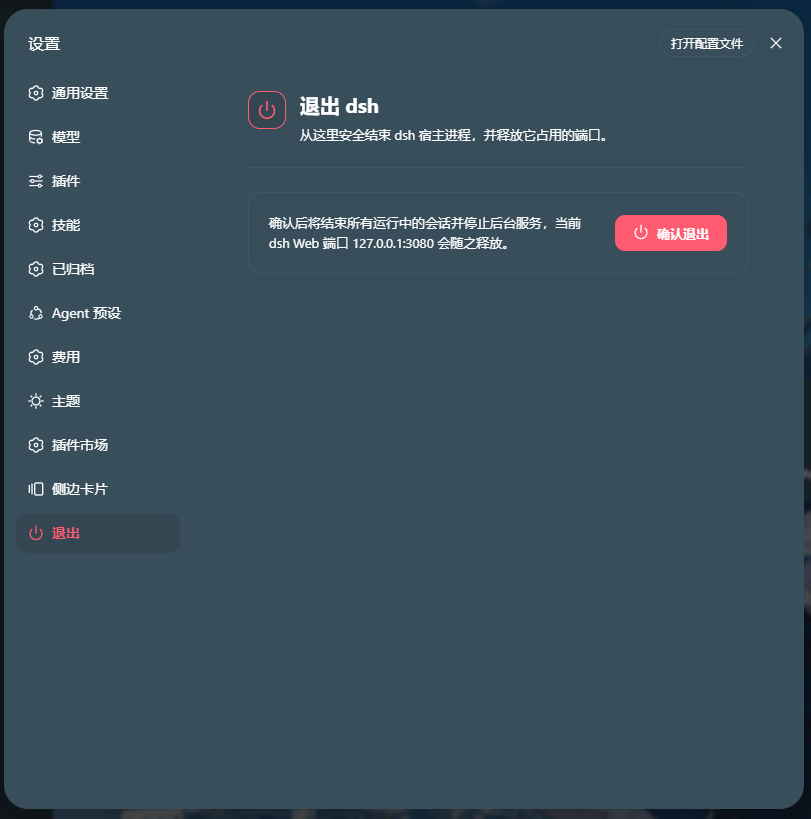
Managing the dsh Web process has traditionally meant switching to a terminal for every start, exit, or restart. dsh-exit brings all three actions into the bottom of the settings panel, giving you a single, safe place to control the process lifecycle.
The plugin centers on a Start / Exit / Restart control group backed by a confirmation modal. Before any destructive action, a clear dialog appears; only after you confirm does the client invoke the host-side Remote method, which gives the gateway a short acknowledgement window before shutting down and releasing every port the process held. On Windows, an optional foreground launcher starts dsh in a visible PowerShell terminal, minimizes it once the local WebUI responds, and keeps it restorable from the taskbar. If the chosen port shows a non-loopback listener, the launcher refuses to start, so the service stays bound to 127.0.0.1 at all times.
This plugin is a lightweight fit for developers who use the dsh Web interface day to day and want a more deliberate, visible way to start, stop, or restart the service, especially on Windows where a recoverable terminal window and loopback-only binding matter most.
Screenshots
Use Cases
- Start, exit, or restart the dsh Web service from the settings panel
- Launch dsh in a foreground terminal on Windows that minimizes once the WebUI responds
- Restart the service while keeping the terminal window available for debugging
Best For
- Developers who use the dsh Web interface daily
- Ops engineers running dsh on Windows who need a restorable terminal
- Users who prefer managing the process from the UI instead of toggling terminals
Related Plugins

Adds an Auto approval mode on the official workspace-write sandbox, classifying semantic risks, asking when ambiguous, and denying destructive operations.

Undo/rollback system for DSH: config & plugin snapshots, one-click undo/redo/restore, message-level revert, secret masking, safe mode, and offline WebUI/GUI/CLI rescue tools for when DSH won't start.
Packages all 87 SKILL.md files from upstream reverse-skill as a DeepSeek Harness plugin that auto-registers them for authorized reverse engineering, penetration testing, and security research.
Dockyard DSH is a native DeepSeek Harness plugin that unifies official OAuth/client sessions for Codex, Antigravity, Grok, Claude, and Cursor, providing account pool, model catalog, and quota status.