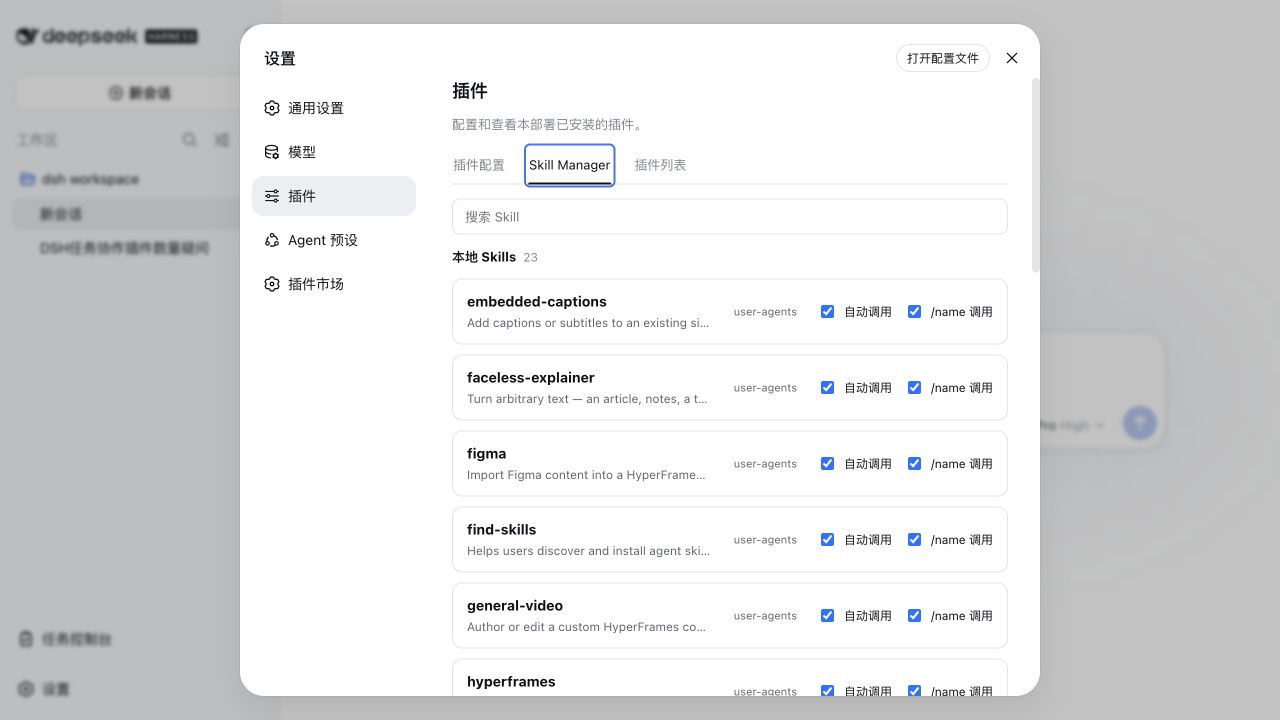
dsh-skill-manager
Run the following command in DeepSeek Harness:
dsh plugin install SLin-code/dsh-skill-manager
Paste the following prompt into your AI chat to install this plugin:
Run dsh plugin install SLin-code/dsh-skill-manager in your DeepSeek Harness terminal to install this plugin; the source code is available at https://github.com/SLin-code/dsh-skill-manager .
About this plugin
When a project accumulates dozens of locally discovered Skills in DeepSeek Harness Web, there is often no lightweight way to see which ones are active and how they are invoked. dsh-skill-manager fills that gap: it does not install, delete, create, or sync Skills. Its single focus is giving you a clear, security-first view of every winning Skill in the current session and project, with one-click toggles for Automatic and manual /name invocation right in each row.
Search by name, description, source, provider, or file path; expand a row to lazy-load the instruction body so nothing is fetched until you need it. Bundled, symbolic-link, runtime, and non-file Skills are automatically locked as read-only to prevent accidental edits. On the security side, the browser sends only the session ID, the exact Skill name, and two booleans—never a filesystem path. The Host resolves everything through official ctx.sessions and ctx.skills services, restricts mutation routes to loopback same-origin requests, revalidates YAML frontmatter before each write, acquires a cross-process lock, and performs an atomic same-directory replacement while preserving existing body text and comments.
This plugin is a good fit for teams or individuals working in a local DSH Web environment who need fine-grained control over how existing Skills are invoked, especially when the Skill count is large, sources are mixed, and you want to avoid pulling in a full installer or marketplace mechanism.
Screenshots
Use Cases
- Toggle Automatic or manual /name invocation for each Skill in the current session
- Search and audit the source, provider, and file path of locally discovered Skills
- Centralize invocation-policy control without pulling in installers or marketplaces
Best For
- Individual developers with a growing number of local Skills in DSH Web
- Small teams that need fine-grained control over Skill invocation behavior
- DSH users who want lightweight management without heavy install or sync tooling
Related Plugins

Adds an Auto approval mode on the official workspace-write sandbox, classifying semantic risks, asking when ambiguous, and denying destructive operations.

Undo/rollback system for DSH: config & plugin snapshots, one-click undo/redo/restore, message-level revert, secret masking, safe mode, and offline WebUI/GUI/CLI rescue tools for when DSH won't start.
Packages all 87 SKILL.md files from upstream reverse-skill as a DeepSeek Harness plugin that auto-registers them for authorized reverse engineering, penetration testing, and security research.
Dockyard DSH is a native DeepSeek Harness plugin that unifies official OAuth/client sessions for Codex, Antigravity, Grok, Claude, and Cursor, providing account pool, model catalog, and quota status.