dsh-plugins-plan-usage
Run the following command in DeepSeek Harness:
dsh plugin install chendefine/dsh-plugins-plan-usage
Paste the following prompt into your AI chat to install this plugin:
Run dsh plugin install chendefine/dsh-plugins-plan-usage in the DeepSeek Harness terminal to install this plugin from https://github.com/chendefine/dsh-plugins-plan-usage
About this plugin
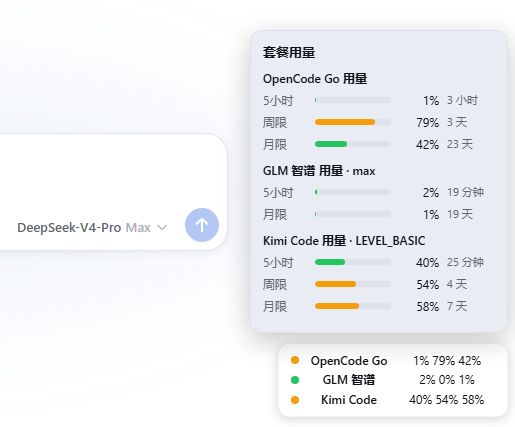
Running several coding plans side by side usually means bouncing between vendor dashboards just to check where each quota stands. dsh-plugins-plan-usage brings that visibility straight into the DeepSeek Harness web chat: a multi-line capsule badge in the bottom-right corner shows, for every active plan, the percentage consumed in the 5-hour rolling window, the weekly limit, and the monthly cap, auto-refreshing every 60 seconds with no extra tabs or doc lookups. Four plan integrations ship out of the box—OpenCode Go, GLM Z.AI (international), GLM Zhipu (domestic), and Kimi Code—each with independent on/off toggles, its own four-level credential fallback chain, and write-only key handling so no secret is ever echoed back to the browser.
The plugin is pure JavaScript with zero build step. The host side drives routes and data fetching through a plans/ registry, and the browser side drives rendering through static data tables, so neither half contains per-plan if-branches. Adding a new plan means dropping one module file into plans/ and registering it; configuration schema, settings card, badge polling, and rendering all light up automatically. The settings card matches the look and feel of Harness built-in cards and requires no modifications to Harness source code or workspace build allowlists.
Ideal for developers who subscribe to multiple coding plans and switch models frequently inside Harness—especially when a rolling window is nearing saturation and could trigger rate limits, or when shared device consumption makes monthly quota hard to predict at a glance.
Screenshots
Use Cases
- Glance at real-time quota percentages for all subscribed plans in the Harness web chat
- Check if the current plan is near a rate-limit threshold before switching models
- Manage rolling windows, weekly limits, and monthly caps across multiple coding plans in one pane
Best For
- Developers subscribing to multiple coding plans who switch models frequently inside Harness
- AI-coding users who need to monitor rolling windows and monthly caps to avoid rate limits
- Individuals or teams who want to track all plan quotas without leaving their web environment
Related Plugins

Adds an Auto approval mode on the official workspace-write sandbox, classifying semantic risks, asking when ambiguous, and denying destructive operations.

Undo/rollback system for DSH: config & plugin snapshots, one-click undo/redo/restore, message-level revert, secret masking, safe mode, and offline WebUI/GUI/CLI rescue tools for when DSH won't start.
Packages all 87 SKILL.md files from upstream reverse-skill as a DeepSeek Harness plugin that auto-registers them for authorized reverse engineering, penetration testing, and security research.
Dockyard DSH is a native DeepSeek Harness plugin that unifies official OAuth/client sessions for Codex, Antigravity, Grok, Claude, and Cursor, providing account pool, model catalog, and quota status.