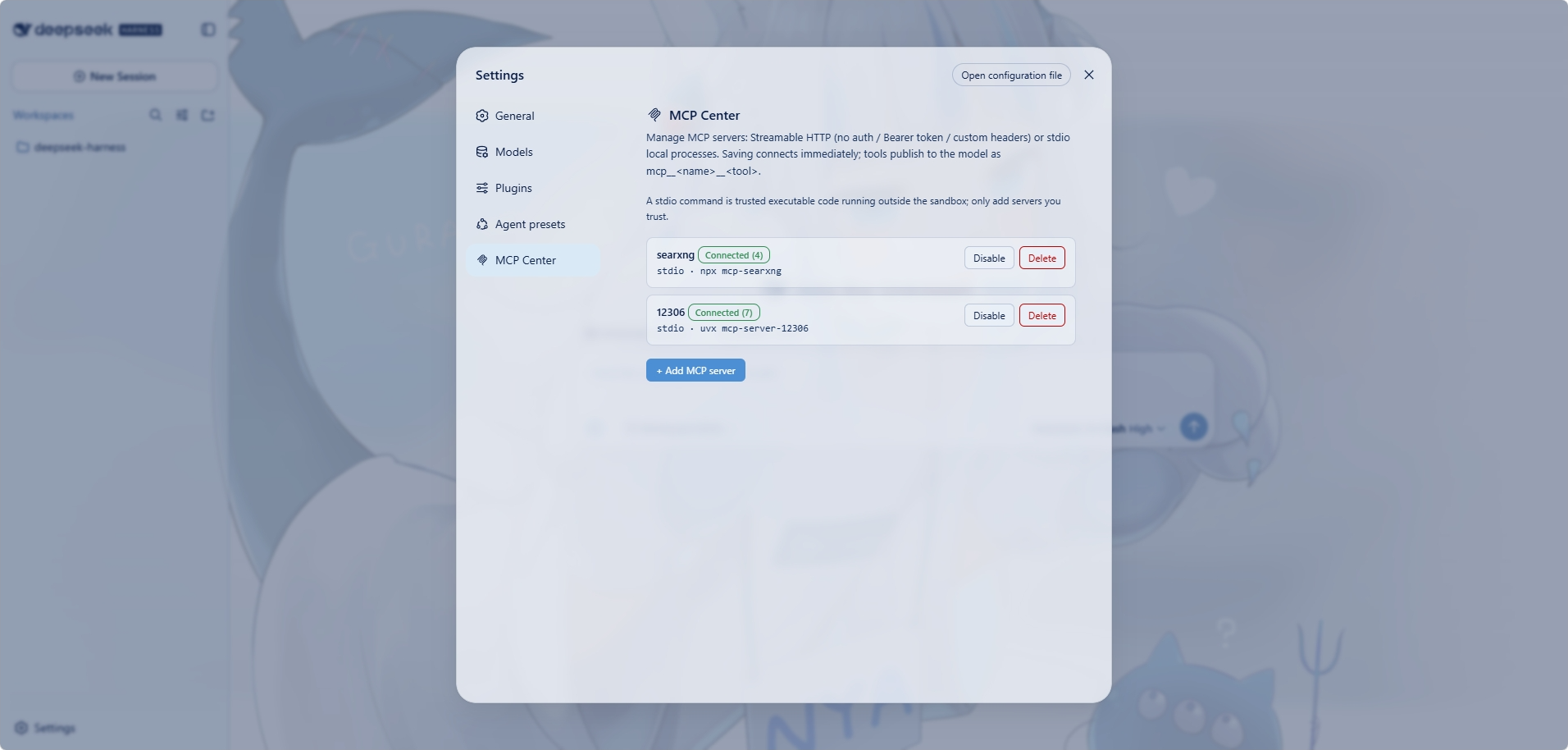
dsh-mcp-center
Run the following command in DeepSeek Harness:
dsh plugin install drfccv/dsh-mcp-center
Paste the following prompt into your AI chat to install this plugin:
Run dsh plugin install drfccv/dsh-mcp-center in your DeepSeek Harness terminal; the full source is at https://github.com/drfccv/dsh-mcp-center. After installing, restart dsh web and manage your MCP servers under Settings → MCP Center.
About this plugin
Hooking up an MCP server to extend the capabilities of a model often means hand-writing config files, managing the JSON-RPC transport layer, and babysitting process lifecycles. Dsh MCP Center collapses all of that into a single settings page: fill in a name, a URL or command, pick an auth mode, hit Save, and the server is live—its tools instantly available as first-class, model-callable tools in every session.
It supports both Streamable HTTP (remote endpoints with optional Bearer Token or custom-header authentication) and stdio (local processes such as npx, uvx, python). The entire client transport is implemented inside the plugin itself with no external MCP SDK, so nothing drags a peer-dependency chain into your profile. Each server has its own on/off toggle; turning one off unregisters its tools and drops the connection while keeping the saved config.
It is built for people already running DeepSeek Harness with the web profile who want to wire external tools—file systems, search, custom APIs—into model workflows without writing code or maintaining config files. Keep in mind the current release bridges tools only (resources and prompts are not yet supported), and Bearer tokens are stored in plain text under ~/.dsh, so treat that file as a secret.
Screenshots
Use Cases
- Register a local npx tool as a model-callable MCP tool inside DeepSeek Harness
- Connect to a remote Streamable HTTP MCP endpoint with Bearer Token auth
- Toggle multiple MCP servers on and off without losing saved configurations
Best For
- Builders running DeepSeek Harness web profile who assemble LLM workflows
- Developers who prefer a settings UI over config files to manage external tools
- Engineers bridging stdio or HTTP MCP services into LLM sessions
Related Plugins

A method pack that makes AI coding agents plan against your real baseline, prove completion with fresh evidence, and reduce reworks and unsafe changes.

Turns the DeepSeek Harness session into a captain that builds a durable sub-agent team, splits goals into dependency-aware tasks, and coordinates work via direct messages and a live Web UI.
Gives coding agents design judgment, letting Claude Code, Cursor, and 70+ agents generate and iterate high-quality UI, presentations, and graphics right from the terminal.
Run the Pi ecosystem's plugins on DeepSeek Harness, unmodified, via a compatibility layer that implements Pi's public extension ABI on DSH's native services.