dsh-assistant-message-forge
Run the following command in DeepSeek Harness:
dsh plugin install anweat/dsh-assistant-message-forge
Paste the following prompt into your AI chat to install this plugin:
Install by running dsh plugin install anweat/dsh-assistant-message-forge in DeepSeek Harness; source code is available at https://github.com/anweat/dsh-assistant-message-forge
About this plugin
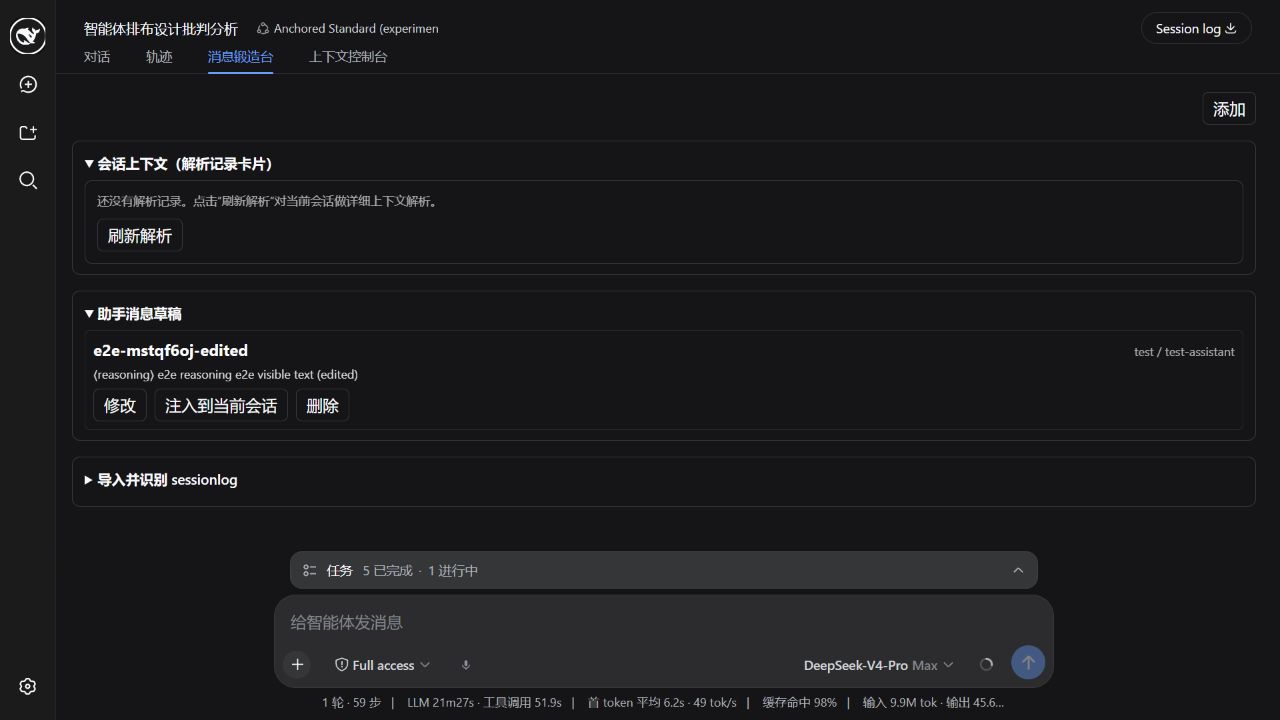
Once a DSH session is running, the user messages, assistant reasoning chains, tool calls and results, and request headers are all buried in raw logs. There is no convenient place to inspect a specific step, tweak a tool argument, or inject a draft into the live conversation. dsh-assistant-message-forge adds a Message Forge tab to the session area and turns that workflow into a single, end-to-end pipeline.
The core flow works in four stages. First, context/refresh parses the entire session into ContextCards covering turn and step boundaries, user and assistant messages, tool calls and results, request headers, and remaining log-only events. Second, the parsed output together with any card overrides is persisted to a local JSON file, so re-parsing never discards prior edits. Third, the tab renders cards grouped by turn, each annotated with its surface folding state. Fourth, every card is dynamically editable—text, reasoning, provider, model, usage, tool names, arguments, and tool-result text—and changes can be saved as a record or applied to the live session via a surface replace operation that rewrites the original message in-place so the model context updates immediately. The plugin also retains draft creation, editing, deletion, and one-click injection, plus zstd/JSONL sessionlog import with event recognition and a repair preview that can spawn a fixed session from a corrupted log.
Under the hood the plugin uses a dual Host + Client architecture. The Host half exposes RPC endpoints for drafts, context, records, and sessionlog operations over a loopback-trusted Connection channel, while the Client half registers a conversation.view tab scoped to the session and receives the sessionId as a standard prop. No apiproxy allowlist changes are required. The design follows a record-first, surface-replace application model: original append events are always preserved in the log, making every modification auditable and reversible. It is aimed at developers and operators who need fine-grained control over DSH session context, want to batch-manage assistant drafts, or must recover data from a corrupted sessionlog.
Screenshots
Use Cases
- Tuning tool-call arguments at a specific step in a live DSH session
- Injecting a pre-written draft into a running conversation with one click
- Previewing a corrupted sessionlog and spawning a repaired session
Best For
- Developers needing fine-grained control over DSH session context
- Ops engineers managing assistant draft workflows at scale
- Technicians recovering data from corrupted or truncated sessionlogs
Related Plugins

Adds an Auto approval mode on the official workspace-write sandbox, classifying semantic risks, asking when ambiguous, and denying destructive operations.

Undo/rollback system for DSH: config & plugin snapshots, one-click undo/redo/restore, message-level revert, secret masking, safe mode, and offline WebUI/GUI/CLI rescue tools for when DSH won't start.
Packages all 87 SKILL.md files from upstream reverse-skill as a DeepSeek Harness plugin that auto-registers them for authorized reverse engineering, penetration testing, and security research.
Dockyard DSH is a native DeepSeek Harness plugin that unifies official OAuth/client sessions for Codex, Antigravity, Grok, Claude, and Cursor, providing account pool, model catalog, and quota status.