dsh-update-copilot
Run the following command in DeepSeek Harness:
dsh plugin install hezhongtang/dsh-update-copilot
Paste the following prompt into your AI chat to install this plugin:
Run dsh plugin install hezhongtang/dsh-update-copilot in your DeepSeek Harness terminal to install this plugin; the source repository is https://github.com/hezhongtang/dsh-update-copilot . After installation, restart dsh web and open Settings → Update Copilot.
About this plugin
DSH ships fast and its plugin ecosystem grows with it, yet every profile pulls plugins through a mix of npm versions, GitHub commit pins, and local link: checkouts that all drift out of date on their own schedules. Walking each repo by hand is tedious; blindly auto-updating everything risks loading unvetted third-party code into your environment. Most people simply stop tracking updates.
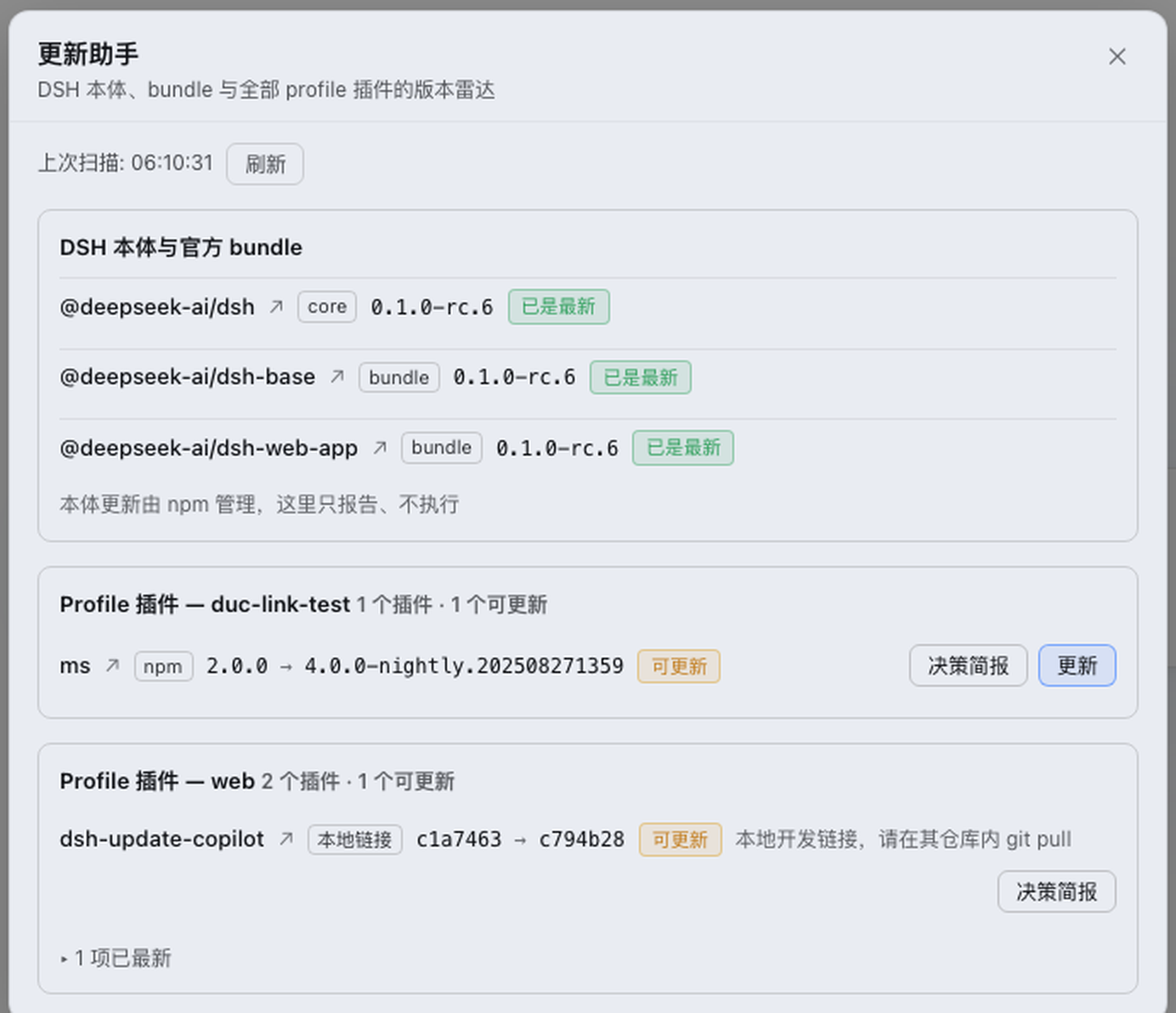
dsh-update-copilot takes the middle path. A radar scan covers the DSH core, the official shipped bundles (dsh-base, dsh-web-app), and every plugin dependency across all profiles, merged package-centrically so the same package appears once with each profile's version listed inline. Each entry carries semver distance, a risk level (major / minor / patch), changelog material, and clickable links to npm version pages, GitHub compare views, or release notes. Updates target only the explicitly eligible profiles for that package; the DSH core stays strictly report-only because upgrading it restarts every session. The Web surface offers a sidebar badge with a one-click radar popup, an "Update all" sequential pass, live SSE progress bars per row, a single-flight mutation lock, hot-reload for in-profile plugins, and optional 30-minute background refresh. Agent tools (scan, brief, update) let a model answer "any updates?" with data-backed risk summaries before you confirm.
It suits DSH users who run multiple profiles, mix npm packages with git and local checkouts, and have enough plugins that remembering each source and version is no longer practical—or anyone who wants to ask their agent a quick question instead of crawling repos after every DSH release.
Screenshots
Use Cases
- Radar-scan npm, git-pinned, and local link: plugin updates across all profiles in one pass
- Ask your agent to scan, summarize semver distance and risk, then confirm before any update
- Run a sequential batch update of every outdated eligible plugin with live SSE progress and a single-flight lock
Best For
- DSH users running many third-party plugins across multiple profiles
- Teams juggling a mix of npm, git-pinned, and local checkouts that need frequent upstream tracking
- Developers who prefer agent-driven update workflows over manually crawling repo changelogs
Related Plugins

A method pack that makes AI coding agents plan against your real baseline, prove completion with fresh evidence, and reduce reworks and unsafe changes.

Turns the DeepSeek Harness session into a captain that builds a durable sub-agent team, splits goals into dependency-aware tasks, and coordinates work via direct messages and a live Web UI.
Gives coding agents design judgment, letting Claude Code, Cursor, and 70+ agents generate and iterate high-quality UI, presentations, and graphics right from the terminal.
Run the Pi ecosystem's plugins on DeepSeek Harness, unmodified, via a compatibility layer that implements Pi's public extension ABI on DSH's native services.