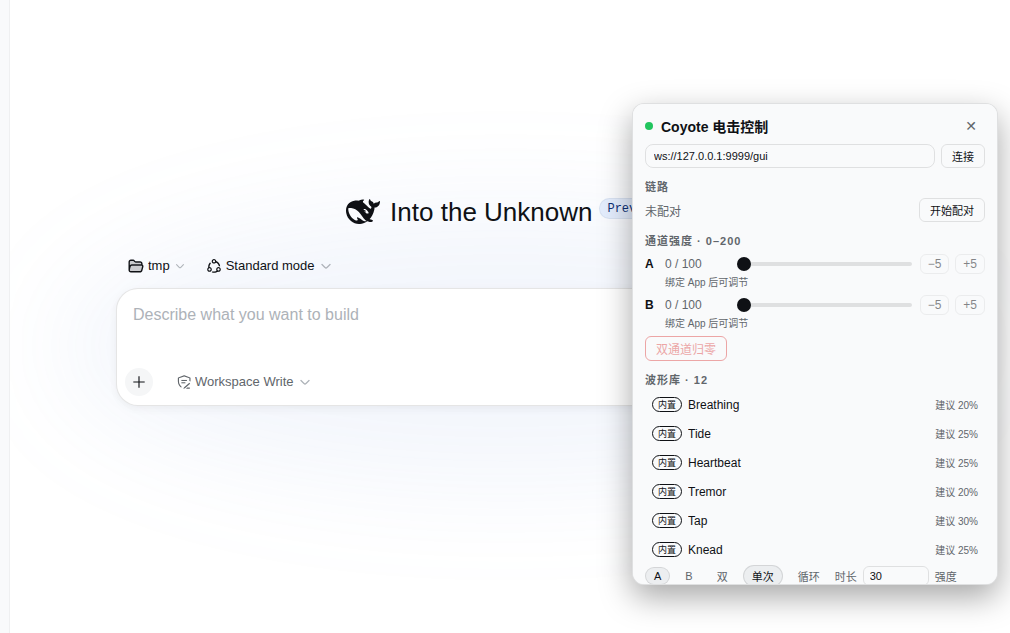
dsh-coyote
Run the following command in DeepSeek Harness:
dsh plugin install THEWOLFWALKER/dsh-coyote
Paste the following prompt into your AI chat to install this plugin:
Run dsh plugin install THEWOLFWALKER/dsh-coyote in your DeepSeek Harness terminal to install this plugin; full source is available at https://github.com/THEWOLFWALKER/dsh-coyote
About this plugin
You own a DG-LAB Coyote e-stim device and want both an AI Agent and a browser panel to drive it safely, sharing the same hard bounds. dsh-coyote runs as the DSH-side WebSocket server implementing the official DG-LAB V3 protocol: once the phone App scans the pairing QR, eight coyote_* agent tools and the DSH sidebar panel share a single CoyoteRuntime where soft limits, the asymmetric increase rate limiter, session cooldown, playback caps, and the disconnect fail-safe are all enforced at the protocol layer, with no path for either face to bypass the bounds.
The tool surface covers the full control loop: QR pairing, absolute or relative strength on channels A and B, twelve built-in waveform presets plus community .pulses or raw-hex imports, playback by name / declarative spec / hex entries, and a panic_stop that zeroes everything and is safe to call repeatedly. Since v0.2 an opt-in Auto-stim layer subscribes to the DSH session event firehose and agent runtime events, reducing them to eleven domain triggers; each enabled rule fires one bounded pulse gated by armed state, single-flight lock, cooldown, and an independent maxIntensity cap. Everything is off by default with zero side effects until you flip the switch.
Aimed at adult DSH users who already own a Coyote device and want agent-native control inside their workflow, as well as developers curious about mapping agent lifecycle events to physical tactile feedback. Hardware safety remains the device owner responsibility; this plugin is a control layer, not a safety certification.
Screenshots
Use Cases
- Let the agent fire bounded pulses reactively on tool calls, errors, or turn boundaries during a DSH session
- Manually pair, adjust strength, play waveform presets, or import community files from the DSH sidebar panel
- Design event-to-tactile-feedback mapping rules for agent workflows, gated by armed state, single-flight, cooldown, and intensity caps
Best For
- Adult users who own a DG-LAB Coyote device and want DSH agent-native control
- Developers who want agent tools and a browser panel to share one runtime safety boundary
- DSH workflow builders exploring mapping agent lifecycle events to physical tactile feedback
Related Plugins

A method pack that makes AI coding agents plan against your real baseline, prove completion with fresh evidence, and reduce reworks and unsafe changes.

Turns the DeepSeek Harness session into a captain that builds a durable sub-agent team, splits goals into dependency-aware tasks, and coordinates work via direct messages and a live Web UI.
Gives coding agents design judgment, letting Claude Code, Cursor, and 70+ agents generate and iterate high-quality UI, presentations, and graphics right from the terminal.
Run the Pi ecosystem's plugins on DeepSeek Harness, unmodified, via a compatibility layer that implements Pi's public extension ABI on DSH's native services.