dsh-task-kanban
Run the following command in DeepSeek Harness:
dsh plugin install fonlan/dsh-task-kanban
Paste the following prompt into your AI chat to install this plugin:
Run dsh plugin install fonlan/dsh-task-kanban in DeepSeek Harness to install this plugin; full source code: https://github.com/fonlan/dsh-task-kanban
About this plugin
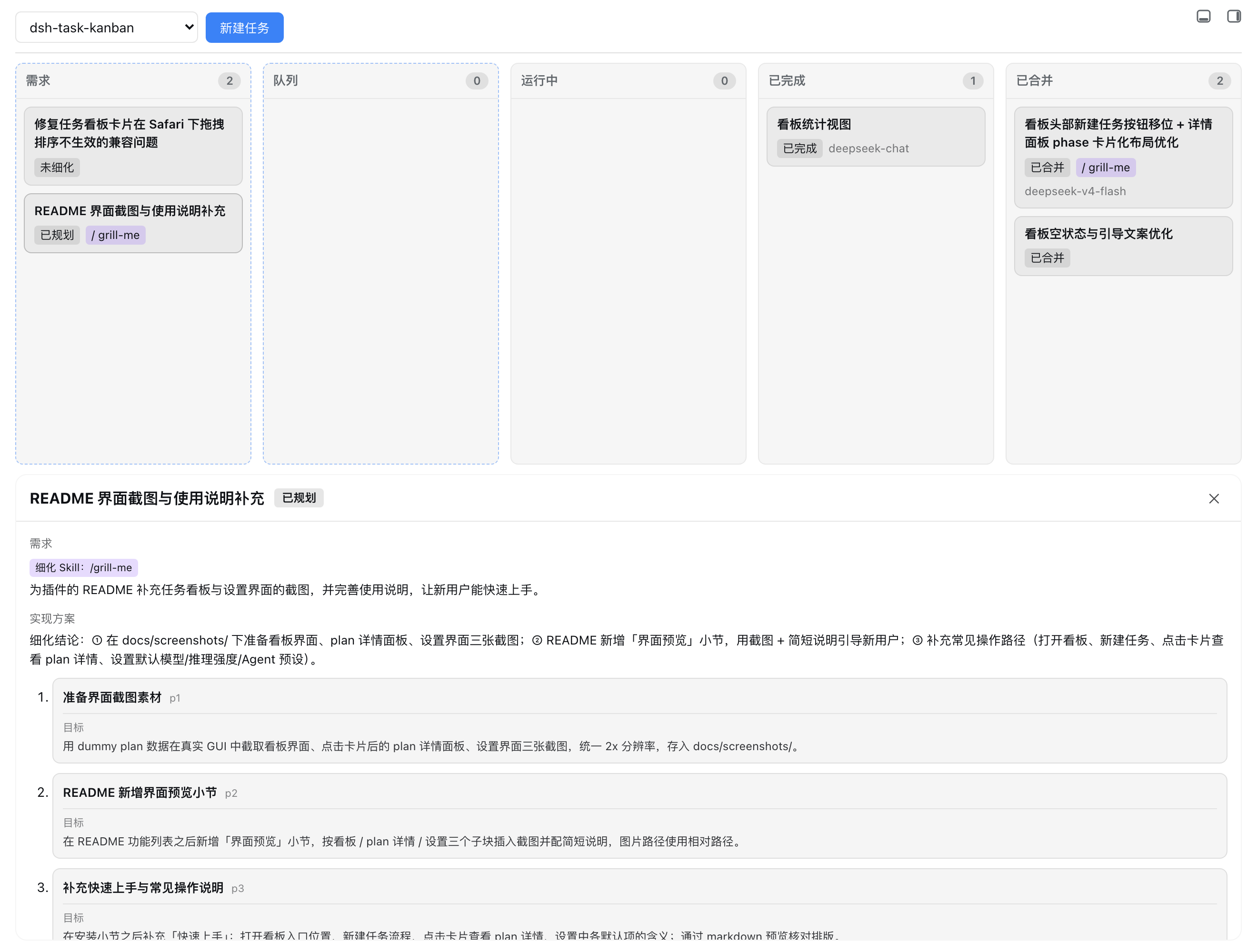
When you drive an AI agent through DSH Web, a single requirement typically passes through several conversational stages (clarification, multi-phase implementation, and merge) yet the web UI offers no single panel to track all of them end to end. dsh-task-kanban closes that gap by bringing the full requirement-to-plan-to-implementation-to-merge pipeline into a sidebar view, with five swimlanes (Backlog, Queue, Running, Done, Merged) that let you see at a glance exactly where every card sits.
Create a task and the plugin immediately launches a refinement session. You can prefix your input with a slash to pick a Skill (e.g. /grill-me); the agent will probe, question, and shape the requirement following that Skill's instructions until it is concrete enough to be written back as a phased plan. Once a plan enters the queue, each phase runs in its own session inside a dedicated git worktree, strictly serial within one workspace. When every phase is done, the plugin merges the branch into main or master and cleans up the worktree automatically. Each card displays the model, reasoning level, plan badge, and phase, with stop, retry, and delete actions right on it.
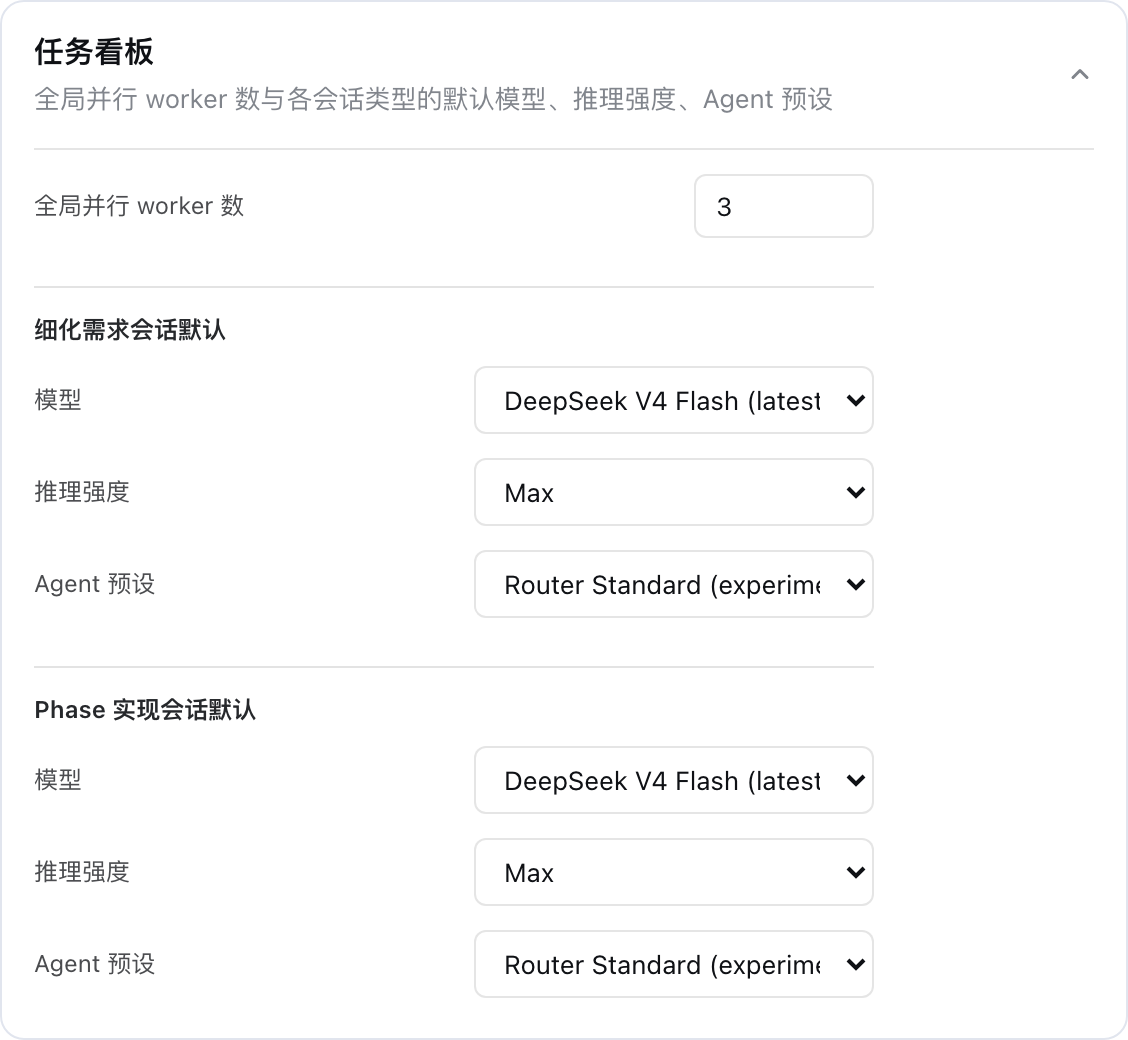
This plugin is a good fit if you routinely use DSH Web to drive coding agents and want structured visual feedback on task progress, non-interfering serial execution across phases, and hands-off merging. The configuration surface stays small: a global worker cap, default models and reasoning levels for refinement versus implementation sessions, and an agent preset, all adjustable from the sidebar settings section.
Screenshots
Use Cases
- Break a requirement into a phased plan and track every stage in the DSH Web sidebar
- Implement multiple phases serially in a dedicated git worktree and auto-merge to main
- Refine a requirement interactively with the agent using a Skill-driven session
Best For
- Developers who routinely drive coding agents in DSH Web and need visual task tracking
- Solo developers who want serial cross-phase execution without workspace conflicts
- AI workflow users who need a one-stop pipeline from requirement refinement to auto-merge
Related Plugins

A method pack that makes AI coding agents plan against your real baseline, prove completion with fresh evidence, and reduce reworks and unsafe changes.

Turns the DeepSeek Harness session into a captain that builds a durable sub-agent team, splits goals into dependency-aware tasks, and coordinates work via direct messages and a live Web UI.
Gives coding agents design judgment, letting Claude Code, Cursor, and 70+ agents generate and iterate high-quality UI, presentations, and graphics right from the terminal.
Run the Pi ecosystem's plugins on DeepSeek Harness, unmodified, via a compatibility layer that implements Pi's public extension ABI on DSH's native services.