dsh-agent-teams-meta
Run the following command in DeepSeek Harness:
dsh plugin install kaka-in-home/dsh-agent-teams-meta
Paste the following prompt into your AI chat to install this plugin:
Install in DeepSeek Harness by running dsh plugin install kaka-in-home/dsh-agent-teams-meta; the project source is available at https://github.com/kaka-in-home/dsh-agent-teams-meta
About this plugin
Bug triage, change review, multi-angle comparison of approaches—these tasks are naturally parallelizable, yet a single agent can only work through them sequentially. dsh-agent-teams-meta turns a DSH lead agent into a team builder: it composes durable members, each with its own role, provider/model route, and private mailbox, while the lead delegates work, tracks dependencies, and collects results—all inside a real DSH session rather than a simulated chat room.
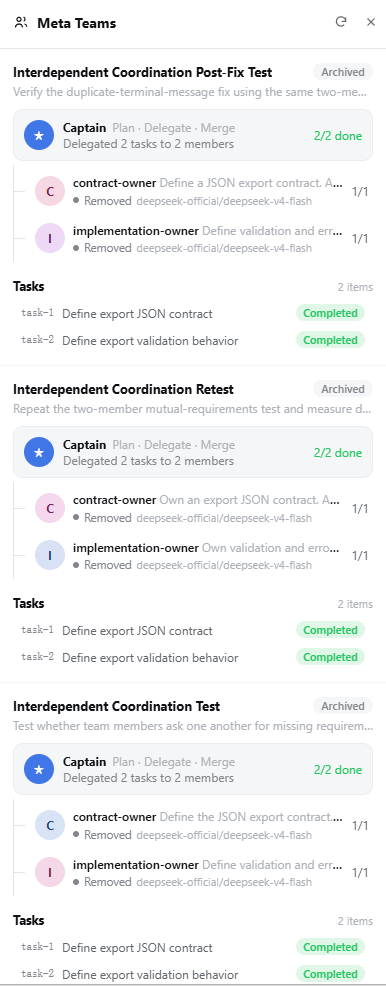
Members can run on entirely different provider/model pairs within the same team. Tasks carry an owner and prerequisite dependencies, so a member can only claim work whose prerequisites are already satisfied. The lead can switch a member to another configured route at any time; the next outbound request picks up the new route while an in-flight one keeps its original attribution. Every participant sees only its own mailbox, keeping the signal-to-noise ratio high. On creation the plugin validates routes against a workspace-local catalog of currently configured models, rejects unknown providers up front, and logs per-request token usage against the active route for clean auditing. A read-only drawer in the DSH Web sidebar surfaces team phase, member status, and task progress without altering the source of truth.
Developers who work in DSH and need to parallelize multi-step workflows will find it useful: assigning different sub-tasks to different models for cost or quality reasons, accelerating work without losing intermediate state, or simply wanting a structured collaboration mechanism with persistent mailboxes and task dependencies instead of juggling multiple chat windows and manually stitching contexts together.
Screenshots
Use Cases
- Split a complex bug triage or code review into parallel sub-tasks delegated to focused members
- Route different team members to different models to optimize per-task cost and quality
- Monitor multi-member team phase, routes, and task states in the DSH Web sidebar at a glance
Best For
- Developers working in DSH who need to parallelize multi-step workflows
- Users who want to pick different models per sub-task for optimal cost and quality
- Engineers who prefer structured collaboration with task dependencies and private mailboxes over juggling multiple chat windows
Related Plugins

A method pack that makes AI coding agents plan against your real baseline, prove completion with fresh evidence, and reduce reworks and unsafe changes.

Turns the DeepSeek Harness session into a captain that builds a durable sub-agent team, splits goals into dependency-aware tasks, and coordinates work via direct messages and a live Web UI.
Gives coding agents design judgment, letting Claude Code, Cursor, and 70+ agents generate and iterate high-quality UI, presentations, and graphics right from the terminal.
Run the Pi ecosystem's plugins on DeepSeek Harness, unmodified, via a compatibility layer that implements Pi's public extension ABI on DSH's native services.