
dsh-perm-guard
Run the following command in DeepSeek Harness:
dsh plugin install a903067276-rgb/dsh-perm-guard
Paste the following prompt into your AI chat to install this plugin:
Run dsh plugin install a903067276-rgb/dsh-perm-guard in the DeepSeek Harness terminal, then restart dsh web to activate the plugin; the project source is at https://github.com/a903067276-rgb/dsh-perm-guard.
About this plugin
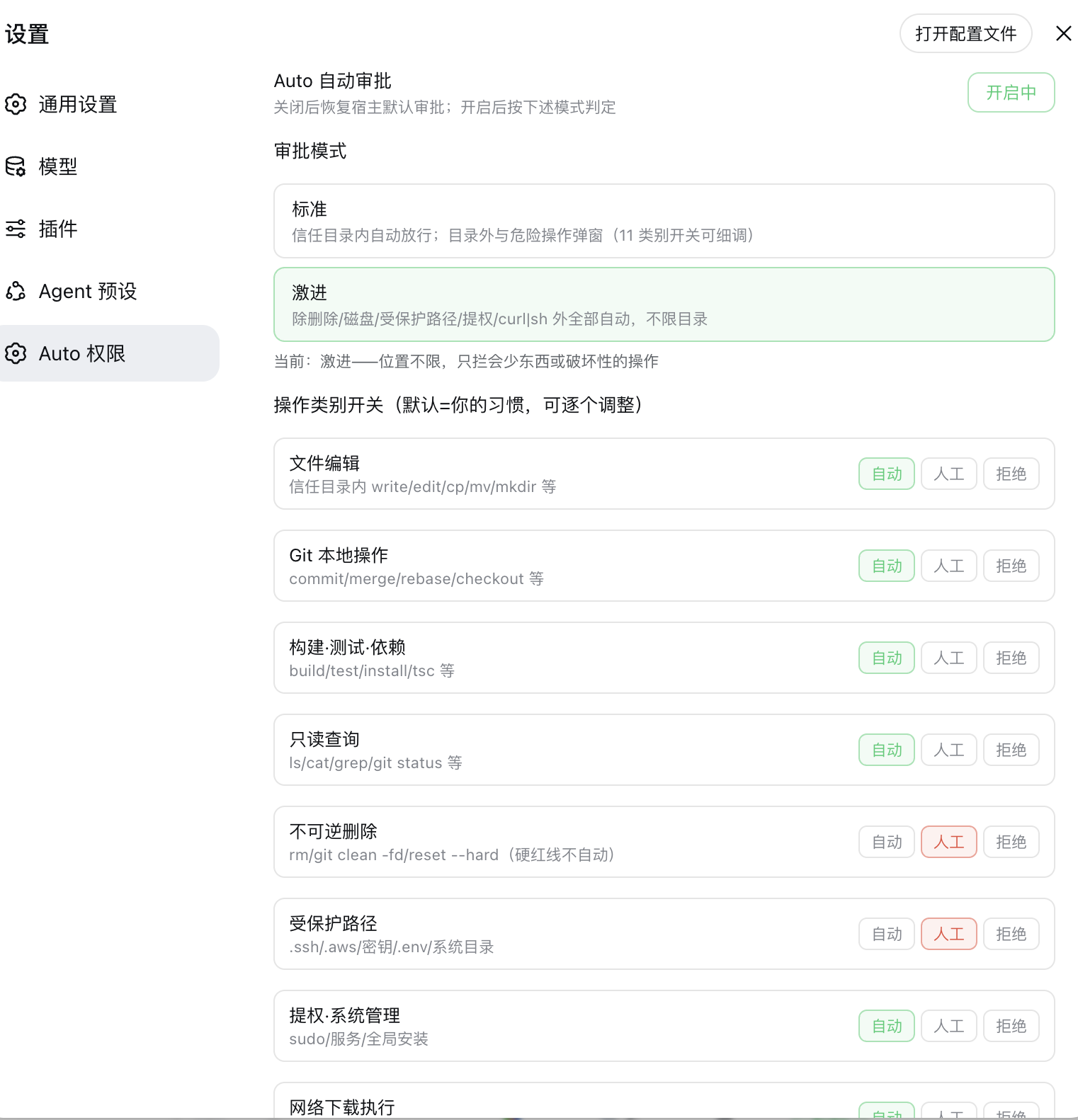
Heavy users of DeepSeek Harness web know the pain: workspace-write pops a confirmation dialog for every cross-directory edit and Git commit, while danger-full-access hands over the keys with no guardrails at all. dsh-perm-guard fills the gap between those two extremes. It intercepts every approval request before the host prompt fires, silently auto-approves everyday operations like file edits, Git local commands, and build-test cycles, and still demands human sign-off for deletes, disk operations, privilege escalation, and curl-pipe-sh patterns. You reclaim your flow without sacrificing a safety net.
Two switchable modes cover different risk appetites. Standard auto-approves inside your trust directories (workspace, siblings, and a custom list) and prompts outside them or on risky categories. Aggressive drops the location restriction entirely and only gates destructive operations. On top of the mode defaults, eleven per-category tri-state switches (auto, ask, deny) let you fine-tune any single category to your preference. Every decision is logged with a timestamp and command summary, and the configuration persists across restarts with zero external dependencies.
It is built for power developers who live in dsh web all day and have grown tired of clicking through dozens of approval cards, yet want a hard floor under the automation. The classifier covers bash, PowerShell, and file-tool entry points; compound commands are split per sub-command and the strictest verdict wins; anything the parser cannot understand always falls back to asking. Whether you are on macOS, Linux, or Windows, it slots in as a single plugin and never changes the host behaviour once you toggle it off.
Screenshots
Use Cases
- Frequent cross-directory edits and Git commits triggering approval popups during daily coding
- Letting build and test ops run unattended while deletion, privilege escalation, and disk ops still demand human sign-off
- Replacing the all-or-nothing workspace-write or danger-full-access toggle with a granular, auditable, persistent policy
Best For
- Heavy dsh web developers tired of clicking through approval dialogs all day
- Automation power users who want a hard safety floor without confirming every safe command individually
- Cross-platform dsh users on macOS, Linux, and Windows seeking a consistent approval policy
Related Plugins

Adds an Auto approval mode on the official workspace-write sandbox, classifying semantic risks, asking when ambiguous, and denying destructive operations.

Undo/rollback system for DSH: config & plugin snapshots, one-click undo/redo/restore, message-level revert, secret masking, safe mode, and offline WebUI/GUI/CLI rescue tools for when DSH won't start.
Packages all 87 SKILL.md files from upstream reverse-skill as a DeepSeek Harness plugin that auto-registers them for authorized reverse engineering, penetration testing, and security research.
Dockyard DSH is a native DeepSeek Harness plugin that unifies official OAuth/client sessions for Codex, Antigravity, Grok, Claude, and Cursor, providing account pool, model catalog, and quota status.