dsh-lifeboat
Run the following command in DeepSeek Harness:
dsh plugin install IoveCelestina/dsh-lifeboat
Paste the following prompt into your AI chat to install this plugin:
Run dsh plugin install IoveCelestina/dsh-lifeboat in DeepSeek Harness to install; the full source code is available at https://github.com/IoveCelestina/dsh-lifeboat
About this plugin
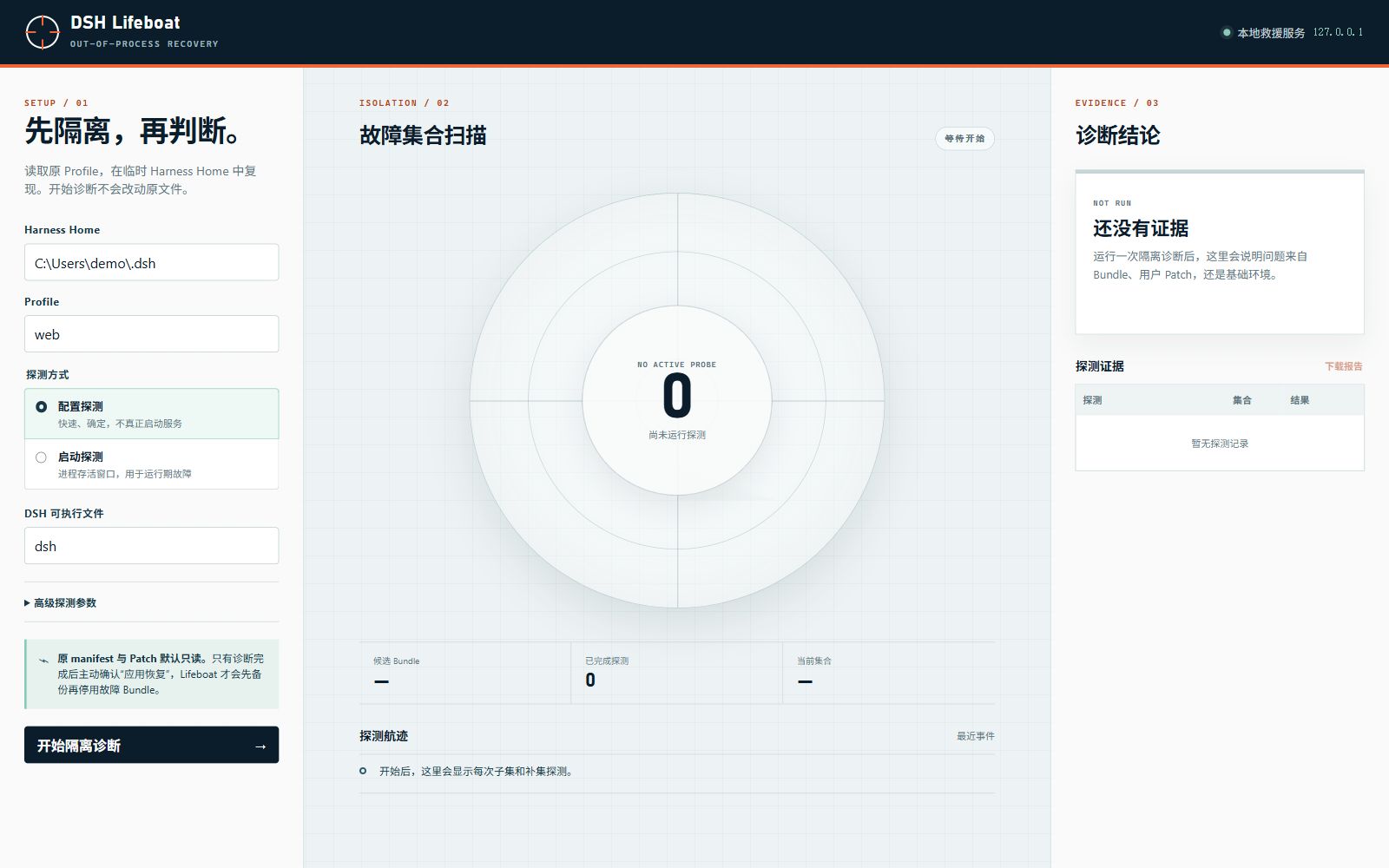
When a DeepSeek Harness profile refuses to boot because of a bad bundle, you cannot see which one is at fault and editing the manifest by hand is risky. dsh-lifeboat is an out-of-process recovery console built for exactly that moment: every probe runs against a fresh cloned snapshot in the OS temp directory while the original profile stays read-only until you explicitly confirm a recovery.
Under the hood it offers config probes and optional runtime survival probes, then uses bounded delta debugging to shrink the set of suspect bundles followed by shallow exact enumeration to prove minimality. Each candidate removal plan is independently re-verified in yet another fresh Home; failed runs, unstable evidence, or snapshot drift all suppress automatic recovery. On confirmed success the system acquires a cross-process lock, hash-checks the manifest, writes an atomic SHA-256-named backup, removes only the selected bundles while keeping dependencies installed, and supports one-click undo that survives a service restart. The server binds to loopback only, write operations require a per-process random token, there are zero runtime dependencies, and both a Web UI and a CLI JSON report are available for incident response or CI pipelines.
It is aimed at teams or individuals who maintain multi-bundle Harness profiles and need a safe, auditable, and reversible way to diagnose and fix startup failures without touching production config. It complements dsh-guard in-process snapshot rollback by covering the gap where the process never starts at all, giving operators a focused, dependency-free rescue path that never runs inside the failing Harness process itself.
Screenshots
Use Cases
- A Harness profile fails to boot due to a bad bundle configuration
- Identify which specific dependency triggers a conflict in a multi-bundle setup
- Verify a recovery plan and undo it after a service restart during an incident
Best For
- Developers maintaining Harness profiles with multiple community bundles
- Ops engineers who need automated startup-failure diagnosis in CI pipelines
- Team leads who want to safely repair profiles without touching production config
Related Plugins

Adds an Auto approval mode on the official workspace-write sandbox, classifying semantic risks, asking when ambiguous, and denying destructive operations.

Undo/rollback system for DSH: config & plugin snapshots, one-click undo/redo/restore, message-level revert, secret masking, safe mode, and offline WebUI/GUI/CLI rescue tools for when DSH won't start.
Packages all 87 SKILL.md files from upstream reverse-skill as a DeepSeek Harness plugin that auto-registers them for authorized reverse engineering, penetration testing, and security research.
Dockyard DSH is a native DeepSeek Harness plugin that unifies official OAuth/client sessions for Codex, Antigravity, Grok, Claude, and Cursor, providing account pool, model catalog, and quota status.