dsh-edit-regenerate
Run the following command in DeepSeek Harness:
dsh plugin install StabCut/dsh-edit-regenerate
Paste the following prompt into your AI chat to install this plugin:
Install this plugin in DeepSeek Harness by running dsh plugin install StabCut/dsh-edit-regenerate; the source code is available at https://github.com/StabCut/dsh-edit-regenerate.
About this plugin
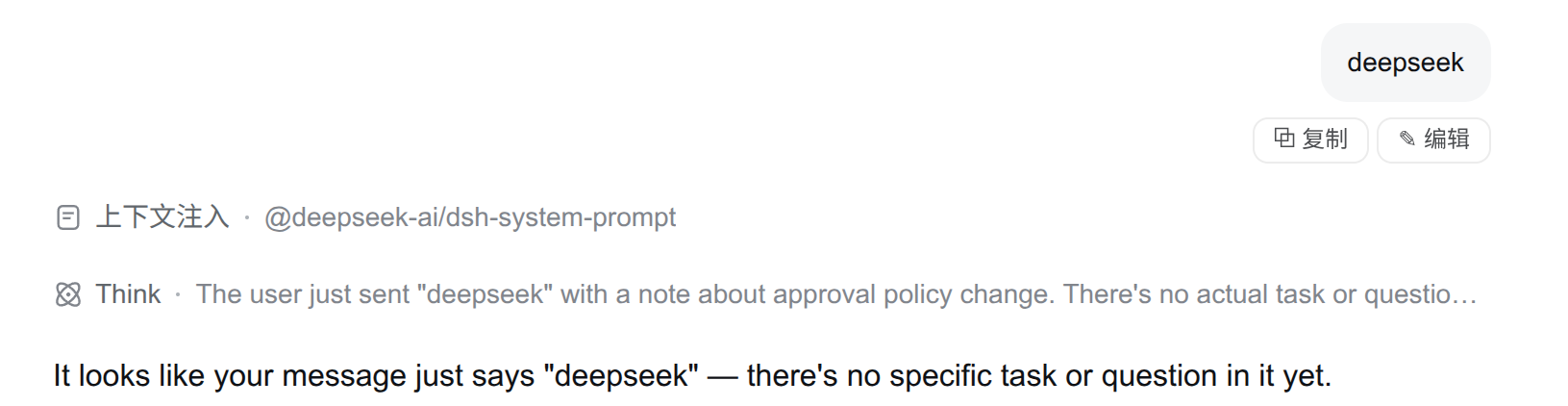
When you are deep into a multi-turn DSH conversation, it is easy to realize that an earlier prompt was worded imprecisely or that you want to try a different angle. Starting a brand-new session means losing the context you have built; copy-pasting the prompt by hand feels clunky. dsh-edit-regenerate closes that gap: every user bubble gains a ✎ Edit button. Revise the text, confirm, and the system immediately regenerates the reply from the corrected prompt — one click, one confirmation, all in place.
Editing a non-first message automatically forks a new child session while the original session stays untouched in history, so you can switch between the two versions at will. Editing the very first message creates a fresh blank session in the same workspace and replays the conversation with the revised opening prompt. The existing ⧉ Copy button remains right next to ✎ Edit on every bubble, so no stock action is lost; a small caveat is that any file attachments are re-sent as plain text after revision, and the UI warns you about this.
The plugin is a great fit for users who lean on DSH for long-form writing assistance, iterative code debugging, or structured brainstorming — anyone who frequently needs to go back and tweak a single instruction while keeping the original conversation trail intact.
Screenshots
Use Cases
- You spot an imprecise instruction mid-conversation and want an instant revised reply
- During code debugging you rephrase a prompt while keeping the original thread for side-by-side comparison
- In a brainstorming session you rewind one turn and regenerate with a sharper prompt
Best For
- Writers and planners who iterate on long DSH conversations
- Developers who frequently tweak individual prompts across multi-turn debugging
- Researchers who branch from a specific turn to compare answers side by side
Related Plugins

A method pack that makes AI coding agents plan against your real baseline, prove completion with fresh evidence, and reduce reworks and unsafe changes.

Turns the DeepSeek Harness session into a captain that builds a durable sub-agent team, splits goals into dependency-aware tasks, and coordinates work via direct messages and a live Web UI.
Gives coding agents design judgment, letting Claude Code, Cursor, and 70+ agents generate and iterate high-quality UI, presentations, and graphics right from the terminal.
Run the Pi ecosystem's plugins on DeepSeek Harness, unmodified, via a compatibility layer that implements Pi's public extension ABI on DSH's native services.