dsh-agent-skills
Run the following command in DeepSeek Harness:
dsh plugin install minivv/dsh-agent-skills
Paste the following prompt into your AI chat to install this plugin:
Search and install it in the DeepSeek Harness 'Settings -> Plugin Market', or visit https://github.com/minivv/dsh-agent-skills to get the source code for local installation.
About this plugin
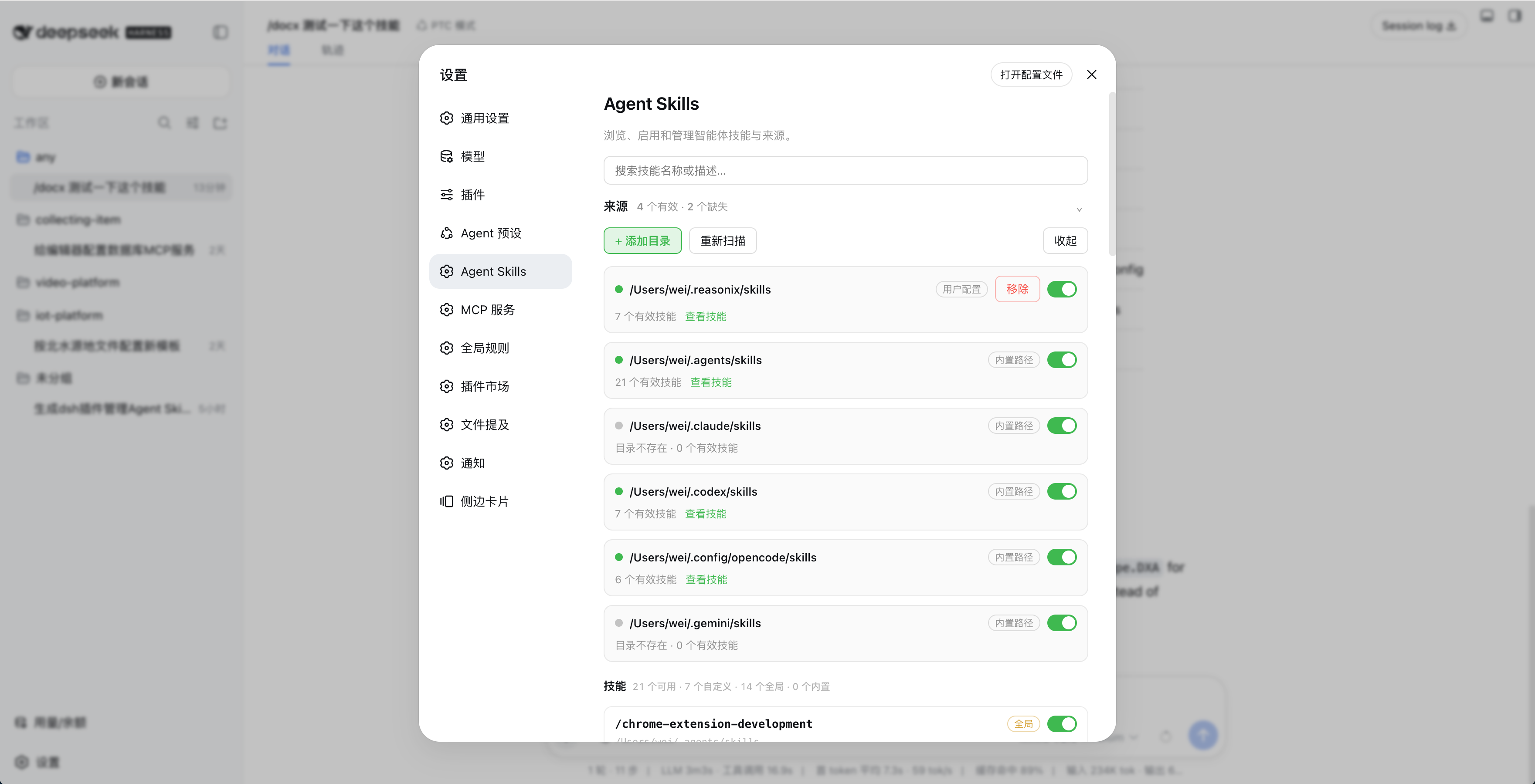
When using DeepSeek Harness (DSH) for AI-assisted development, developers often maintain a large number of local Agent skills, sometimes juggling skill libraries across multiple tools like Claude, Codex, and Gemini. Unifying and flexibly invoking these scattered skill files can be a significant pain point. The dsh-agent-skills plugin is designed to solve this by seamlessly integrating local skill management directly into the DSH settings interface.
This plugin automatically scans and aggregates local skill directories from mainstream tools such as ~/.claude/skills and ~/.codex/skills, while also supporting custom paths. It provides a visual interface to precisely toggle skills by directory or individually, search descriptions, and monitor file changes in real-time for automatic refreshing. Importantly, it operates in a read-only manner, ensuring your original SKILL.md files remain untouched.
If you are a developer heavily reliant on local Agent skill libraries, or a power user who frequently switches contexts between different projects and AI tools, this plugin will save you from the tediousness of manual configuration. It empowers you to achieve unified and highly efficient orchestration of your skill assets.
Screenshots
Use Cases
- Unify and manage local Agent skills scattered across different AI tool directories.
- Quickly search and toggle specific skills with a single click in a visual interface.
- Automatically monitor and refresh skill changes after modifying local files without manual reloading.
Best For
- Heavy AI developers maintaining extensive local Agent skill libraries.
- Tech enthusiasts using multiple AI assistants who desire unified skill configurations.
- Workflow builders who frequently switch contexts and skills across different projects.
Related Plugins

A method pack that makes AI coding agents plan against your real baseline, prove completion with fresh evidence, and reduce reworks and unsafe changes.

Turns the DeepSeek Harness session into a captain that builds a durable sub-agent team, splits goals into dependency-aware tasks, and coordinates work via direct messages and a live Web UI.
Gives coding agents design judgment, letting Claude Code, Cursor, and 70+ agents generate and iterate high-quality UI, presentations, and graphics right from the terminal.
Run the Pi ecosystem's plugins on DeepSeek Harness, unmodified, via a compatibility layer that implements Pi's public extension ABI on DSH's native services.