
dsh-session-insights
Run the following command in DeepSeek Harness:
dsh plugin install GreenLv/dsh-session-insights
Paste the following prompt into your AI chat to install this plugin:
Run dsh plugin install GreenLv/dsh-session-insights in DeepSeek Harness to install the plugin from https://github.com/GreenLv/dsh-session-insights.
About this plugin
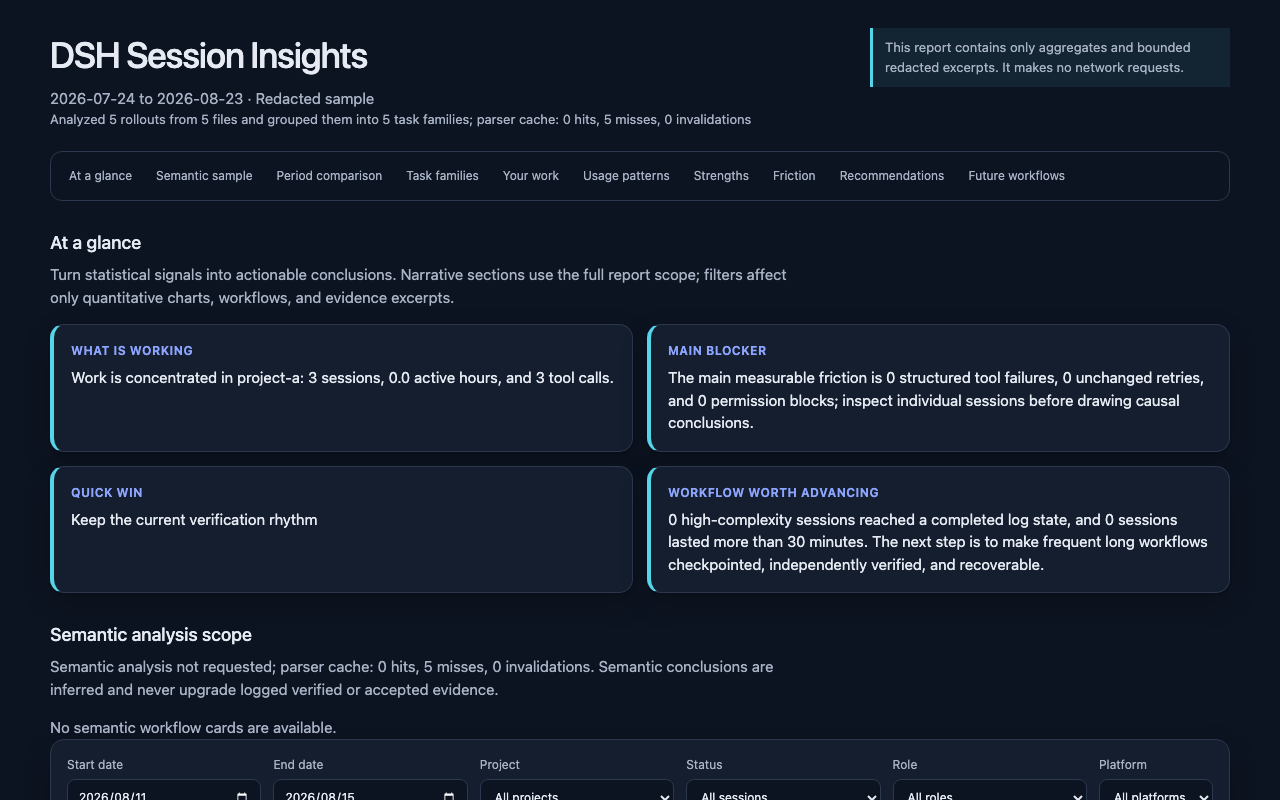
If you live in DeepSeek Harness day after day, it is easy to lose the big picture: which projects actually consume the most effort, where tool calls keep failing or stalling, and which habits are genuinely working. dsh-session-insights turns your local session history into a single, offline workflow review that surfaces task distribution, tool-usage patterns, friction signals, and concrete next steps. No telemetry, no external service, no upload channel—the analysis stays on your machine.
One command produces a self-contained HTML dashboard alongside a machine-readable JSON report. The dashboard covers five lenses: an overview with period-over-period comparison, a work and workflow breakdown by project and role, usage patterns across days, tools, and skills, an evidence-based wins-and-friction section, and actionable recommendations with copy-ready prompts. Every file carries its own styles and data, so you can open it anywhere without spinning up a server. An optional semantic-analysis stage runs through whichever model provider DSH is currently configured with; its output is validated before entering the report, and the pipeline falls back gracefully to a deterministic report if the model stage cannot finish. Three privacy modes—redacted (default), metrics, and local—let you decide exactly how much session text the report retains and whether the semantic stage is allowed to run at all.
This plugin is built for developers and small teams who rely on DSH heavily and want a ten-minute, evidence-backed look at recent working patterns before the next sprint. Everything runs locally by default, reports are never written back into the session log tree, and the tool itself does not add an upload path, so the privacy boundary stays clear and predictable.
Screenshots
Use Cases
- Before a sprint review, generate a report to see which projects and workflows consumed the most effort
- After a rough stretch of tool failures, open the dashboard to spot recurring friction and retry patterns
- Share the self-contained HTML file with a teammate to align on improvements, all offline with no data upload
Best For
- Individual developers who rely on DeepSeek Harness heavily every day
- Small teams looking for a lightweight, offline way to review agent workflow patterns
- Privacy-conscious users who want session-history analysis without uploading any data
Related Plugins

A method pack that makes AI coding agents plan against your real baseline, prove completion with fresh evidence, and reduce reworks and unsafe changes.

Turns the DeepSeek Harness session into a captain that builds a durable sub-agent team, splits goals into dependency-aware tasks, and coordinates work via direct messages and a live Web UI.
Gives coding agents design judgment, letting Claude Code, Cursor, and 70+ agents generate and iterate high-quality UI, presentations, and graphics right from the terminal.
Run the Pi ecosystem's plugins on DeepSeek Harness, unmodified, via a compatibility layer that implements Pi's public extension ABI on DSH's native services.