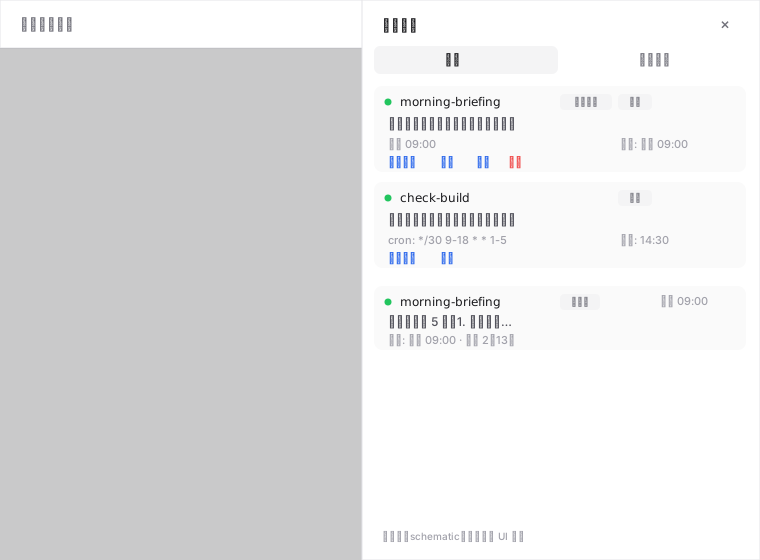
dsh-cron
Run the following command in DeepSeek Harness:
dsh plugin install ZhuoSir/dsh-cron
Paste the following prompt into your AI chat to install this plugin:
Run dsh plugin install ZhuoSir/dsh-cron in your DeepSeek Harness terminal to install this plugin (source: https://github.com/ZhuoSir/dsh-cron), then restart dsh web and hard-refresh the browser.
About this plugin
If you have ever wished DeepSeek Harness could work on a schedule—remind you to file the weekly report every Monday at 9 a.m., check CI builds every thirty minutes, or summarize market data right after the close—dsh-cron was built for exactly that. There is no crontab to hand-write and no scheduler script to maintain: simply describe what you need in plain language and the agent converts it into a scheduling rule and creates the task for you.
When the clock strikes, the plugin injects a [cron]-tagged message into the very session that created the task. The agent wakes up, executes the prompt, and replies with the result right in that same conversation. A right-side drawer in the web UI lets you browse tasks, inspect run history, trigger runs on demand, or pause and delete entries. Notifications cascade through multiple levels—unread badge, page toast, a synthesized WebAudio chime, and browser-system or OS-native alerts—so you never miss a result even when the tab is in the background or the browser is closed entirely.
It suits anyone who wants conversation-driven automation in DSH: product managers scheduling stand-up reminders, developers watching builds and deploys, or analysts generating periodic reports. The plugin makes zero outbound network calls, ships no install-time scripts, confines file writes to two local JSON stores, and works identically in headless mode—lightweight, auditable, and drop-in.
Screenshots
Use Cases
- Auto-remind to submit the weekly report every Monday at 9 a.m. with results in the same chat
- Check CI build status at fixed intervals and surface alerts on failures
- Compile a daily market summary right after the closing bell
Best For
- DSH users who want to create cron jobs with a single sentence of natural language
- Developers and ops teams that re-run the same prompt on a recurring schedule
- Users who need a zero-network, purely local scheduler with full auditability
Related Plugins

A method pack that makes AI coding agents plan against your real baseline, prove completion with fresh evidence, and reduce reworks and unsafe changes.

Turns the DeepSeek Harness session into a captain that builds a durable sub-agent team, splits goals into dependency-aware tasks, and coordinates work via direct messages and a live Web UI.
Gives coding agents design judgment, letting Claude Code, Cursor, and 70+ agents generate and iterate high-quality UI, presentations, and graphics right from the terminal.
Run the Pi ecosystem's plugins on DeepSeek Harness, unmodified, via a compatibility layer that implements Pi's public extension ABI on DSH's native services.