dsh-easy-start
Run the following command in DeepSeek Harness:
dsh plugin install aorucshiea/dsh-easy-start
Paste the following prompt into your AI chat to install this plugin:
Run dsh plugin install aorucshiea/dsh-easy-start in DeepSeek Harness; the source repository is https://github.com/aorucshiea/dsh-easy-start. Restart DSH Web after installation to enable the plugin.
About this plugin
Launching DSH Web used to mean opening a terminal, typing commands, and—when things get stuck—manually killing the process and restarting. dsh-easy-start turns that friction into a double-click: if no desktop shortcut exists yet, the plugin creates a DSH Easy Start one; if a DeepSeek Harness shortcut is already there, it simply reuses it without duplicating. When you launch, the shortcut first runs an available repair script, then starts DSH Web, and opens your browser once the service is ready—no terminal required.
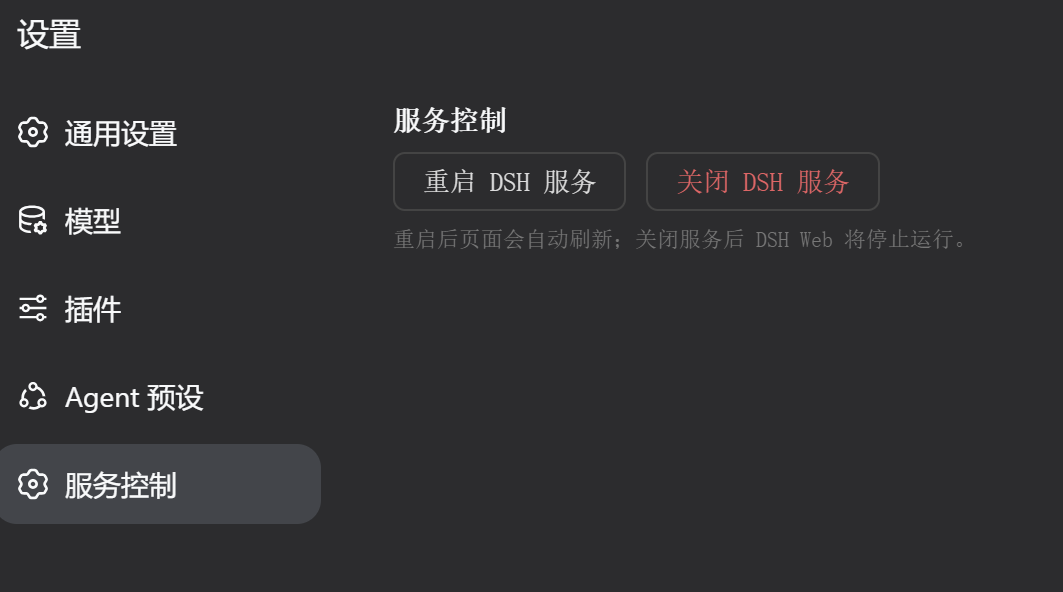
Beyond startup, the plugin adds a Service Control panel on the DSH Web settings page. Restart or shut down the service with a single click, right from the UI. The restart flow is guarded by a separate Node watchdog process that waits for the old instance to release its port before launching a fresh one with the original command; the page polls automatically and refreshes once the new service is up, so a transient network hiccup will not leave you staring at a dead tab.
It is built for developers who start and stop DSH Web frequently and want a fully graphical, terminal-free experience. No commands to memorize, no port conflicts to chase—just double-click, click, done.
Screenshots
Use Cases
- Double-click a desktop shortcut to launch DSH Web without opening a terminal
- Restart a stuck service from the settings page with automatic polling and refresh
- Safely shut down the DSH Web process with a single button press
Best For
- Developers who start and stop DSH Web frequently and prefer a GUI over terminal commands
- Users who prefer double-click workflows and do not want to memorize CLI commands
- DSH Web users who restart services often and want to avoid port conflicts
Related Plugins

A method pack that makes AI coding agents plan against your real baseline, prove completion with fresh evidence, and reduce reworks and unsafe changes.

Turns the DeepSeek Harness session into a captain that builds a durable sub-agent team, splits goals into dependency-aware tasks, and coordinates work via direct messages and a live Web UI.
Gives coding agents design judgment, letting Claude Code, Cursor, and 70+ agents generate and iterate high-quality UI, presentations, and graphics right from the terminal.
Run the Pi ecosystem's plugins on DeepSeek Harness, unmodified, via a compatibility layer that implements Pi's public extension ABI on DSH's native services.