dshp
Run the following command in DeepSeek Harness:
dsh plugin install asdf17128/dshp
Paste the following prompt into your AI chat to install this plugin:
Run dsh plugin install asdf17128/dshp in the DeepSeek Harness terminal to install; source code at https://github.com/asdf17128/dshp .
About this plugin
dsh can boot a profile and forward installs to pnpm, but it cannot create an empty one, list what is on your machine, or snapshot a working setup before you start experimenting. Those tasks still mean hand-editing files under ~/.dsh/profiles. dshp folds them into a single, dependency-free CLI.
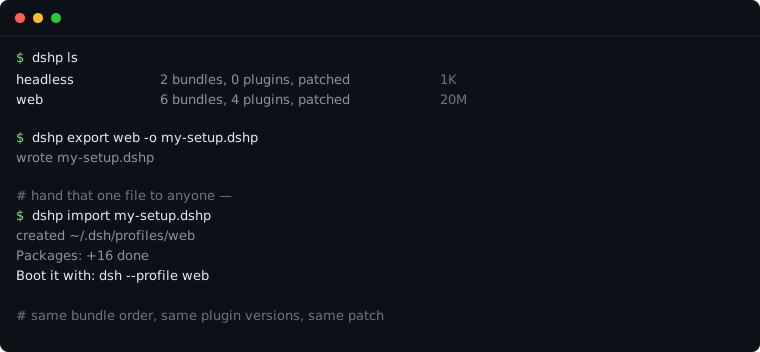
The core workflow is see, copy, reproduce. dshp ls and show tell you at a glance what is installed, in what load order, and whether a patch is attached. clone duplicates a full working profile, including node_modules, in under a second so you can iterate on the copy without risking the original. export writes plugin versions, bundle order, and your patch into one short portable file; import on another machine rebuilds the identical tree. A 132-entry profile was verified end-to-end, with the patch preserved byte-for-byte and never evaluated.
Built for developers who juggle multiple dsh profiles, want to share a setup via a single pastable file, or need a safe sandbox before touching production config. Pure filesystem operations, zero dependencies, Node 18+ is all it needs.
Screenshots
Use Cases
- Export a dsh profile to a single pastable file so a colleague can reproduce it with one import
- Clone a working profile into a sandbox copy, experiment freely, then delete when done
- Rebuild a 132-entry profile tree byte-for-byte on a fresh machine from the export file
Best For
- Developers maintaining multiple dsh profiles for front-end and back-end stacks
- Engineers who need to hand off a working environment as a single portable file
- Terminal users who want a safe sandbox before touching production profiles
Related Plugins

A method pack that makes AI coding agents plan against your real baseline, prove completion with fresh evidence, and reduce reworks and unsafe changes.

Turns the DeepSeek Harness session into a captain that builds a durable sub-agent team, splits goals into dependency-aware tasks, and coordinates work via direct messages and a live Web UI.
Gives coding agents design judgment, letting Claude Code, Cursor, and 70+ agents generate and iterate high-quality UI, presentations, and graphics right from the terminal.
Run the Pi ecosystem's plugins on DeepSeek Harness, unmodified, via a compatibility layer that implements Pi's public extension ABI on DSH's native services.