dsh-plugin-balance
Run the following command in DeepSeek Harness:
dsh plugin install lmmzss-jk/dsh-plugin-balance
Paste the following prompt into your AI chat to install this plugin:
Run dsh plugin install lmmzss-jk/dsh-plugin-balance in your terminal to install the plugin. Source: https://github.com/lmmzss-jk/dsh-plugin-balance
About this plugin
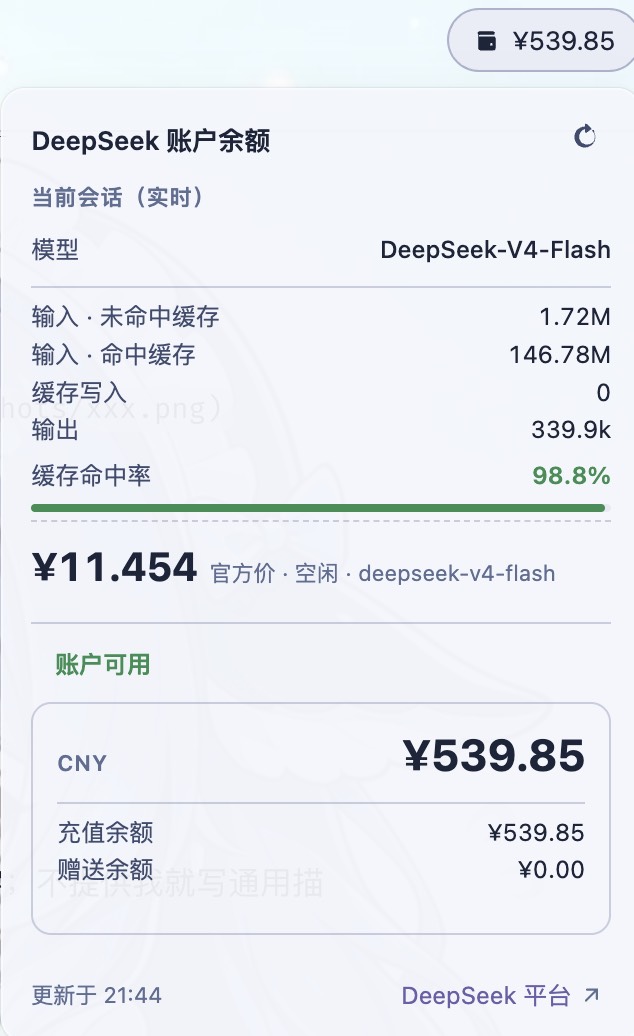
Developers who call the DeepSeek API frequently often only check their balance and bill after the fact, by which point the exact token spend and cache performance of that session are hard to reconstruct. dsh-plugin-balance solves this by adding a balance button right next to the native Session log control in the conversation header. Click it to reveal a dropdown with two panels: your account balance (total, top-up, and gift credits) and a real-time breakdown of the current session—input tokens (cache hit vs. miss), output tokens, cache hit-rate progress bar, and an estimated cost calculated from DeepSeek's official peak and off-peak pricing table. Pricing auto-syncs every six hours via ETag conditional requests and adapts to Beijing-time peak windows automatically; no extra setup is needed beyond the API key already configured in DSH.
This plugin is well suited for anyone using DSH with DeepSeek for coding assistance, batch generation, or long-running agent workflows who wants at-a-glance cost visibility without leaving the chat. It is also handy when sharing a team account (quickly spotting a low-balance state) or when comparing spend between v4-flash and v4-pro on equivalent tasks. The figures are estimates for reference; the authoritative bill remains on platform.deepseek.com.
Screenshots
Use Cases
- Check real-time session token spend and cost estimate right after a long conversation
- Monitor remaining balance and account status on a shared DeepSeek account
- Compare token costs and cache hit rates between v4-flash and v4-pro on equivalent tasks
Best For
- Developers using DSH together with the DeepSeek API
- Users running long-running agent workflows who need cost visibility
- Teams sharing a DeepSeek account that requires real-time spend awareness
Related Plugins

A method pack that makes AI coding agents plan against your real baseline, prove completion with fresh evidence, and reduce reworks and unsafe changes.

Turns the DeepSeek Harness session into a captain that builds a durable sub-agent team, splits goals into dependency-aware tasks, and coordinates work via direct messages and a live Web UI.
Gives coding agents design judgment, letting Claude Code, Cursor, and 70+ agents generate and iterate high-quality UI, presentations, and graphics right from the terminal.
Run the Pi ecosystem's plugins on DeepSeek Harness, unmodified, via a compatibility layer that implements Pi's public extension ABI on DSH's native services.