dsh-replay-lab
Run the following command in DeepSeek Harness:
dsh plugin install tbxy09/dsh-replay-lab
Paste the following prompt into your AI chat to install this plugin:
Run dsh plugin install tbxy09/dsh-replay-lab in DeepSeek Harness to install; the plugin source is hosted at https://github.com/tbxy09/dsh-replay-lab .
About this plugin
Running agents through DeepSeek Harness can produce a strange experience: the same model label, a different preset or plugin, and the trajectory shifts in ways that are hard to pin down. Token spend jumps, tool-call loops appear or vanish, and nobody is sure which piece of the request surface is responsible. The usual workaround—run a second session with the other configuration and eyeball the difference—hits a wall quickly because the prompt may have drifted, the workspace may have moved on, the injected context differs, and the token budget no longer matches. Two independently created sessions produce a weak basis for any causal claim.
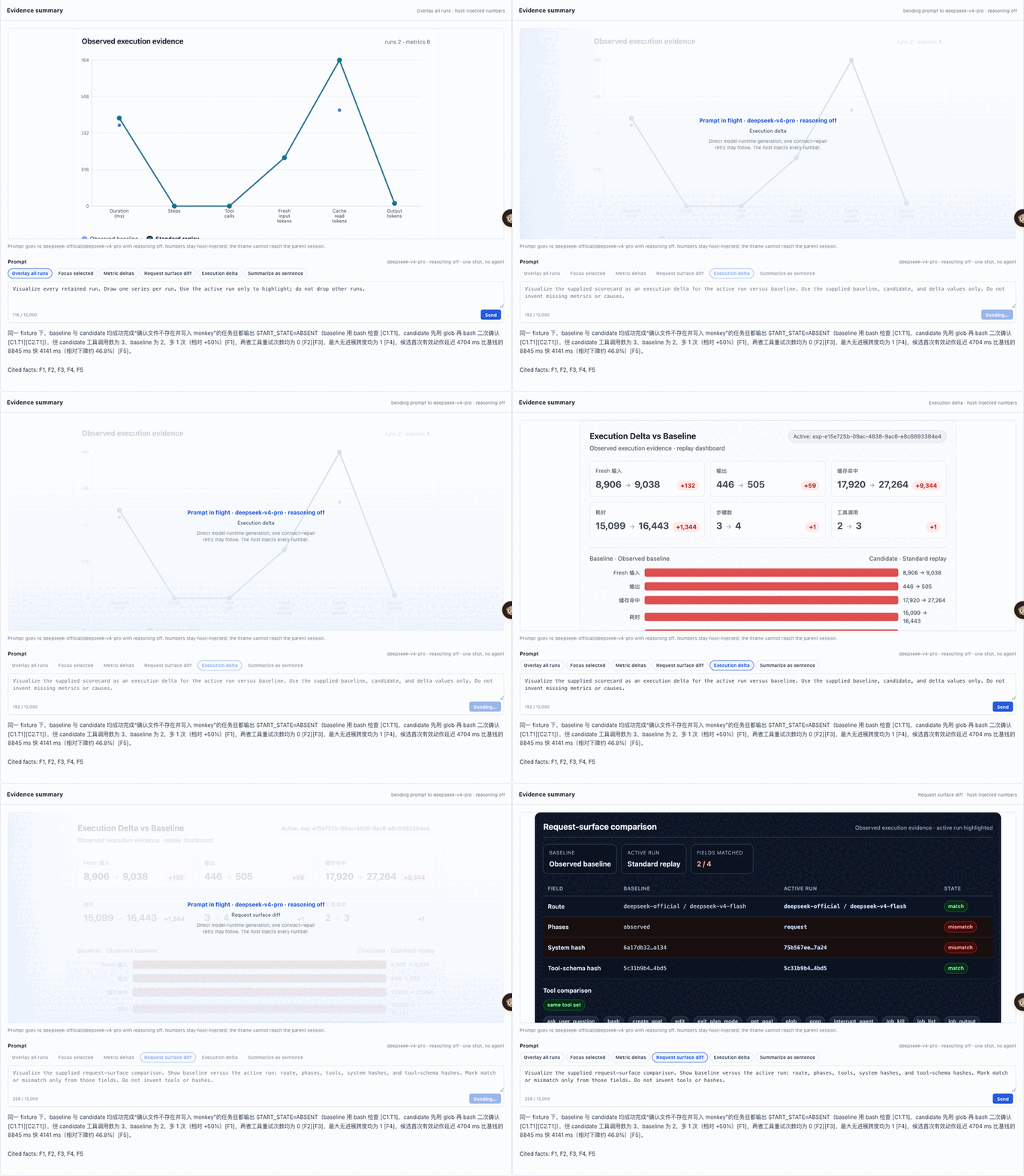
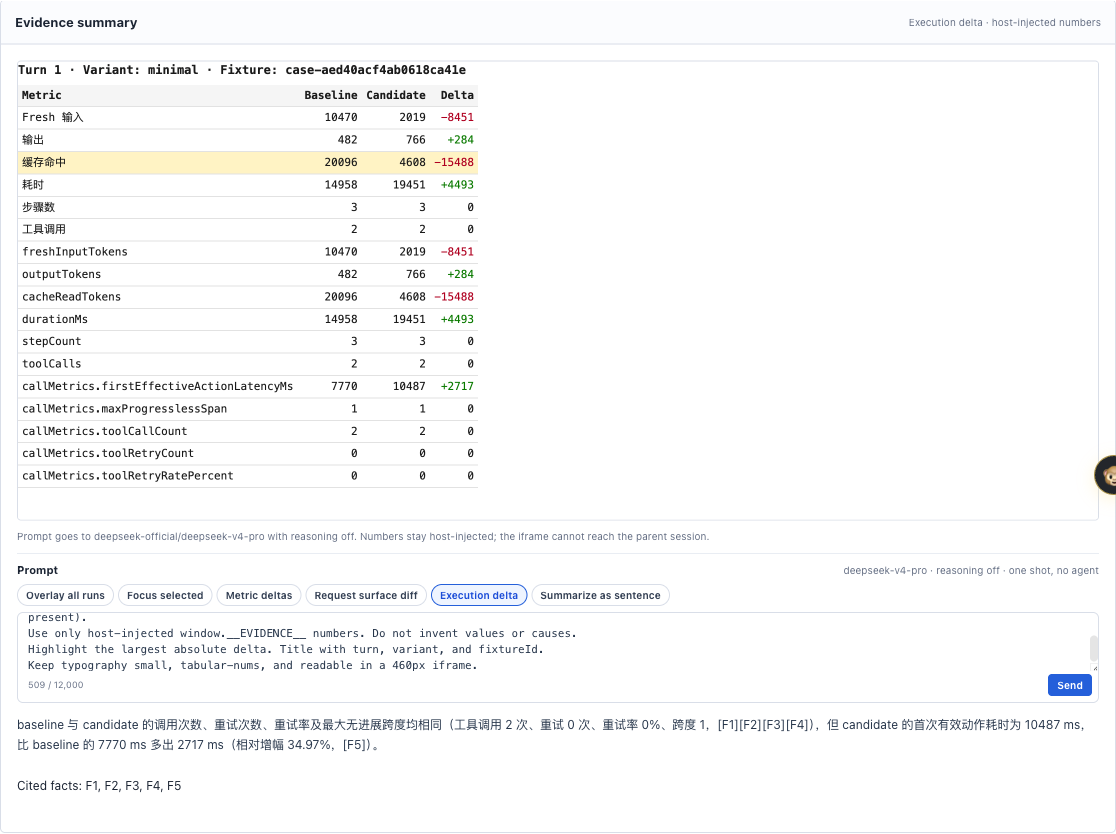
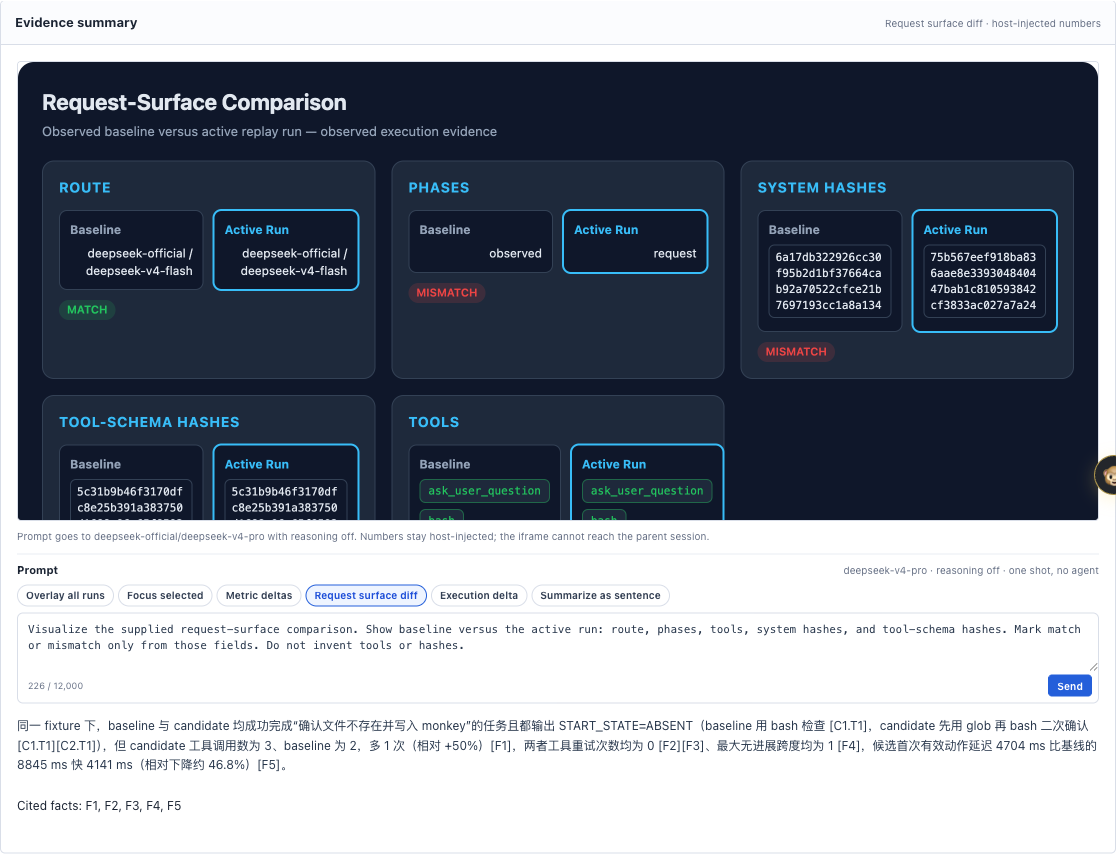
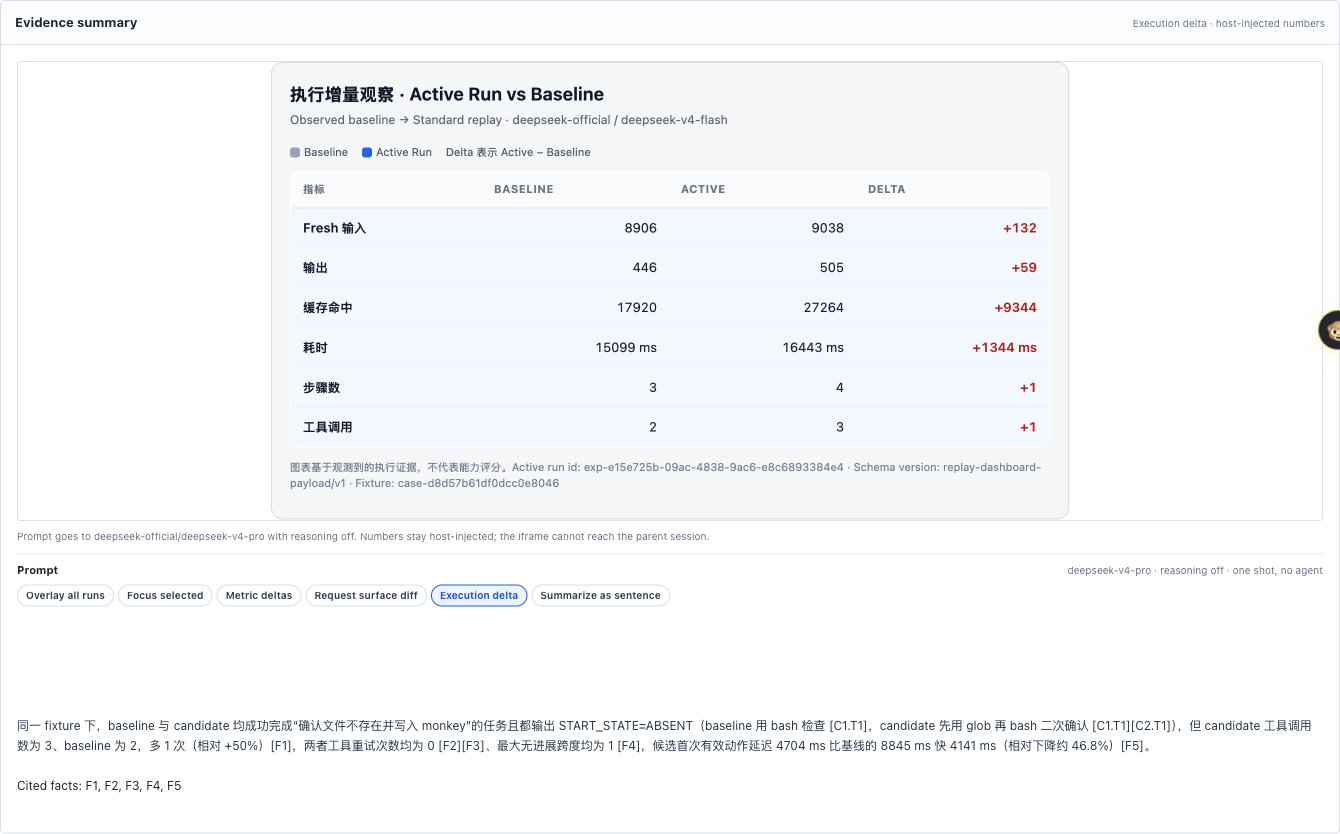
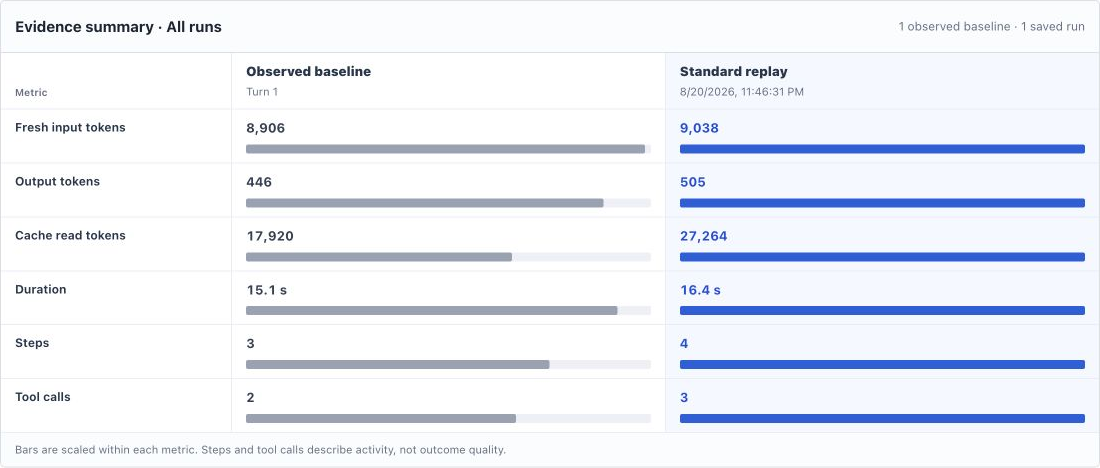
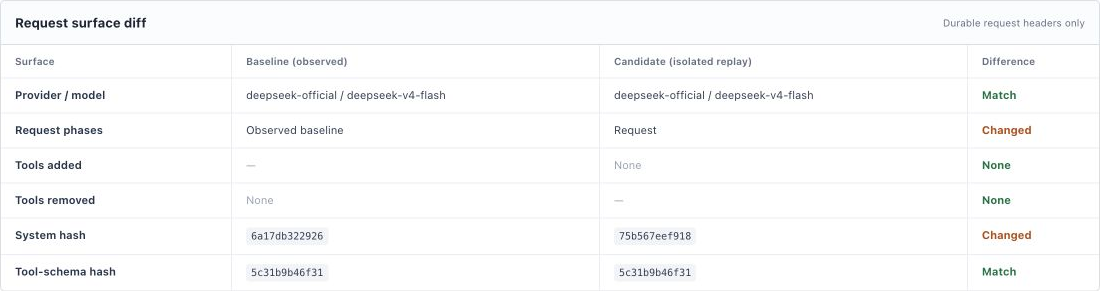
dsh-replay-lab turns that fuzzy comparison into a controlled experiment built on one real, completed DSH turn. It freezes the turn s identity: prompt and prompt hash, provider, model, reasoning setting, maxTokens, observed preset label, system-prompt fingerprint, tool-schema fingerprint, visible tool names, and a workspace checkpoint captured at turn start. A single approved candidate session then executes in a validated, isolated copy of that workspace. When the run finishes, the plugin hands you two independent evidence tracks. First, a baseline / candidate / delta execution scorecard covering fresh input tokens, output tokens, cache-read tokens, duration, step count, and tool-call count. Second, a request-surface diff that compares route, request phase, schema hashes, and the visible tool list regardless of execution cost. Candidate file mutations are restored to the checkpoint after the run; the source workspace is never rewritten or rolled back. All durable session events and comparison evidence persist, so you can revisit the evidence dashboard at any time.
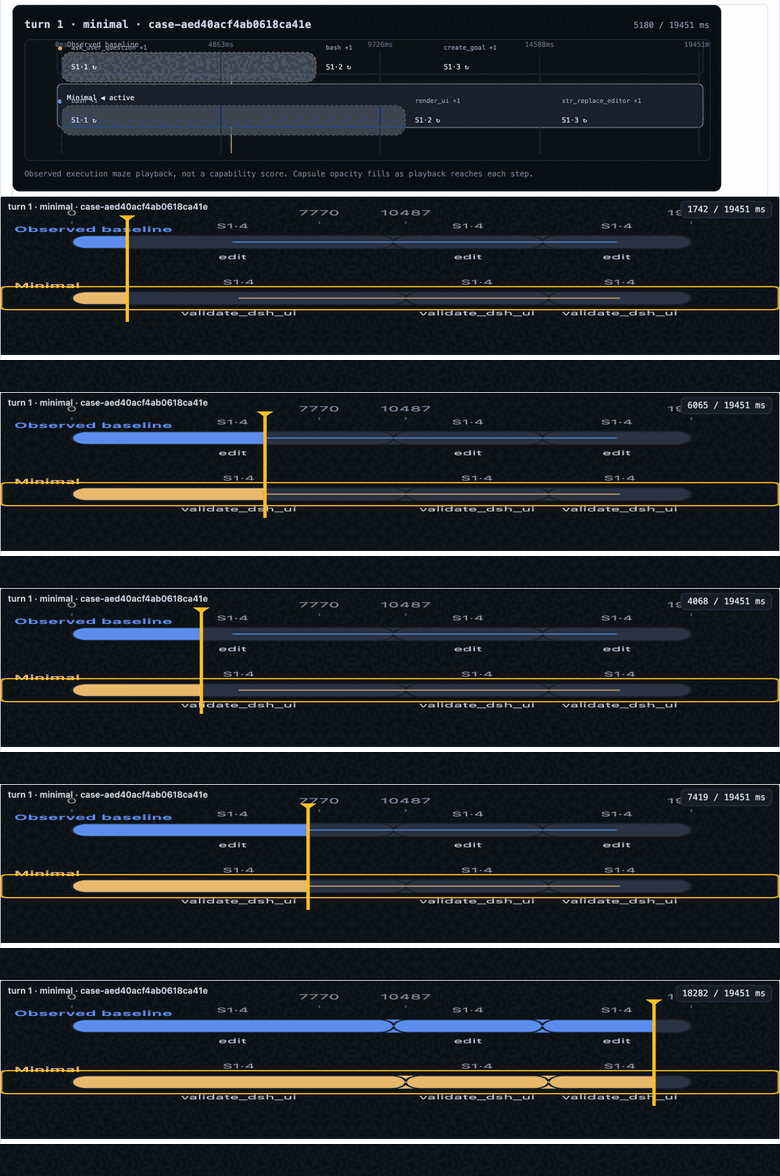
That sandboxed dashboard is where comparisons become visual and interactive. Pick one of the built-in presets—Overlay all runs, Focus selected, Metric deltas, Request surface diff, Execution delta, or Summarize as sentence—or type any free-form prompt and hit Send. The model returns HTML into an opaque-origin iframe and every number on the page is host-injected from the replay payload, never computed by the model. Invalid HTML falls back to the built-in chart seamlessly. You can ask for a radar, a diff table, a compact metric grid, a dual-lane capsule maze, or any other visualization the payload can support, all without leaving the sandbox.
Who is this for? Developers and researchers who tune DSH presets or plugins, debug repeated tool-call loops and no-progress turns, or want to systematically compare how different request-surface configurations change model trajectory. The plugin does not assign a capability score or a verdict of intelligence. It hands you reproducible execution metrics, request-surface fingerprints, and cited evidence IDs so that your next hypothesis rests on a shared, frozen case rather than a hazy before-and-after that both sessions can deny having produced.
Screenshots

Use Cases
- Diagnose tool-call loops or no-progress turns across different presets
- Compare token spend and trajectory shifts between Minimal, Standard, and Anchored Standard on the same turn
- Verify in an isolated sandbox whether a plugin change altered the effective request surface sent to the provider
Best For
- Developers tuning DSH presets or plugin configurations
- Engineers who need to reproduce and attribute unexpected agent trajectories
- ML researchers studying the Model × Harness interaction effect
Related Plugins

A method pack that makes AI coding agents plan against your real baseline, prove completion with fresh evidence, and reduce reworks and unsafe changes.

Turns the DeepSeek Harness session into a captain that builds a durable sub-agent team, splits goals into dependency-aware tasks, and coordinates work via direct messages and a live Web UI.
Gives coding agents design judgment, letting Claude Code, Cursor, and 70+ agents generate and iterate high-quality UI, presentations, and graphics right from the terminal.
Run the Pi ecosystem's plugins on DeepSeek Harness, unmodified, via a compatibility layer that implements Pi's public extension ABI on DSH's native services.