dsh-crew
Run the following command in DeepSeek Harness:
dsh plugin install dshworks/dsh-crew
Paste the following prompt into your AI chat to install this plugin:
Please install the dsh-crew plugin in DeepSeek Harness using the source code URL https://github.com/dshworks/dsh-crew。
About this plugin
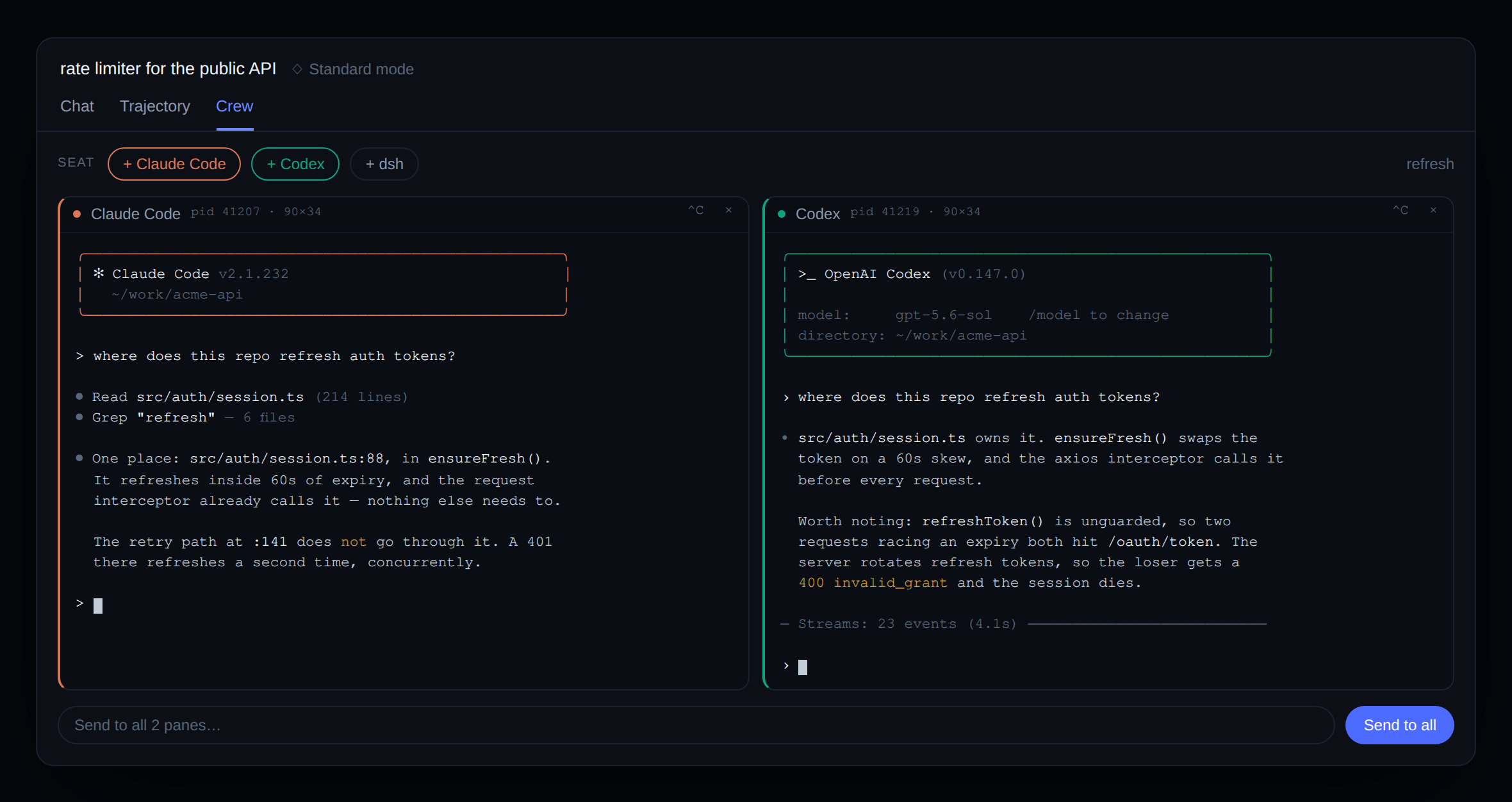
While dsh's existing subagent mechanism excels at unattended delegation, it lacks visual interaction, leaving the model unable to visually follow the process or intervene immediately. dsh-crew fills this gap by providing real PTY terminal split-screen views for agents like Claude Code and Codex in the Web UI. This allows users to monitor code generation in real-time, much like watching a live stream, and interact via broadcast commands to multiple agents simultaneously. This plugin is ideal for developers who require high transparency and want to manually intervene or collaborate during debugging. By fusing delegation and observation into a single terminal interface, it significantly enhances the fluidity and sense of control in human-machine collaboration.
Screenshots
Use Cases
- Monitor AI code generation in real-time
- Debug AI outputs and take control of the keyboard instantly
- Broadcast messages to multiple agents simultaneously
Best For
- Developers seeking high transparency and real-time feedback
- Debuggers who want manual intervention during AI execution
- Advanced users building complex workflows with dsh
Related Plugins

A method pack that makes AI coding agents plan against your real baseline, prove completion with fresh evidence, and reduce reworks and unsafe changes.

Turns the DeepSeek Harness session into a captain that builds a durable sub-agent team, splits goals into dependency-aware tasks, and coordinates work via direct messages and a live Web UI.
Gives coding agents design judgment, letting Claude Code, Cursor, and 70+ agents generate and iterate high-quality UI, presentations, and graphics right from the terminal.
Run the Pi ecosystem's plugins on DeepSeek Harness, unmodified, via a compatibility layer that implements Pi's public extension ABI on DSH's native services.