dsh-error-lens
Run the following command in DeepSeek Harness:
dsh plugin install Wanbinyu/dsh-error-lens
Paste the following prompt into your AI chat to install this plugin:
Please install the dsh-error-lens plugin in DeepSeek Harness, with the source code available at https://github.com/Wanbinyu/dsh-error-lens
About this plugin
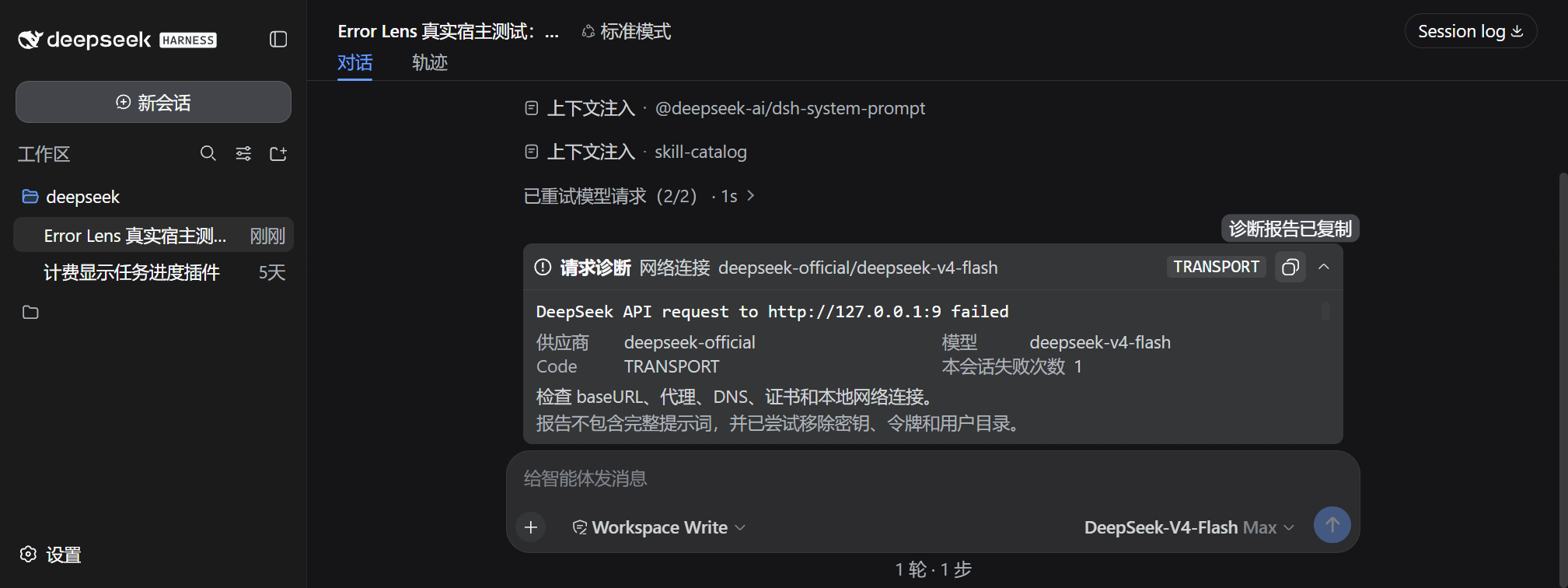
When using third-party OpenAI-compatible gateways, vague messages like "Run Failed" often make it difficult to pinpoint the root cause quickly. The dsh-error-lens plugin is designed for DeepSeek Harness Web to transform such obscure error messages into clear diagnostic reports. It not only preserves critical status codes and request IDs but also automatically desensitizes data before display, removing sensitive API keys and tokens to ensure debugging safety.
Screenshots
Use Cases
- Unable to locate the specific cause when third-party gateways report errors
- Need to check request IDs and status codes during development debugging
- Need to generate desensitized reports for GitHub Discussions
Best For
- Developers using third-party OpenAI-compatible gateways
- DeepSeek Harness users needing to troubleshoot model requests
- Technical teams concerned about API key security
Related Plugins

Adds an Auto approval mode on the official workspace-write sandbox, classifying semantic risks, asking when ambiguous, and denying destructive operations.

Undo/rollback system for DSH: config & plugin snapshots, one-click undo/redo/restore, message-level revert, secret masking, safe mode, and offline WebUI/GUI/CLI rescue tools for when DSH won't start.
Packages all 87 SKILL.md files from upstream reverse-skill as a DeepSeek Harness plugin that auto-registers them for authorized reverse engineering, penetration testing, and security research.
Dockyard DSH is a native DeepSeek Harness plugin that unifies official OAuth/client sessions for Codex, Antigravity, Grok, Claude, and Cursor, providing account pool, model catalog, and quota status.